3.
Compensate for Launch and Tail Cords
(recommended)
Launch and tail cords let the tester measure the loss and
reflectance of the first and last connectors in the cabling
and also include them in the measurement of overall loss.
Without launch and tail cords, no backscatter is available
before the first connector nor after the last.
Fluke Networks recommends that you use launch and tail
cords. You should also use the launch/tail cord
compensation function to remove the lengths of these
fibers from the OTDR measurements.
To compensate for launch and tail cords
3-1
Select launch and tail cords that have the same type of
fiber as the fiber you will test.
3-2
On the home screen, tap TOOLS, then tap Set Launch
Compensation.
3-3
On the SET LAUNCH METHOD screen tap Launch + Tail.
3-4
Clean and inspect the OTDR port and the launch/tail cord
connectors.
3-5
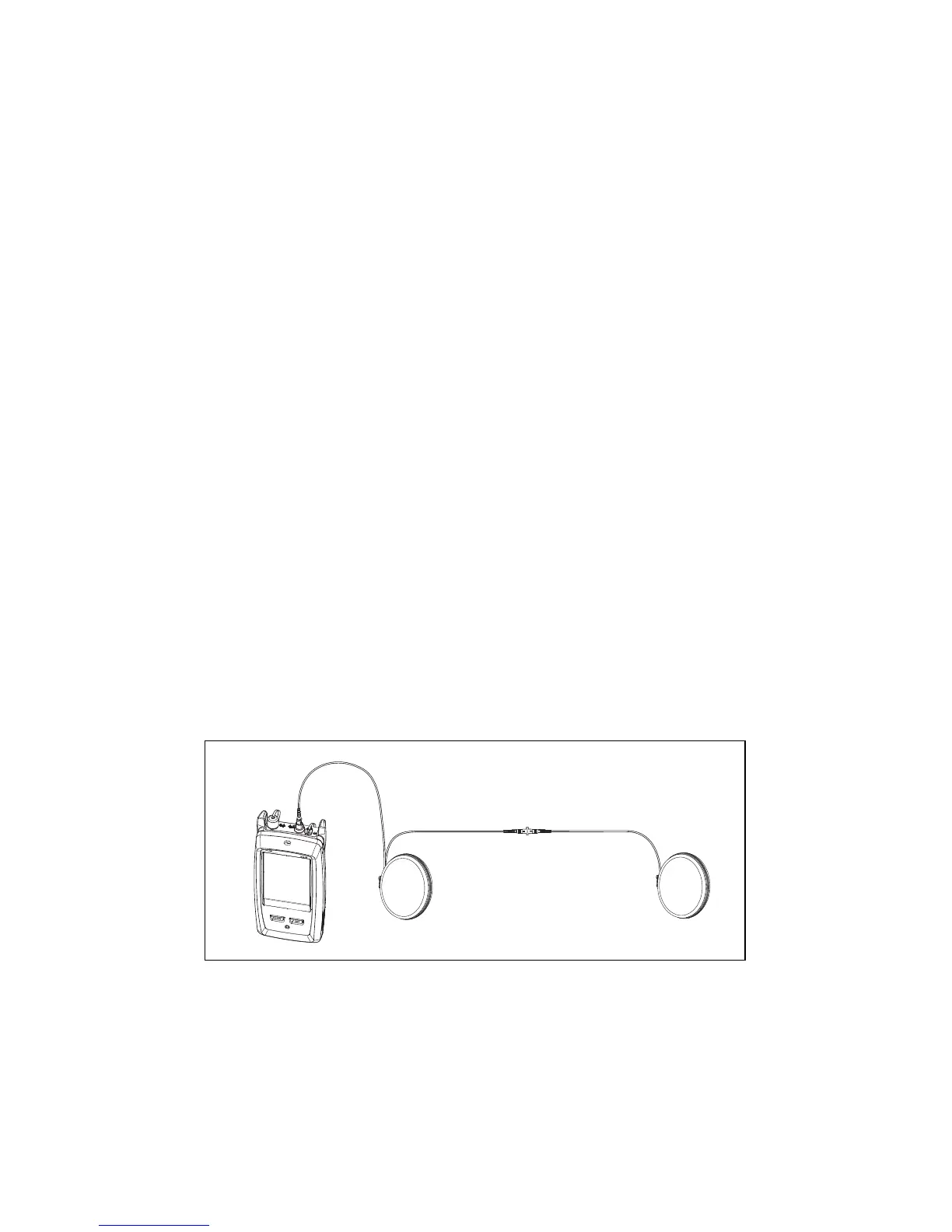
Make the connections shown in Figure 3.
3-6
Tap SET.
3-7
When the SET LAUNCH COMP screen shows, select the
event that is the end of the launch cord and the start of
the tail cord, if this event is not already selected.
3-8
Tap SAVE.
GSM03.EPS
Figure 3. Connections for Launch + Tail Compensation


 To Next Page