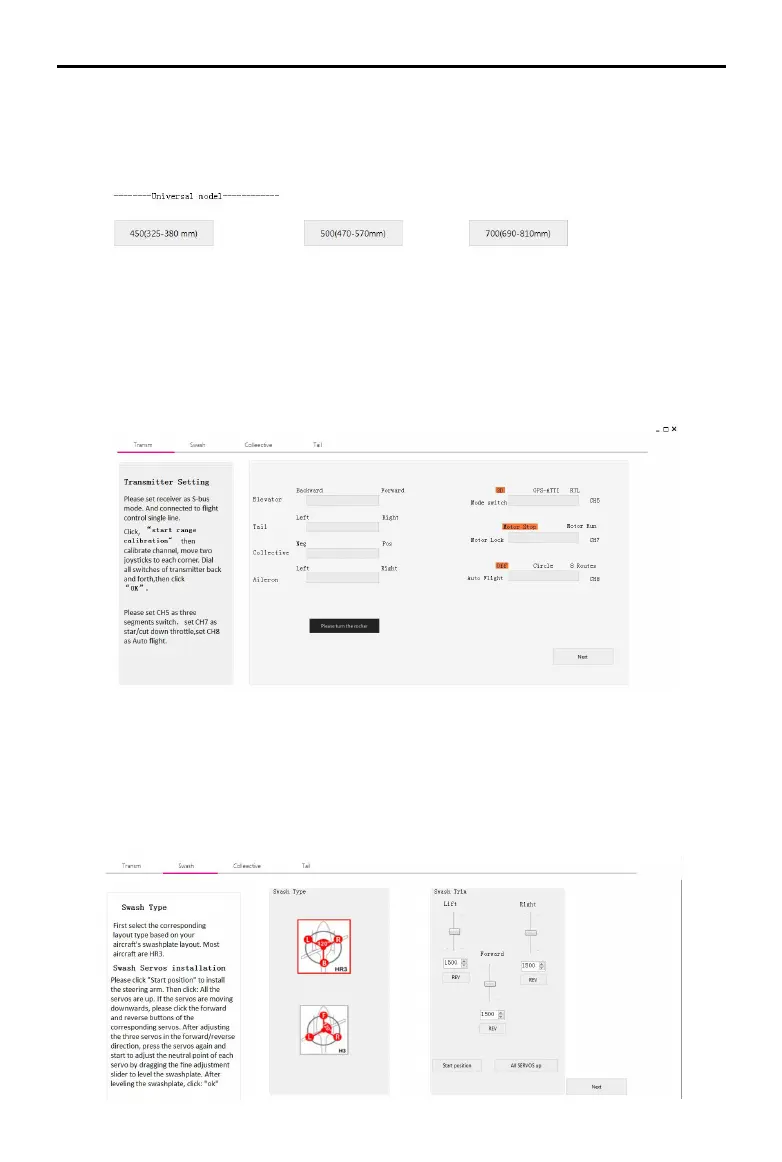
11,If it is not the aircraft of this configuration, please select the general
model installation at the bottom; select the model of the corresponding size.
(The type of aircraft is distinguished by the length of the single rotor.)
12,Enter the transmitter calibration option and follow the instructions on
the left to perform transmitter calibration. If the software display does not
match the direction of the transmitter (the transmitter pushes forward and
the software progress bar is at the “back” end), it will correspond in the
transmitter menu. The channel is reversed (refer to the transmitter manual)
until all channels are correct.
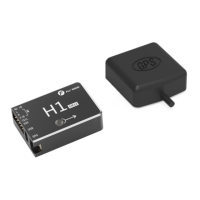
13、Enter the swash plate installation option, first select the corresponding
swashplate type according to the left prompt, then adjust the forward and
reverse direction of the steering gear to ensure the correct direction of the
steering gear. Finally, fine-tune the steering gear neutral point for swashplate
leveling.
H1
user manual


 To Next Page