FLYBOX
Operating Instructions
REV 1.0
16
®
APR1- User Manual,
Safety Instructions and Warning Booklet
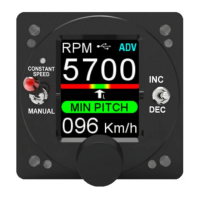
3.0 Indications on the “Normal” screen
Air speed
indication
Air speed
unit
Travel Limit
Indication
Target
RPM
USB status
Icon
Working
Mode
RPM bar
and pointer
USB status icon: This icon appears only when a USB
ash drive is connected to the instrument.
Its coloring can vary in:
- White > pen drive connected, datalog O
- Green > pen drive connect, datalog ON
- Red > Pen drive connected, error writing data
There are 3 dierent screen you can chose as the main
one, the one dened as "NORMAL" is shown below.
Read chapter 4.3.3 for more.


 To Next Page