FLYBOX
General Suggestions
REV 1.0
40
®
APR1- User Manual,
Safety Instructions and Warning Booklet
5.2 Use in ADV (Advanced mode)
In Advanced mode, the regulator will automatically set the
engine revs following the Speed/RPM curve set by your
installer.
After setting the ADV control mode (see chapter 4.3.1) you
can follow the advice below if you want to use APR1 in this
automatic mode.
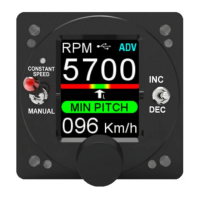
At start-up, the instrument will automatically set the target
RPM to the maximum value set by your installer, e.g. 5700
or 5800 in case of Rotax or another RPM in case of a
dierent engine.
Before takeo, always do the Propeller test in automatic
mode as expected and explained in chapter 4.1.
This is to check that the APR1-propeller system is working
correctly and if something goes wrong, do not take o but
check what the problem might be and if necessary call
your technician.
When the the Propeller Test is nished, check that the
green idle pitch light is lit and that the target RPM on the
display is the maximum RPM for takeo.
During the takeo run, in addition to checking the
increasing aircraft speed, it is mandatory to check if the
motor is giving the target RPM for takeo. Remember that
the target RPM shown on APR1 are not the engine RPM.
The engine RPM must be checked on the aircraft REV
Counter not on the APR1 screen.


 To Next Page