4.3.2 Manually Modify RPMs while in ADV and
ADV+ mode
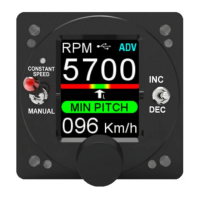
An important feature of ADV and ADV+ modes is the
ability given to the pilot to manually select a dierent
number of RPM from those predicted by the Speed/RPM
curve by turning the knob or operating the INC/DEC
switch, (click down to decrease or click up to increase the
target RPM). Other ways are also possible, if enabled by
the installer, for example by an external switch installed on
the stick grip, or by connecting an external control
potentiometer. Contact your installer if you have any
queries.
When making a manual setting of the target RPMs, in any
of the modes described above, the ashing message
CSPD appears in the top right of the display.
The ashing message will remain as long as the CSPD
status requested by the pilot persists.
To exit this mode and return to ADV or ADV+ mode, simply
press the knob.
A safety control system, automatically returns the RPM to
the Speed/RPM curve as soon as the aircraft speed
deviates signicantly, either positively or negatively, from
the speed at the time of the RPM request. Go to chapter
4.3.5, “Speed win” section for more.
FLYBOX
Operating Instructions
REV 1.0
26
®
APR1- User Manual,
Safety Instructions and Warning Booklet


 To Next Page