bug position on the altimeter tape indicator and press “Done” to confirm. Alternatively it's possible to press the “Actual” button
to set bug to the actual altitude. If the actual bug is out of the displayed scale a numeric indication is shown on the high or low
limit, that indicate the actual position of the bug.
-
CAMERAS
: to switch to video/cameras page (see chap.8.4 “Video/cameras section”).
-
LOG MARK
: to create a mark that will be visible in the datalog and in KML file for Google Earth (see chap.8.5
“Datalogger”)
-
SYSTEM SETUP
: Press P1 + P4 for 2 seconds.
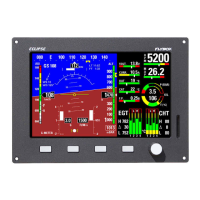
8.3 IFIS Section (for ECLIPSE IFIS only)
This is a mixed screen organized in two windows:
•
On the left are shown all the flight data (after instrument turn on wait 10 seconds before moving your aircraft, to allow the
setup of the attitude indicator).
•
On the right are shown the engine data or the fuel/hourmeter data.
--->
Left window Right window with engine data Right window with
fuel/hourmeter data
•
The functions and indications of the left page are the same explained in the PFD section
•
The functions and indications of the two right pages are the same explained in the EIS section.
FUNCTIONS MENU AVAILABLE (press any key to display the menu):
-
PFD
: to switch to PFD page.
-
ZERO PITCH
: Reset the pitch of the attitude indicator.
This function must be used only when the aircraft is in
leveled flight, never use it to reset the horizon during other flight attitude.
-
TRK
or
HDG
: to switch between Heading/Tracking compass indications.
-
ENGINE
or
FUEL/TIMER
: to switch right page between engine or fuel/hourmeter data.
-
RESET G
: to reset the peak accelerations.
-
DIMMER
: display brightness adjustment (1=min. brightness, 10=max. brightness)
-
HDG BUG/AP
: to set the position of the bug related to compass indication or insert autopilot system (if installed). Turn the
knob to adjust in steps of 1° the bug position on the compass tape indicator and press “Done” to confirm.
Alternatively it's possible to press the “On Course” button to set bug to the actual Heading/Tracking. If the actual bug
is out of the displayed scale a numeric indication is shown on the left or right limit, that indicate the actual position of
the bug.
-
ALT BUG
: to set the position of the bug related to altimeter indication. Turn the knob to adjust in steps of 5 feets the
bug position on the altimeter tape indicator and press “Done” to confirm. Alternatively it's possible to press the “Actual” button
46


 To Next Page