14
Using Forte Control
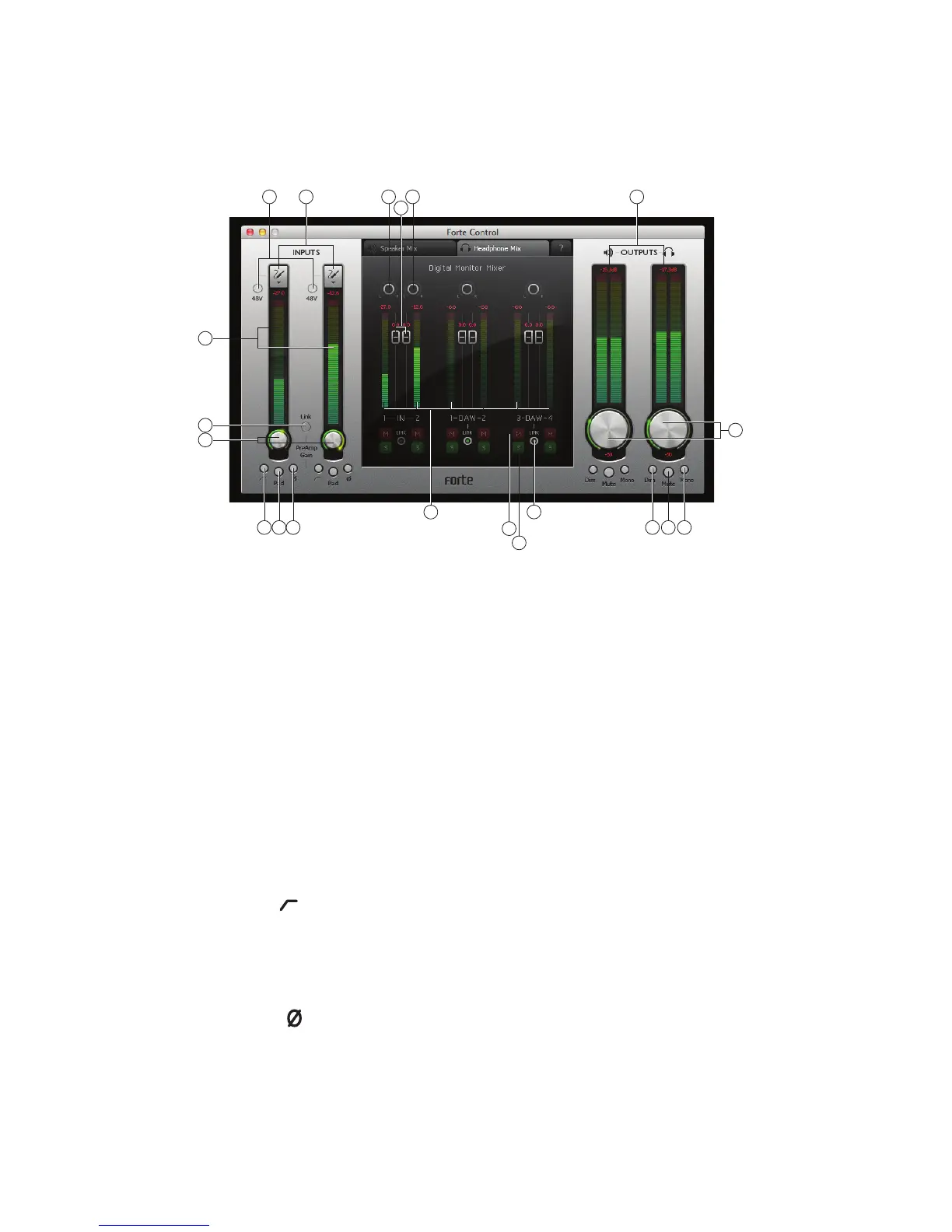
Forte Control is the application that lets you control all of Forte’s features from a single, convenient GUI.
2
3
1 19 19
14
9
5 6 7
15
4
8
10
11 12 13
16
17
18
Input Channels
1. Input Select – select mic, instrument or line setting for each of the two inputs.
2. 48V – applies 48 V phantom power to the mic inputs only (XLRs), provided that Forte is powered
by the supplied external PSU.
3. Signal level – each input channel has a bargraph meter to indicate relative signal levels,
with a numerical readout of instantaneous peak level at the top of the meter. The bargraph
segment corresponding to peak level will stay lit for 1 second (time is user-adjustable, see
“Settings” on page 16). The top segments of the meter are coloured red, and signal levels
this high should be avoided. The top of the scale corresponds to 0 dBFS, and digital clipping is
indicated by the red segments of the bargraph illuminating and the numerical field displaying
OVR for 1 second (time is user-adjustable, see “Settings” on page 16).
4. Input gain – a rotary control operated by the mouse. This parameter may also be controlled
from the Forte hardware controller.
5. Hi-pass filter [ ] – a switchable hi-pass filter is included; when in circuit it reduces the LF
response below 75 Hz, with an 12 dB/octave slope. This parameter may also be controlled
from the Forte hardware controller.
6. Pad – a 10 dB pad may be inserted in each channel to reduce sensitivity on the Mic input. This
parameter may also be controlled from the Forte hardware controller.
7. Phase reverse [ ] – available on all input sources. Inverts the phase of the signal in the input
channel. This parameter may also be controlled from the Forte hardware controller.
8. Channel linking - the input channels may be linked – e.g., for convenience of handling stereo
sources. Gain, phase reverse, hi-pass filter and pad functions become common. Any offset in
gain between the two channels when Channel Link is selected will be retained. This parameter
may also be controlled from the Forte hardware controller.















 To Next Page