15
Outputs
The two stereo output channels are identical; the left-hand one controls the rear panel main outputs
and the right-hand the front panel headphones output.
Note: Powering Forte via the USB port will place the unit in “USB Low-Power mode”. In this mode,
the maximum output levels available from the main and headphone outputs are limited. If higher
output levels are required (e.g., for headphones) then use the 5 V DC power supply provided.
9. Signal level - the output meters are identical to those used for input signal metering.
10. Output level – rotary controls adjusted with the mouse. Double-clicking the controls sets a
fixed output level of -30 dBFS. This parameter may also be controlled from the Forte hardware
controller. Note that if powered by USB the maximum output level is limited to -18 dBFS.
11. Dim – reduces the output level by 12 dB. This parameter may also be controlled from the
Forte hardware controller.
12. Mute – mutes the output channel. This parameter may also be controlled from the Forte
hardware controller.
13. Mono – each output can be reconfigured as an L+R mono sum. This parameter may also be
controlled from the Forte hardware controller.
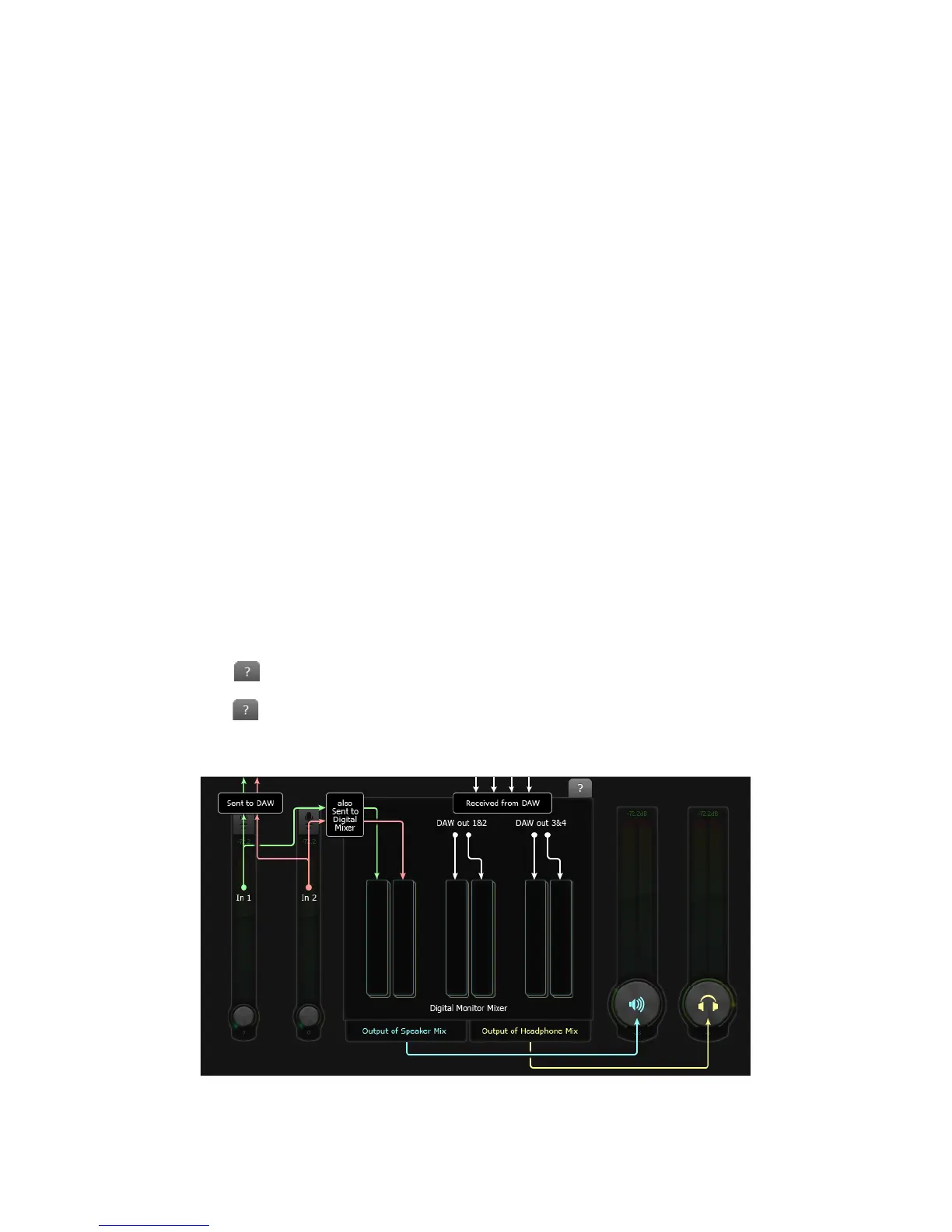
Digital Monitor Mixer
The Speaker Mix and Headphone Mix sections of Forte Control are identical; use the tabs at the top
to select one or the other. Each mixer has six input channels: two from the input channels, and four
from the DAW outputs. The six channels are arranged in three pairs, and the features of each pair
are identical, thus only one is described below. The mixers control the audio mix which is fed to the
outputs, and have no effect on the signals being sent to the DAW for recording.
Clicking on the tab at the top of the Digital Monitor Mixer opens a block diagram clarifying how
the sources and destinations are routed to and from the Forte, and which section of the GUI controls
what. Click the tab a second time to return to the main GUI screen.















 To Next Page