18
Pro Tools Connection
Confirm that Red 16Line’s Host setting is set to ‘Pro Tools’, see Global Host Settings on page 20.
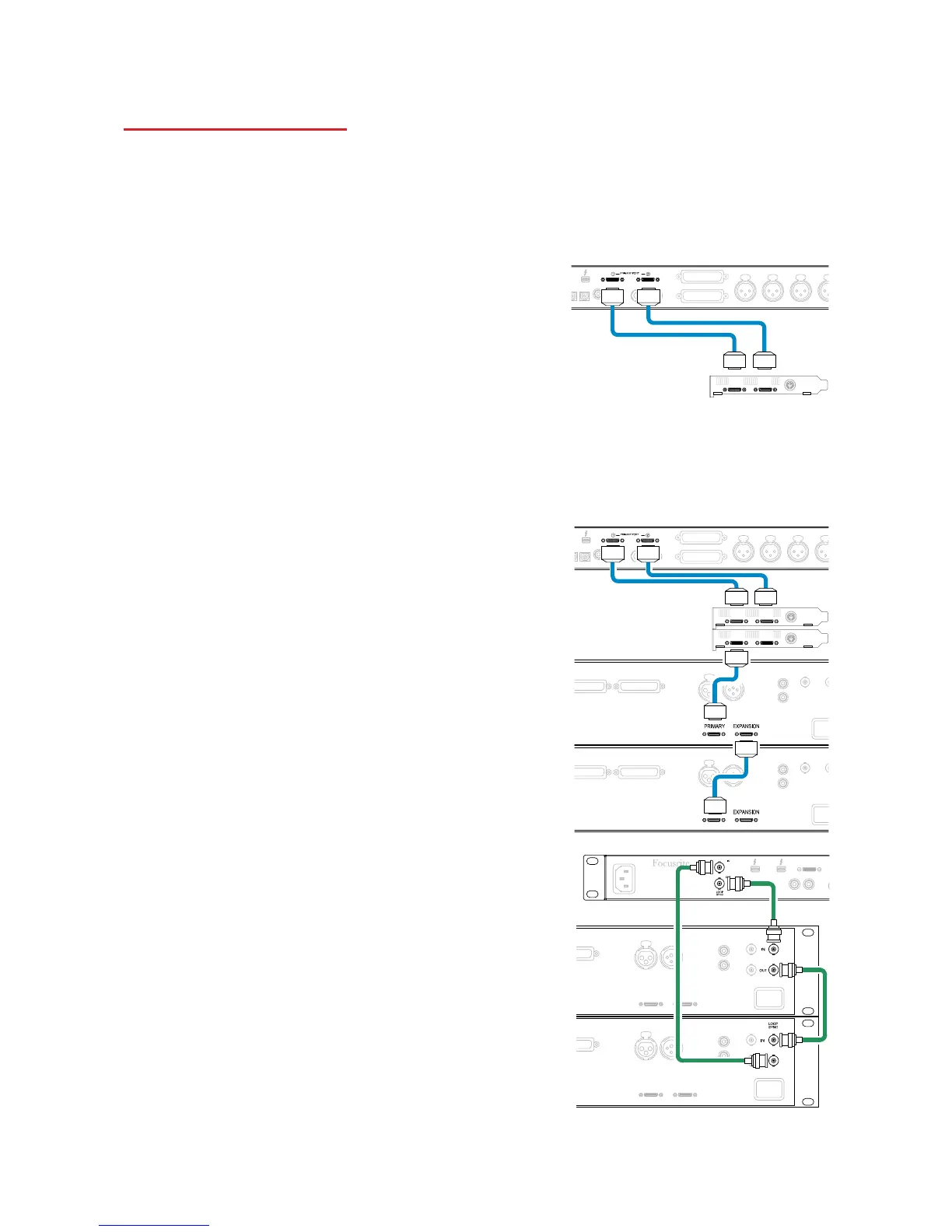
Connect both rear panel PRIMARY ports to a Pro Tools | HDX card using Mini DigiLink cables.
Each Pro Tools | HDX PCI/PCIe card provides two Mini DigiLink ports (giving the card a capacity of 64
inputs and 64 outputs), thus one Red 16Line may be connected to each card.
A Red 16Line will appear as four devices in Pro Tools:
A: 1-16 (Port 1)
B: 1-16 (Port 1)
C: 1-16 (Port 2)
D: 1-16 (Port 2)
A maximum of 3* Red 16Line units can be connected,
giving a total I/O capability of 174 inputs and 192 outputs.
* Or one Red 16Line if using an HD Native system.
Note that both Red 16Line ports are Primary connectors; this means that an additional Pro Tools interface cannot
be added in series – Red 16Line does not operate in Expansion mode.
Using Red 16Line with other Pro Tools | HD
interfaces
Pro Tools | HD I/O audio interfaces may be used on the same
Pro Tools system as Red 16Line. Pro Tools interface units can
be added by using additional Pro Tools | HDX PCIe interface
cards.
Connection to a Pro Tools | HD system would require the use of DigiLink
-to- Mini DigiLink adapter cables.
Loop Sync
It is important when using additional I/O devices that the
Loop Sync connection is complete between all units:
• Using 75Ω BNC cables, connect each LOOP SYNC OUT
connector to the LOOP SYNC IN connector on the next
I/O unit
• Complete the chain by connecting LOOP SYNC OUT on
the final I/O unit back to LOOP SYNC IN on the first unit
Mini DigiLink Cables














 To Next Page