55
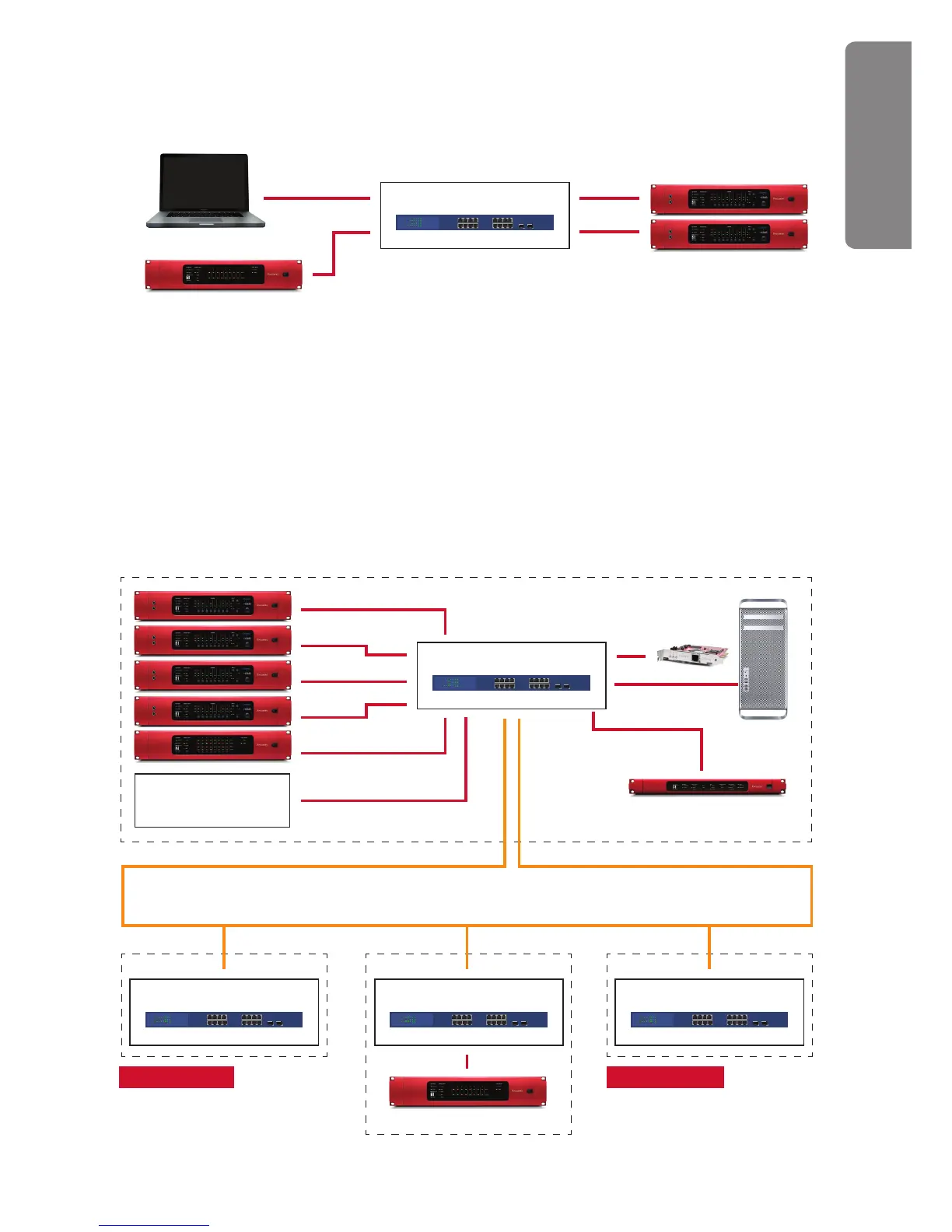
Basic Location Recording Setup using DVS (without PCIe card)
Dante Virtual Soundcard provides a great solution for the mobile recording engineer. Simply plug
into your onboard Ethernet port with a CAT 6 cable, and connect to RedNet interfaces via a switch.
Here, two RedNet 4 units provide 16 channels of remote controlled mic pres (which could be
placed under/near the stage) and a single RedNet 1 unit provides the line I/O for monitoring the
recording. Remember that as RedNet uses standard Ethernet hardware, each CAT 6 cable can be
up to 100m (109 yards) in length, perfect for location recording. See p.51 for more details.
DIAGRAM 3
DIAGRAM 4
LAPTOP AND DVS
REDNET 1
REDNET 4 x2
SWITCH
REDNET 4
REDNET 1
REDNET 4
REDNET 4
REDNET 4
REDNET 2
Yamaha DM1000 (Example)
COMPUTER AND
REDNET PCIe
REDNET 6
SEE DIAGRAM 1 SEE DIAGRAM 2
GREEN ROOM
AUDITORIUM
SWITCH
SWITCH SWITCHSWITCH
CONNECTION DIAGRAMS
& EXAMPLE SETUPS











 To Next Page