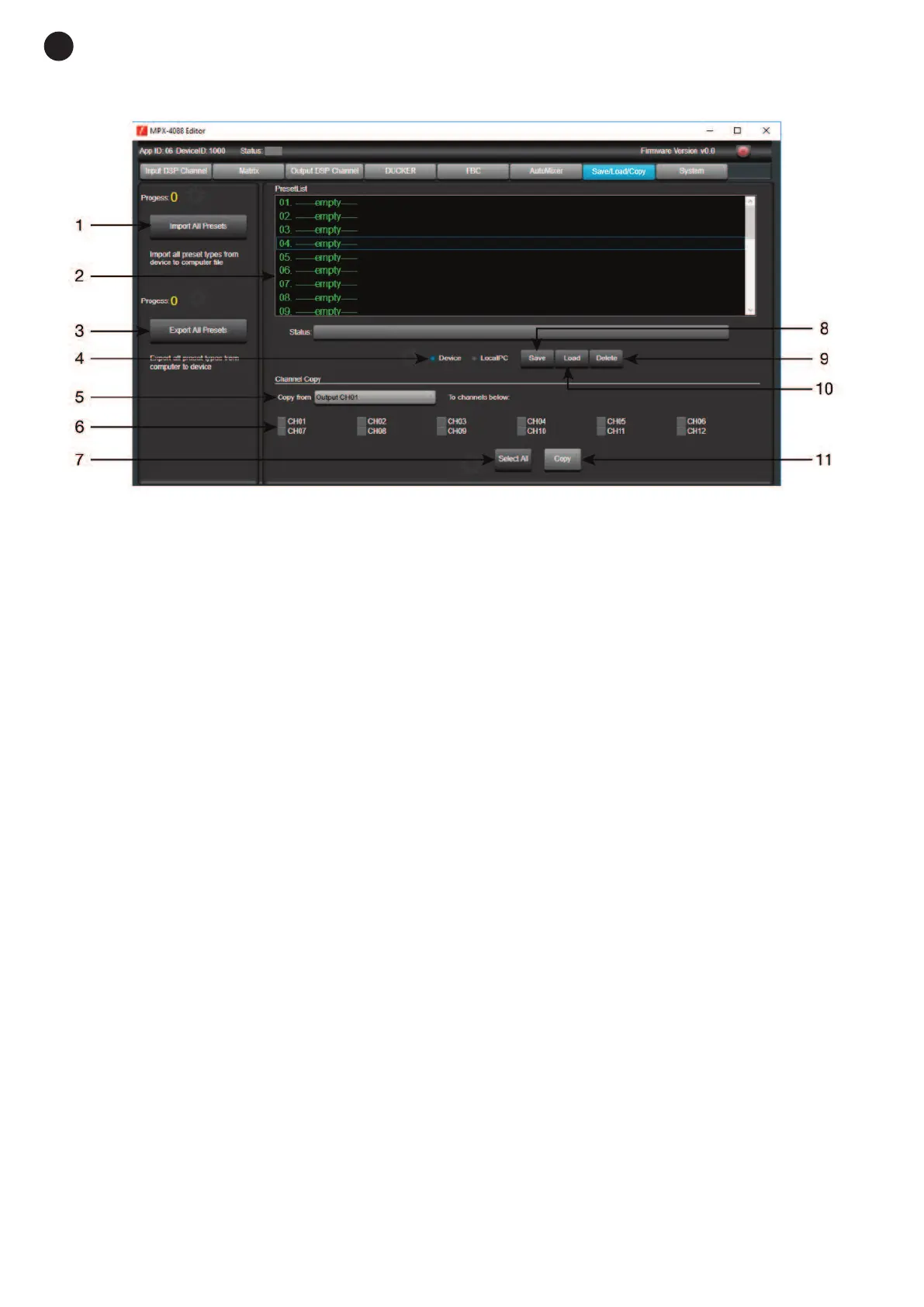
SAVE/LOAD
From the SAVE/LOAD tab, configurations can be saved and loaded as presets. This data can be saved in the
internal memory of the matrix, as well as in the PC. The memory of the MPX-4088 matrix has a capacity for
a total of 16 presets.
1.- Import All Presets: imports the presets from the MPX-4088 matrix to a file in the PC.
2.- Window showing the list of presets and their position in the memory.
3.- Export All Presets: exports all the presets from the PC to the MPX-4088 matrix.
4.- Device/Local PC: selects in order to act on the matrix memory or that of the PC.
5.- Copy from: channel from which the copy is made.
6.- Selection of channels to which the copy is applied.
7.- Selection of all channels simultaneously.
8.- Save: saves the current configuration of the MPX-4088 matrix as a preset in the PC or matrix memory.
9.- Delete: eliminates a preset from the MPX-4088 matrix.
10.- Load: loads a preset from a PC file or from a matrix memory.
11.- Copy: makes a copy of the selected channels.
- 16 -
E
N


 To Next Page