WWW.FOSCAM.COM FI8608W User Manual
z Network Configuration
This page will allow you to configure the Network parameters.
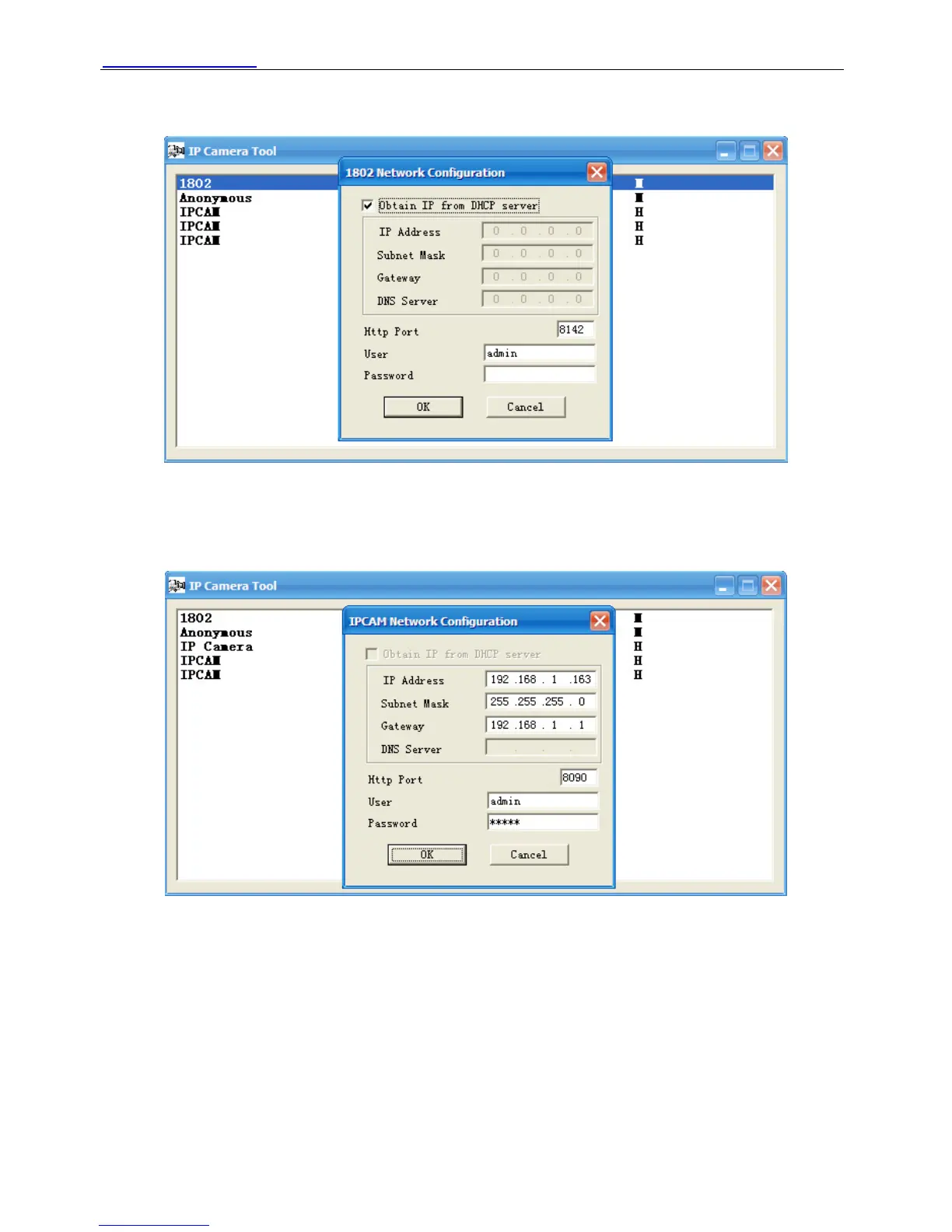
Figure 2.4
Obtain IP from DHCP server: If checked, the device will obtain IP from DHCP server. In other
words, the camera will have a dynamic IP. (Make sure the Router which the camera connects
has DHCP function and DHCP is enabled).H series can’t obtain IP from DHCP server.
Figure 2.5
IP Address: Fill in the IP address assigned and make sure it is in the same subnet as your
computer or router. (I.e. the first three sections are the same)
Subnet Mask: The default subnet mask of the equipment in our LAN is: 255.255.255.0.You can
find the subnet mask in the basic information of your router or the locally-attached of your PC.
Gateway: Make sure it is in the same subnet with PC’s IP address. The gateway is your router’s
LAN IP.
DNS Server: IP address of your ISP network provider. You can find the DNS server in your
router or check the locally-attached address of your computer. Your PC contains your PC’s IP
address, gateway and DNS server. Normally, there are two DNS servers. Here you can also set
Shenzhen Foscam Intelligent Technology Co., Limited
Tel: 86 755 2674 5668 Fax: 86 755 2674 5168
8



 To Next Page