13
w
w
w
w
w
w
w
w
w
w
w
w
w
w
w
w
ww.foscam.
ww.foscam.
ww.foscam.
ww.foscam.
ww.foscam.
ww.foscam.
ww.foscam.
ww.foscam.
us
us
us
us
us
us
us
us
Foscam
Foscam
Foscam
Foscam Digital
Digital
Digital
Digital Technologies
Technologies
Technologies
Technologies LLC
LLC
LLC
LLC
Telephone:
Telephone:
Telephone:
Telephone: 1-800-930-0949
1-800-930-0949
1-800-930-0949
1-800-930-0949
13
13
13
13
O
O
O
O n
n
n
n screen
screen
screen
screen Mouse
Mouse
Mouse
Mouse Control
Control
Control
Control
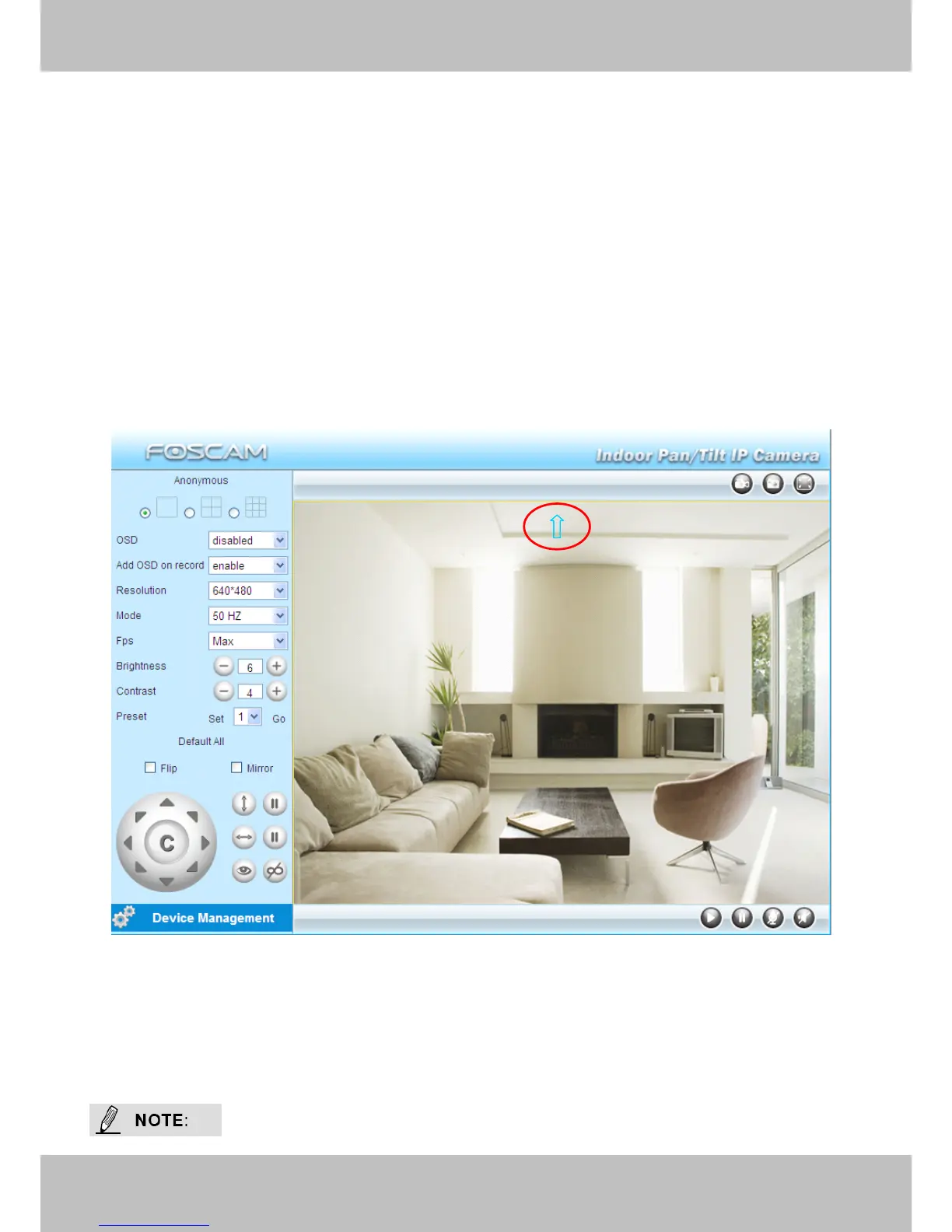
Double click right mouse on the surveillance window, then left click on the screen to indicate the
camera move direction you prefer, press the left mouse and the camera ’ Len will move to the
corresponding direction.. Double click right mouse again, cancel onscreen mouse control.
For example, double click right mouse, then left click on the up corner of the screen, you can see
the arrow, press the left mouse, and the camera ’ s lens will moving towards the up direction.
Double click right mouse again, cancel onscreen mouse control.
Figure 2.4



 To Next Page