18
w
w
w
w
w
w
w
w
w
w
w
w
w
w
w
w
ww.foscam.
ww.foscam.
ww.foscam.
ww.foscam.
ww.foscam.
ww.foscam.
ww.foscam.
ww.foscam.
us
us
us
us
us
us
us
us
Foscam
Foscam
Foscam
Foscam Digital
Digital
Digital
Digital Technologies
Technologies
Technologies
Technologies LLC
LLC
LLC
LLC
Telephone:
Telephone:
Telephone:
Telephone: 1-800-930-0949
1-800-930-0949
1-800-930-0949
1-800-930-0949
18
18
18
18
3.2
3.2
3.2
3.2
3.2
3.2
3.2
3.2 Alias
Alias
Alias
Alias Settings
Settings
Settings
Settings
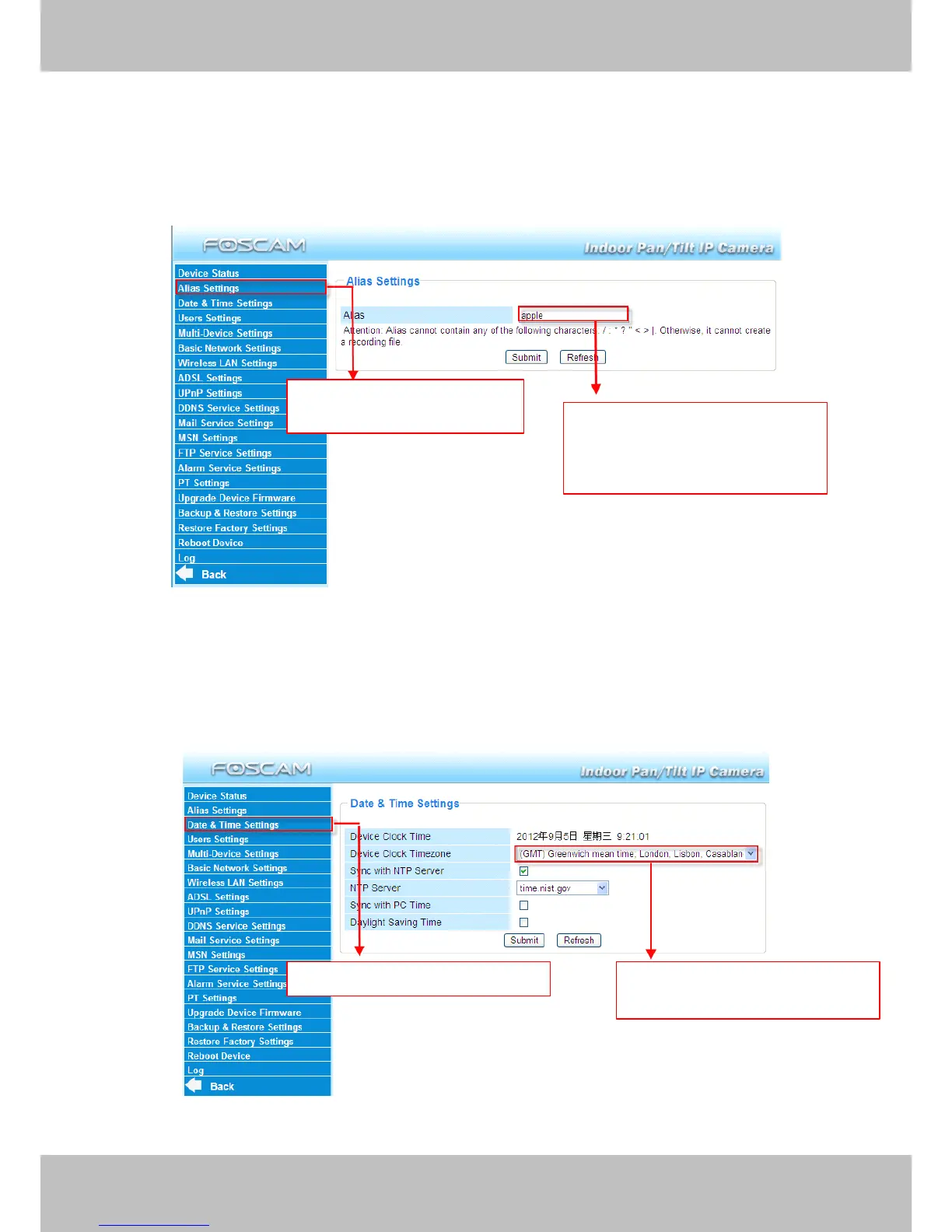
Default alias is Anonymous. You can define a name for your camera here such as apple. Click
Submit
Submit
Submit
Submit to save your change s. The alias name supports special character s .
Figure 3.4
3.3
3.3
3.3
3.3
3.3
3.3
3.3
3.3 Date
Date
Date
Date &
&
&
& Time
Time
Time
Time Settings
Settings
Settings
Settings
Choose the time zone of your country. You can choose Sync
Sync
Sync
Sync with
with
with
with NTP
NTP
NTP
NTP Server
Server
Server
Server or Sync
Sync
Sync
Sync with
with
with
with PC
PC
PC
PC
Time
Time
Time
Time . If your country implement s the Daylight
Daylight
Daylight
Daylight Saving
Saving
Saving
Saving Time
Time
Time
Time , that option can also be selected .
Figure 3.5
Click
Click
Click
Click the
the
the
the option
option
option
option here
here
here
here to
to
to
to
modify
modify
modify
modify the
the
the
the device
device
device
device name
name
name
name Enter
Enter
Enter
Enter the
the
the
the device
device
device
device name
name
name
name as
as
as
as
you
you
you
you like.
like.
like.
like. Use
Use
Use
Use different
different
different
different names
names
names
names
to
to
to
to identify
identify
identify
identify multi-cameras
multi-cameras
multi-cameras
multi-cameras
Go
Go
Go
Go to
to
to
to Data
Data
Data
Data &Time
&Time
&Time
&Time Settings
Settings
Settings
Settings Select
Select
Select
Select the
the
the
the time
time
time
time zone
zone
zone
zone belong
belong
belong
belong
to
to
to
to your
your
your
your region
region
region
region



 To Next Page