EasyManua.ls Logo

Foscam FI8916W - Page 18

Foscam FI8916W
79 pages
Print Icon
To Next Page IconTo Next Page
To Previous Page IconTo Previous Page
Loading...
17
w
w
w
w
w
w
w
w
w
w
w
w
w
w
w
w
ww.foscam.
ww.foscam.
ww.foscam.
ww.foscam.
ww.foscam.
ww.foscam.
ww.foscam.
ww.foscam.
us
us
us
us
us
us
us
us
Foscam
Foscam
Foscam
Foscam Digital
Digital
Digital
Digital Technologies
Technologies
Technologies
Technologies LLC
LLC
LLC
LLC
Telephone:
Telephone:
Telephone:
Telephone: 1-800-930-0949
1-800-930-0949
1-800-930-0949
1-800-930-0949
17
17
17
17
Another
Another
Another
Another Way:
Way:
Way:
Way:
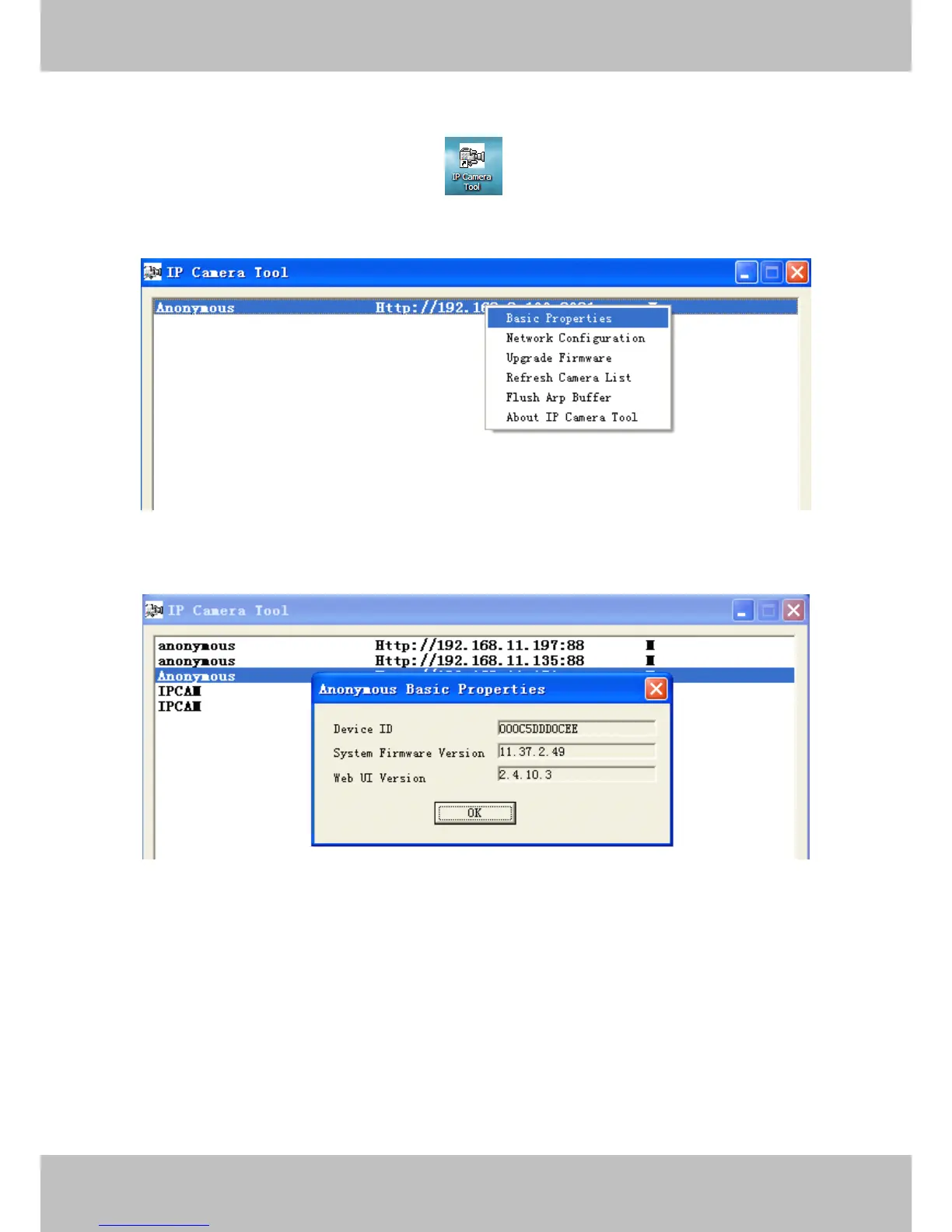
Double click the the icon IP Camera .exe , select the camera IP, right click and select
the Basic Properties, you can also see the Firmware Version and MAC Address, such as the
following screen:
Figure 3.2
Figure 3.3

Other manuals for Foscam FI8916W

Related product manuals