16
w
w
w
w
w
w
w
w
w
w
w
w
w
w
w
w
ww.foscam.
ww.foscam.
ww.foscam.
ww.foscam.
ww.foscam.
ww.foscam.
ww.foscam.
ww.foscam.
us
us
us
us
us
us
us
us
Foscam
Foscam
Foscam
Foscam Digital
Digital
Digital
Digital Technologies
Technologies
Technologies
Technologies LLC
LLC
LLC
LLC
Telephone:
Telephone:
Telephone:
Telephone: 1-800-930-0949
1-800-930-0949
1-800-930-0949
1-800-930-0949
16
16
16
16
3
3
3
3
3
3
3
3
Advanced
Advanced
Advanced
Advanced
Advanced
Advanced
Advanced
Advanced
Camera
Camera
Camera
Camera
Camera
Camera
Camera
Camera
Settings
Settings
Settings
Settings
Settings
Settings
Settings
Settings
Click the bar “ Device Management ” , goes to Administrator Control Panel to make advanced
camera settings.
3.1
3.1
3.1
3.1 Device
Device
Device
Device Status
Status
Status
Status
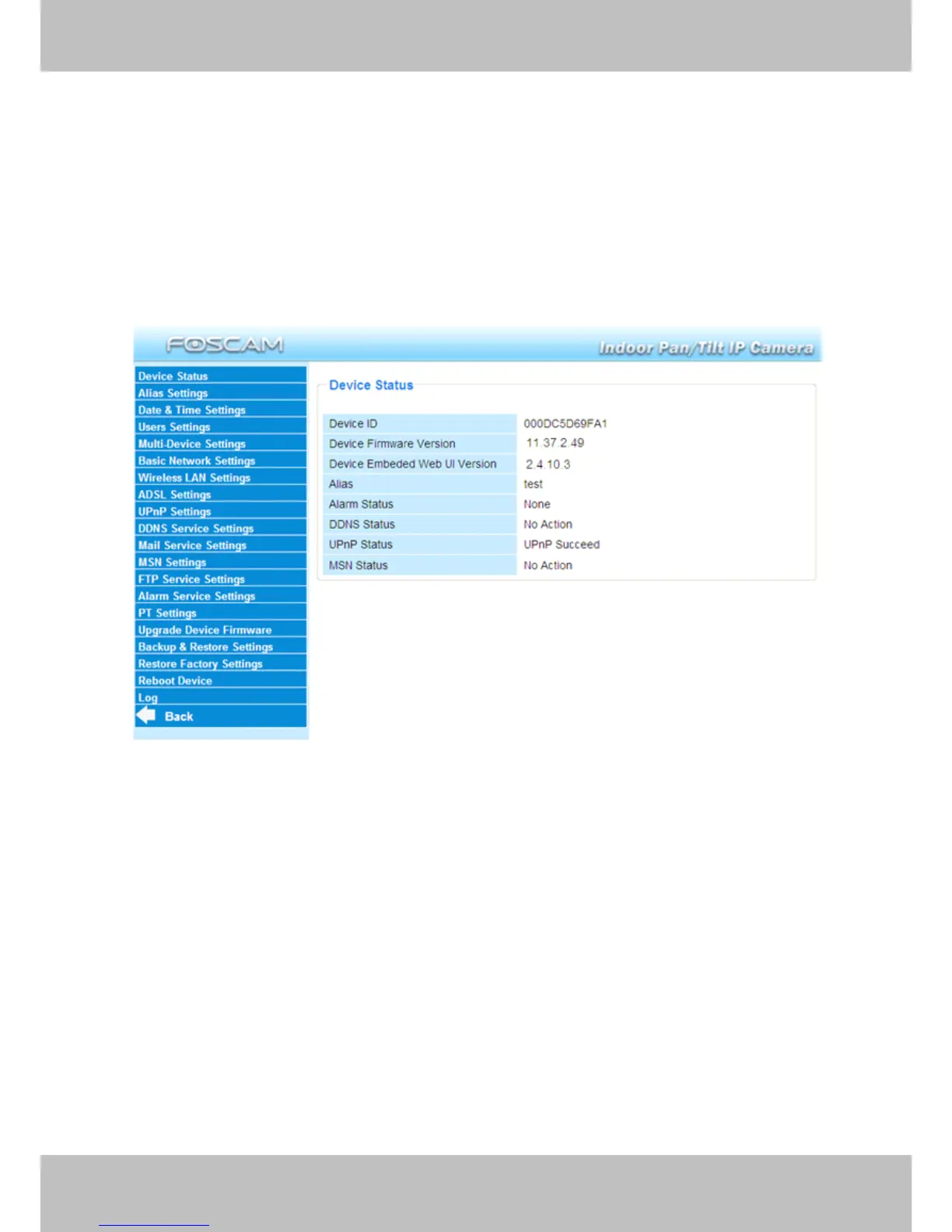
Figure 3.1
1------Device
1------Device
1------Device
1------Device ID
ID
ID
ID MAC ID of the camera by wired connection
2-----Device
2-----Device
2-----Device
2-----Device Firmware
Firmware
Firmware
Firmware Version
Version
Version
Version System Firmware version of the camera
3-----Device
3-----Device
3-----Device
3-----Device Web
Web
Web
Web UI
UI
UI
UI Version
Version
Version
Version Web UI firmware version of the camera
4-----Alias
4-----Alias
4-----Alias
4-----Alias Name of the camera
5-----Alarm
5-----Alarm
5-----Alarm
5-----Alarm Status
Status
Status
Status The status of Alarm Service Setting
6-----DDNS
6-----DDNS
6-----DDNS
6-----DDNS Status
Status
Status
Status The status of DDNS Setting
7
7
7
7 -----UPnP
-----UPnP
-----UPnP
-----UPnP Status
Status
Status
Status The status of UPnP Setting
8
8
8
8 -----
-----
-----
----- MSN
MSN
MSN
MSN Status
Status
Status
Status The status of MSN Setting



 To Next Page