24
w
w
w
w
w
w
w
w
w
w
w
w
w
w
w
w
ww.foscam.
ww.foscam.
ww.foscam.
ww.foscam.
ww.foscam.
ww.foscam.
ww.foscam.
ww.foscam.
us
us
us
us
us
us
us
us
Foscam
Foscam
Foscam
Foscam Digital
Digital
Digital
Digital Technologies
Technologies
Technologies
Technologies LLC
LLC
LLC
LLC
Telephone:
Telephone:
Telephone:
Telephone: 1-800-930-0949
1-800-930-0949
1-800-930-0949
1-800-930-0949
24
24
24
24
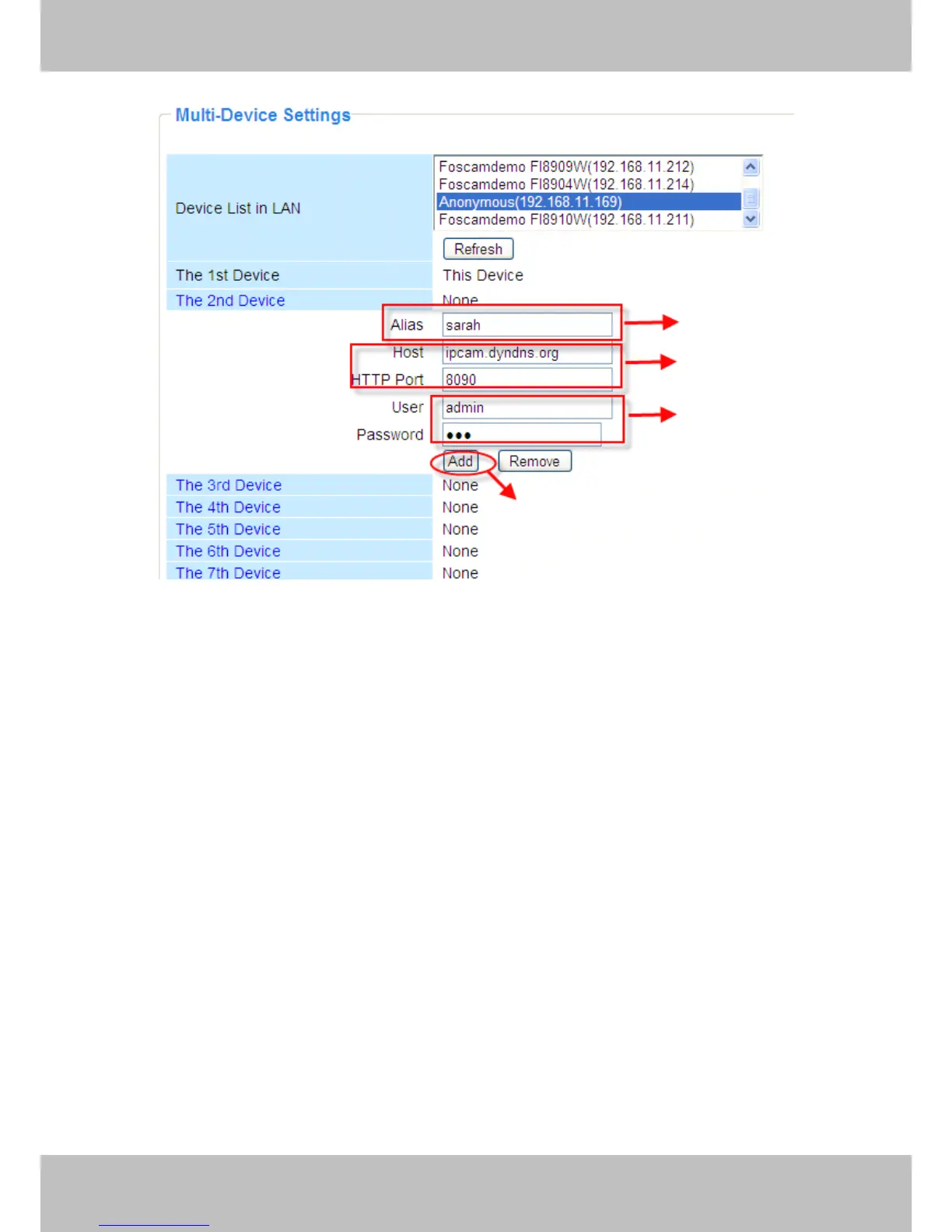
Figure 3.11
1----- The 2nd camera ’ s name
2----- Fill in the 2nd camera ’ s DDNS host not LAN IP
3 ---- Enter the 2nd camera ’ s user name and password
4---- Click Add button and to take effect
Add the other cameras in the same way. Click Submit
Submit
Submit
Submit to save.
1
1
1
1
2
2
2
2
3
3
3
3
4
4
4
4



 To Next Page