30
w
w
w
w
w
w
w
w
w
w
w
w
w
w
w
w
ww.foscam.
ww.foscam.
ww.foscam.
ww.foscam.
ww.foscam.
ww.foscam.
ww.foscam.
ww.foscam.
us
us
us
us
us
us
us
us
Foscam
Foscam
Foscam
Foscam Digital
Digital
Digital
Digital Technologies
Technologies
Technologies
Technologies LLC
LLC
LLC
LLC
Telephone:
Telephone:
Telephone:
Telephone: 1-800-930-0949
1-800-930-0949
1-800-930-0949
1-800-930-0949
30
30
30
30
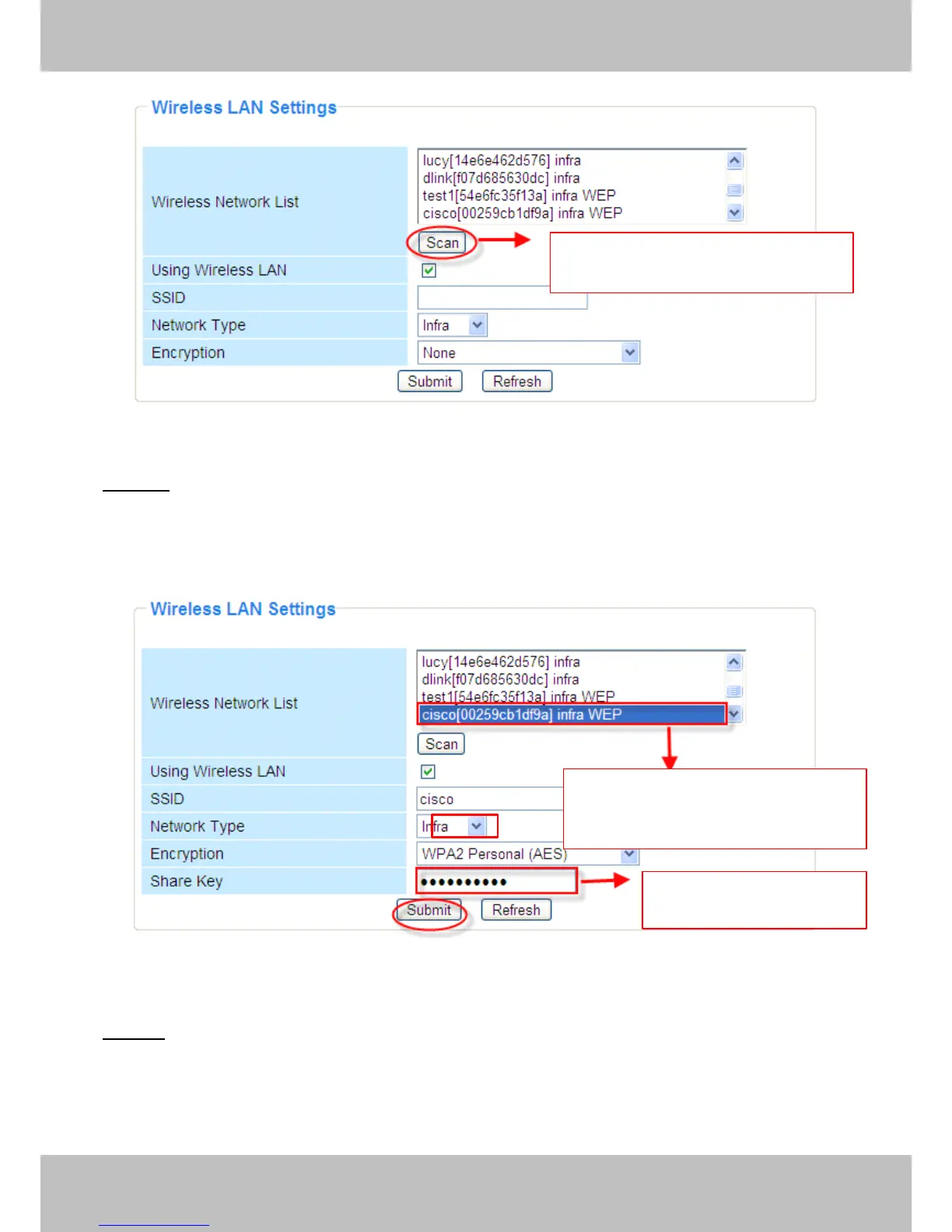
Figure 3.19
Step
Step
Step
Step 02
02
02
02 )
)
)
) Click the SSID of your router in the list, the corresponding information (SSID &
Encryption) will be filled in the following boxes automatically.
You
will only need to fill in the share key. Make sure that SSID, Encryption and share key you
filled in for the camera are exactly the same for your router
.
Figure 3.20
Step
Step
Step
Step 03
03
03
03 )
)
)
) Please click on the Submit
Submit
Submit
Submit button after all settings have been entered, t he camera will
reboot . A fter the camera has completed the reboot process, wait 10 seconds and disconnect the
network cable.
T he LAN IP address will disappear on the window of IP Camera
Tool
when the camera gets
restarted. Just wait for around 1 minute, the camera will get wireless connection, and the LAN IP
Click
Click
Click
Click Scan
Scan
Scan
Scan Button
Button
Button
Button to
to
to
to search
search
search
search WIFI
WIFI
WIFI
WIFI
device
device
device
device
Click
Click
Click
Click the
the
the
the SSID
SSID
SSID
SSID of
of
of
of router
router
router
router and
and
and
and SSID,
SSID,
SSID,
SSID,
Encryption
Encryption
Encryption
Encryption will
will
will
will be
be
be
be filled
filled
filled
filled in
in
in
in the
the
the
the
following
following
following
following box
box
box
box automatically
automatically
automatically
automatically
Enter
Enter
Enter
Enter the
the
the
the same
same
same
same share
share
share
share key
key
key
key
with
with
with
with your
your
your
your router
router
router
router



 To Next Page