31
Model LM16 [Mixer basics]
The LM16 features the internal effects (re-
verb/delay) processor, which allows apply-
ing effects to the mixer channel signals.
Using the internal effects processor
• Using Insert
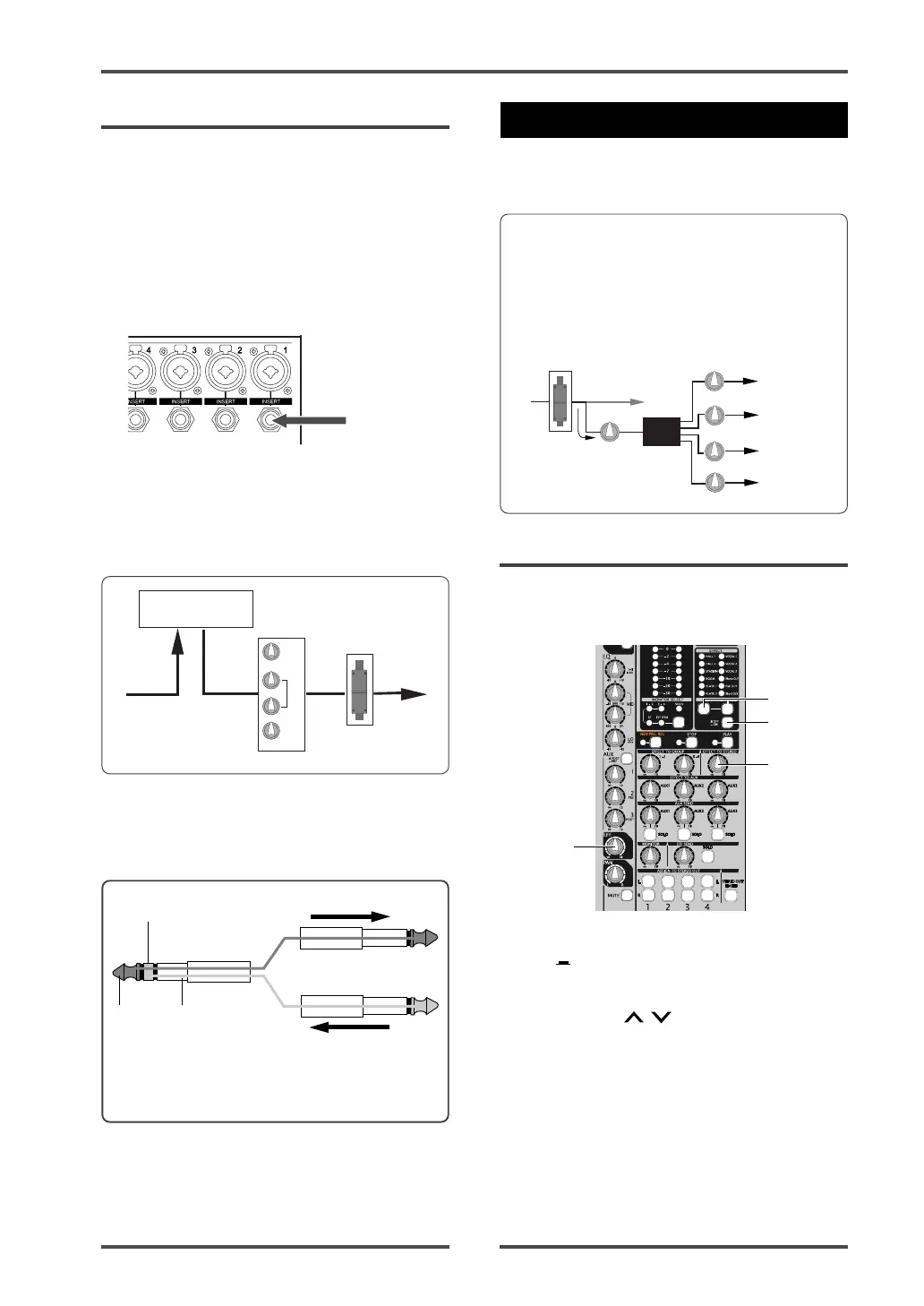
The [INSERT] jack, as well as the AUX post
send, is used for connecting to an external
processor. Unlike the AUX send, you can ap-
ply effects to a single channel signal.
The LM16 provides the [INSERT] jacks for
mixer channels 1 through 8. Each jack is used
mainly for connecting a compressor, limiter,
equalizer, etc.
Tip
Ring
Sleeve
Send (to an effect processor)
Return (from an effect processor)
*The sleeve is a ground for both signals.
(1) Set the [EFFECT] ON/OFF switch to "ON"
(
).
(2) Select the desired effect type using the
[SELECT]
/ switch.
The indicator for the selected type is
illuminated. (See the next page for details
about each effect type.)
(3) Adjust the effect send level of the channel
signal using the [EFF] control on each mixer
channel.
Note that the effect send level is affected by
the channel fader.
LO
HIGH
MID
EQ
The [INSERT] jack on the LM16 is the TRS-
type unbalanced phone jack. You can make
bidirectional connection with the effect pro-
cessor using a "Y" cable as shown below.
External effects
processor
[INSERT] jack
By connecting an external effect processor to
the [INSERT] jack, you can send the channel
signal to the processor and receive the pro-
cessed signal.
The effect send signal of each channel is ad-
justed by the [EFF] control after the channel
fader. The effected (wet) signal is adjusted
using the controls in the [EFFECT TO STE-
REO], [EFFECT TO GROUP] and [EFFECT TO
AUX] sections and sent to the stereo, group
and AUX busses.
• Applying the internal effects
The following shows how to send the effected
(wet) signal from the internal effects proces-
sor to the stereo L/R buss.
3
4
1
2
Internal
Effector
EFFECT
EFF RTN L-R
EFF RTN 1-2
EFF RTN 3-4
EFF RTN AUX 1, 2, 3
STEREO BUSS
GROUP 1-2 BUSS
GROUP 3-4 BUSS
AUX 1, 2, 3 BUSS
INPUT
FADER



 To Next Page