34
Model LM16 [Mixer basics]
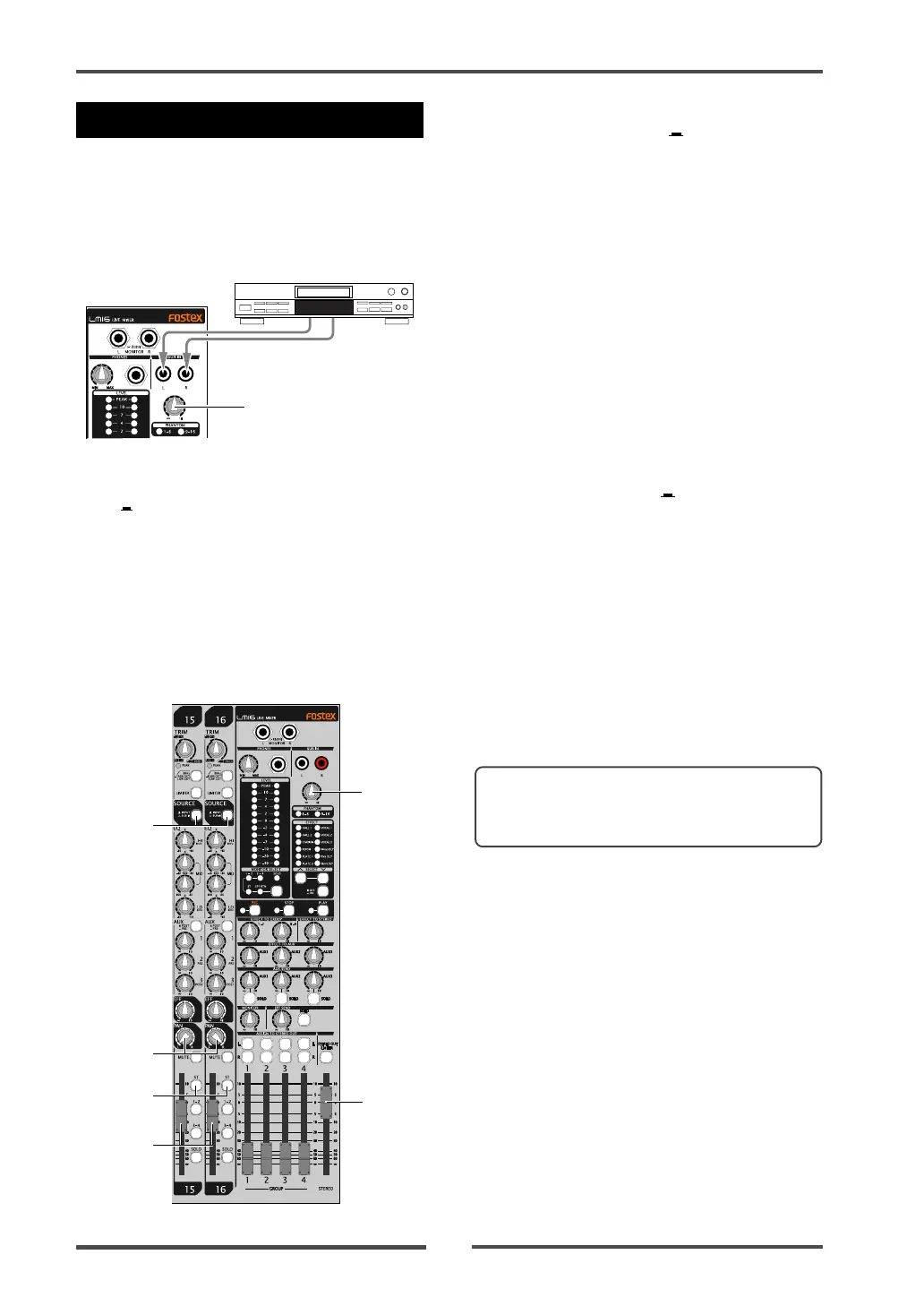
You can connect a stereo audio source such
as a CD player, MD player, etc., to the [SUB IN
(L, R)] jacks and output it from the mixer’s
output. Therefore, you can connect a BGM
source and play it back during a break in the
show, etc.
Using SUB IN
[SUB IN] control
Audio player
By setting the [SOURCE] switches on input
channels 15 and 16 to the "SUB IN" posi-
tion ( ), the signals from the [SUB IN] jacks
are sent to these channels (L for channel
15, R for channel 16). Use the [SUB IN] con-
trol to adjust the input level. (Note that the
[TRIM] control on each of channels 15 and
16 does not affect the [SUB IN] signal.)
The following shows the setting example for
playing back the signals from the [SUB IN]
jacks by the main speakers of a live stage.
1
2
3
4
5
6
(1) Set the [SOURCE] switches on channels
15 and 16 to "TRK" (
).
The input signals from the [SUB IN] jacks
are selected as the sources of channels 15
and 16.
(2) Use the [SUB IN] control to adjust the level
of the signals from the [SUB IN] jacks.
You can use the [SUB IN] control to adjust
the level of the signals from the [SUB IN]
jacks, but cannot use the [TRIM] control for
them.
(3) To output the signals from the [SUB IN]
jacks in stereo, set the [PAN] control on
channel 15 to “L” and set the [PAN] control
on channel 16 to “R”.
(4) Set the [ST] assign switches on channels
15 and 16 to "ON" ( ).
The signal from the [SUB IN] jacks is routed
to the stereo L/R buss.
(5) Use the channel faders on channel 15 and
16 to control the output level of the
channel signals sent to the stereo L/R buss.
(6) Use the [STEREO] faders on channels 15
and 16 to control the level of the stereo buss
signal output from the [STEREO OUT (L,
R)] connectors, which affects the main
speaker volume.
<Memo>: The [SUB IN] jacks can be used to
increase the total number of inputs by con-
necting to a sub mixer.



 To Next Page