13
Model LM16 [Before using the unit]
CONTROLLER
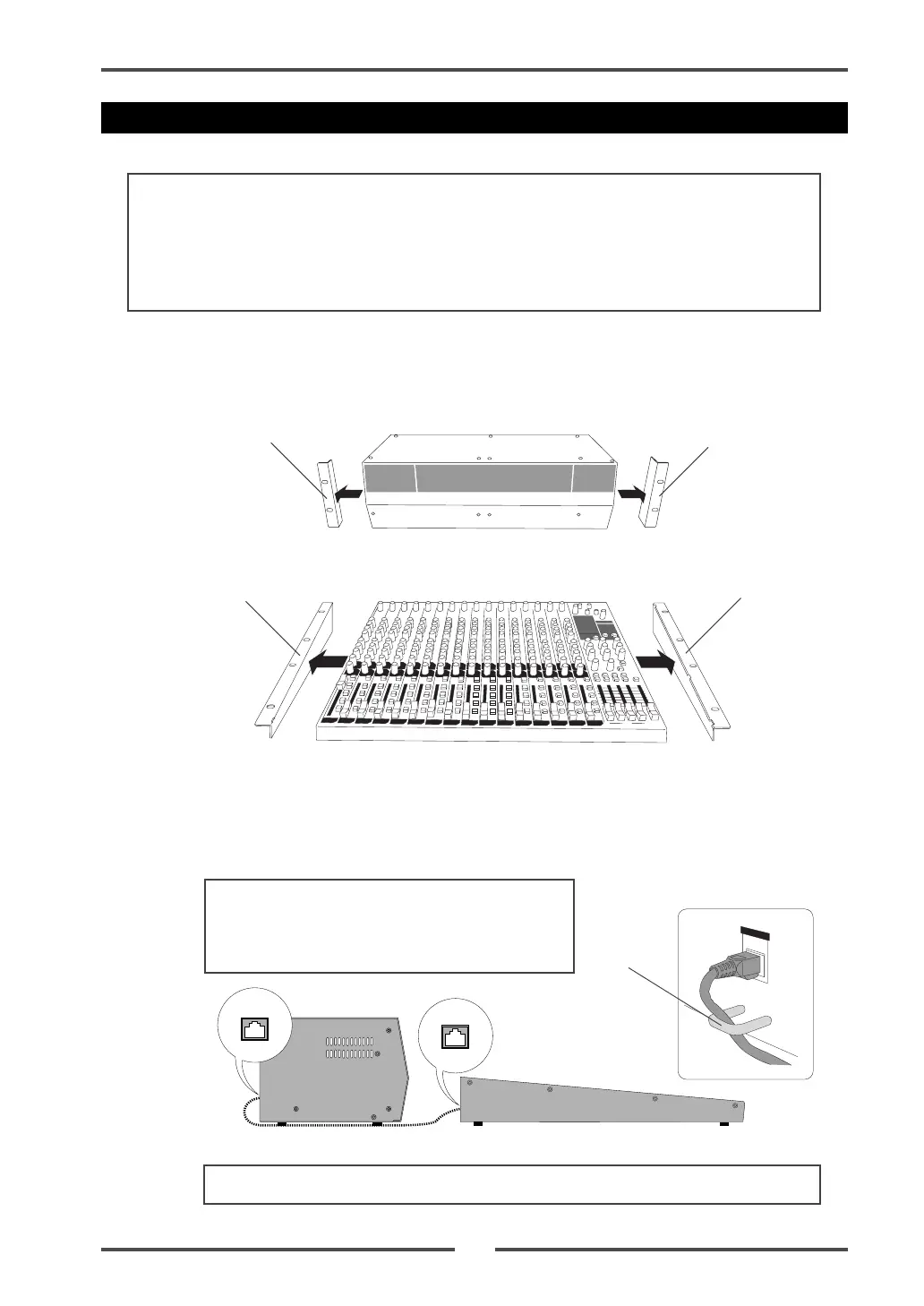
(1) Remove the rack mount adaptors attached to the side panels of each unit.
The removed rack mount adaptors and fixing screws are used in step (3) below, so be
careful not to loose them.
(2) Connect the [ETHER] connector of the control unit and the [CONTROLLER] connector
of the main unit using the supplied CAT-5 cable.
The cable should run through the cable guides fixed near the connectors of the both
units (see below).
Follow the procedure below to integrate the control unit and main unit.
<Note>:
Work on a flat and stable surface. It is recommended to put the units on a soft
cloth (or blanket) to protect the units.
<Necessary items>
• Phillips-head screwdriver (which matches the fixing screws for rack mounting)
• The supplied CAT-5 cable
Control unit
Main unit
Rack mount adaptor
Rack mount adaptor
Rack mount adaptor
Rack mount adaptor
<Note>:
Insert the connector of the cable firmly in the correct direction.
Main unit
Control unit
Integrating the control unit and main unit
Cable guide
<Note>:
Do not connect or disconnect a CAT-5
cable while the LM16 is powered on.
When you connect or disconnect a CAT-5 cable,
make sure that the LM16 is powered off.



 To Next Page