Foundry Hardware Installation Guide for the FES, FESX, and FWSX
2 - 10 © 2006 Foundry Networks, Inc. June 2006
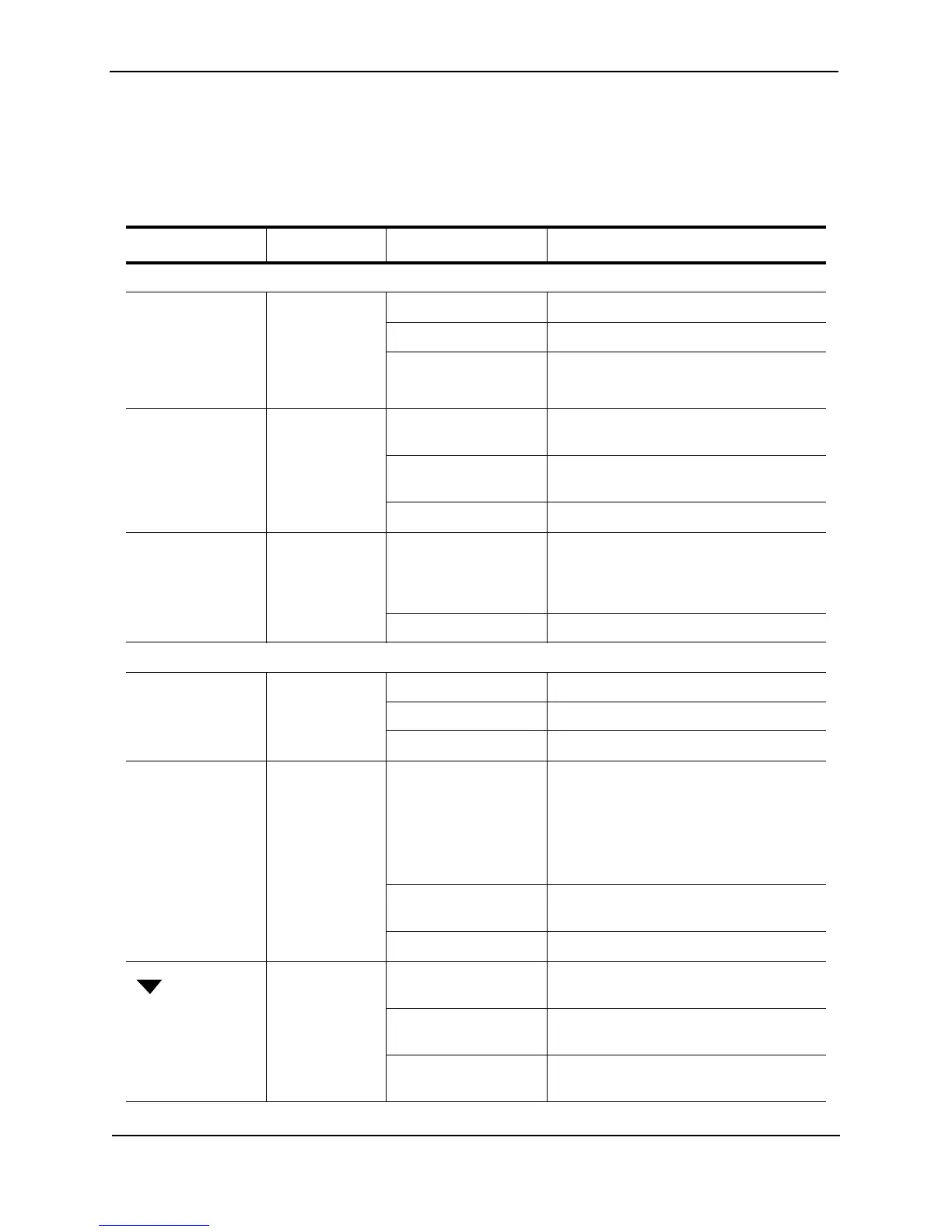
LEDs for FES Ports
The 10/100 Mbps and 10/100/1000 Mbps ports on FES devices provide status information using the LEDs listed in
Table 2.3.
Table 2.3: LEDs for FES Ports
LED Position State Meaning
10/100 Port LEDs
Lnk/Act Left LED above
port
OR
Top LED above
port
On Link is up.
Off Link is down.
Blinking Port is transmitting or receiving.
FDX Right LED
above port
OR
Middle LED
above port
On Full-duplex connection found or
configured.
Off Half-duplex connection or no port
connection exists.
Blinking Collisions are being detected.
Power (POE
devices only)
Bottom LED
above port
(POE devices
only)
On The port is providing in-line power to the
power consuming device, such as a VoIP
phone or other device, that is connected
to the port.
Off The port is not providing in-line power.
10/100/1000 Port LEDs
Lnk/Act Top On Link is up.
Off Link is down.
Blinking Port is transmitting or receiving traffic
FDX Bottom On Full-duplex connection found or
configured.
Note: This LED also is lit if you configure
the port to 10 Mbps full-duplex or 100
Mbps full-duplex. This is true even when
no link is present.
Off Half-duplex connection or no port
connection exists.
Blinking Collisions are being detected.
Upper left
corner of upper
copper
connector for
upper copper
connector
Off No copper port connection exists on
upper copper connector.
Green Copper port is connected on upper copper
connector.
Amber Traffic is being transmitted and received
on upper copper connector.



 To Next Page