Foundry Hardware Installation Guide for the FES, FESX, and FWSX
4 - 6 © 2006 Foundry Networks, Inc. June 2006
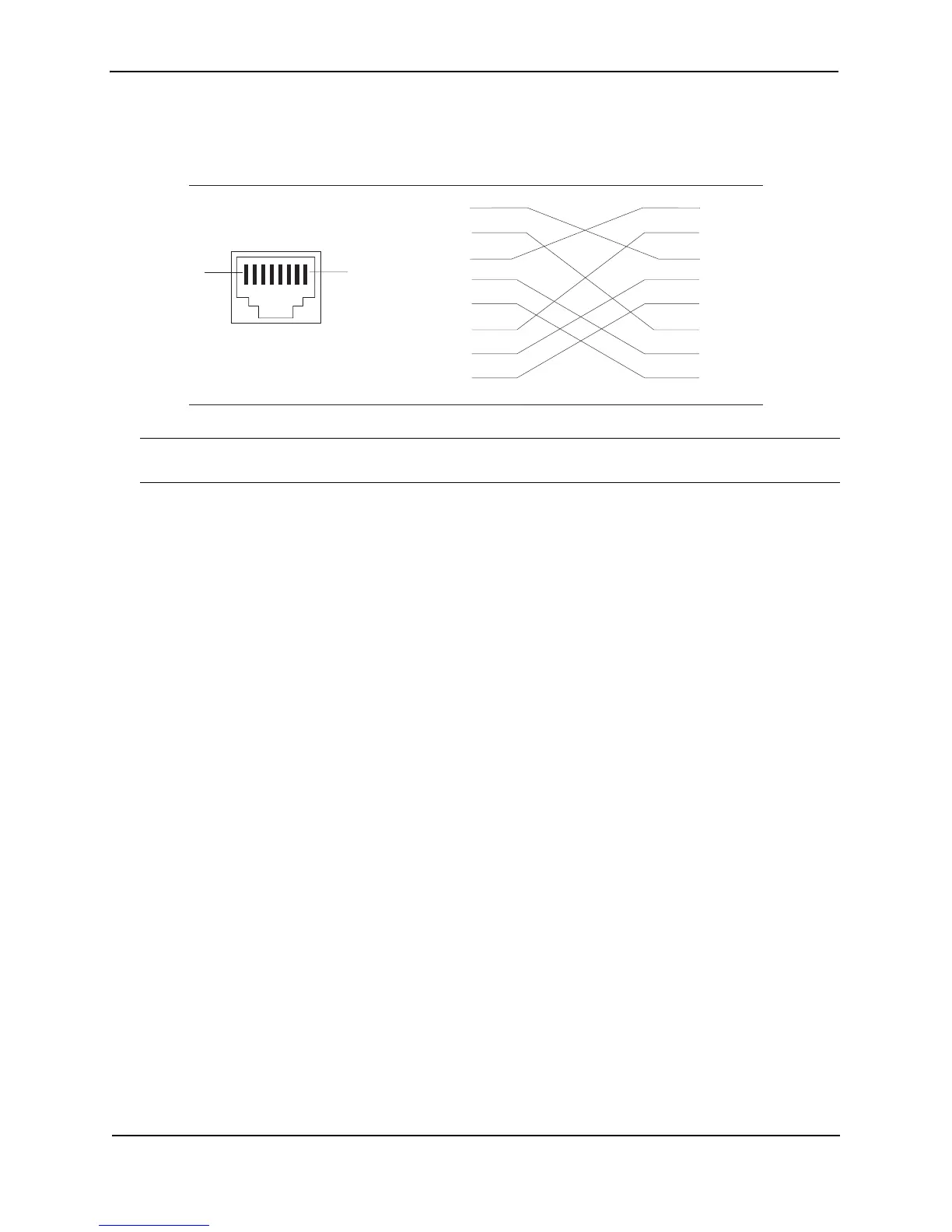
Figure 4.2 Cat-5 crossover cable for 1000BaseT
NOTE: The 802.3ab standard calls for automatic negotiation of the connection between two 1000BaseT ports.
Consequently, a crossover cable may not be required; a straight-through cable may work as well.
Connecting to Workstations, Servers, or Routers
Straight-through UTP cabling is required for direct UTP attachment to workstations, servers, or routers using
network interface cards (NICs).
Fiber cabling is required for direct attachment to Gigabit NICs or switches and routers via fiber ports. See
“Connecting a Network Device to a Fiber Port” on page 4-6.
Automatic MDI/MDIX Detection
All 10/100 and Gigabit Ethernet Copper ports on the Foundry FastIron devices support automatic Media
Dependent Interface (MDI) and Media Dependent Interface Crossover (MDIX) detection. This feature is enabled
on all 10/100 and Gigabit copper ports by default. For each port, you can disable auto MDI/MDIX, designate the
port as an MDI port, or designate the port as an MDIX port.
For more information about this feature and how configure it, see the Foundry FastIron X-Series Configuration
Guide or the Foundry Switch and Router Installation and Basic Configuration Guide.
Connecting a Network Device to a Fiber Port
For direct attachment from the Foundry device to a Gigabit NIC, switch, or router, fiber cabling with an LC
connector is required.
To connect the Foundry device to another network device using a fiber port, you must do the following:
• Install a fiber optic module (SFP transceiver or mini-GBIC for Gigabit Ethernet ports, or XFP-MSA transceiver
for 10-Gigabit Ethernet ports)
• Cable the fiber optic module
The following sections provide information about performing these tasks.
Installing a Fiber Optic Module
You must install a fiber optic module (SFP or XFP transceiver) in each Gigabit Ethernet and 10-Gigabit Ethernet
fiber port you want to use.
You can install a new fiber optic module in a port while the FastIron Stackable device is powered on and running.
Before installing one of these modules into the port, have the following on hand:
• An ESD wrist strap with a plug for connection to a metal surface.
1
2
3
4
5
6
7
8
1
2
3
4
5
6
7
8
1
8
Cat-5 Crossover Cable
1000BaseT



 To Next Page