Business iQ (BiQ) Self Help Troubleshooting Guide
Printed: 5 July 2021
© FOXTEL Management Pty Ltd 2020 4
• Yes – Go to Re-Boot Box.
• No – Continue below.
4. Press the Menu/Home key on remote control to display the box Welcome
screen and then press Red (C), Red (C), 8, 8, 8, <EXIT>. Not to fast but not too
slow to cause the box to perform a FTA channel scan. Is “Scanning” with a %
displayed in red on screen?
• Yes – Continue below
• No – Repeat above step.
5. Wait for scan to 100% complete and then change channels (the channel must
be changed after the scan) to check if the red No Signal is still displayed on
any FTA channel. Is the No Signal message still displayed?
• Yes – Go to Re-Boot Box.
• No – All FTA channels now have signal as expected. Issue resolved.
3. Loss of All FTA and/or Foxtel Channels – One Box
1. Does property have a vuStreamer (Foxtel’s IPTV headed)?
• Yes – Go to Loss of Channels – One IPTV (vuStreamer) Box.
• No – Continue below.
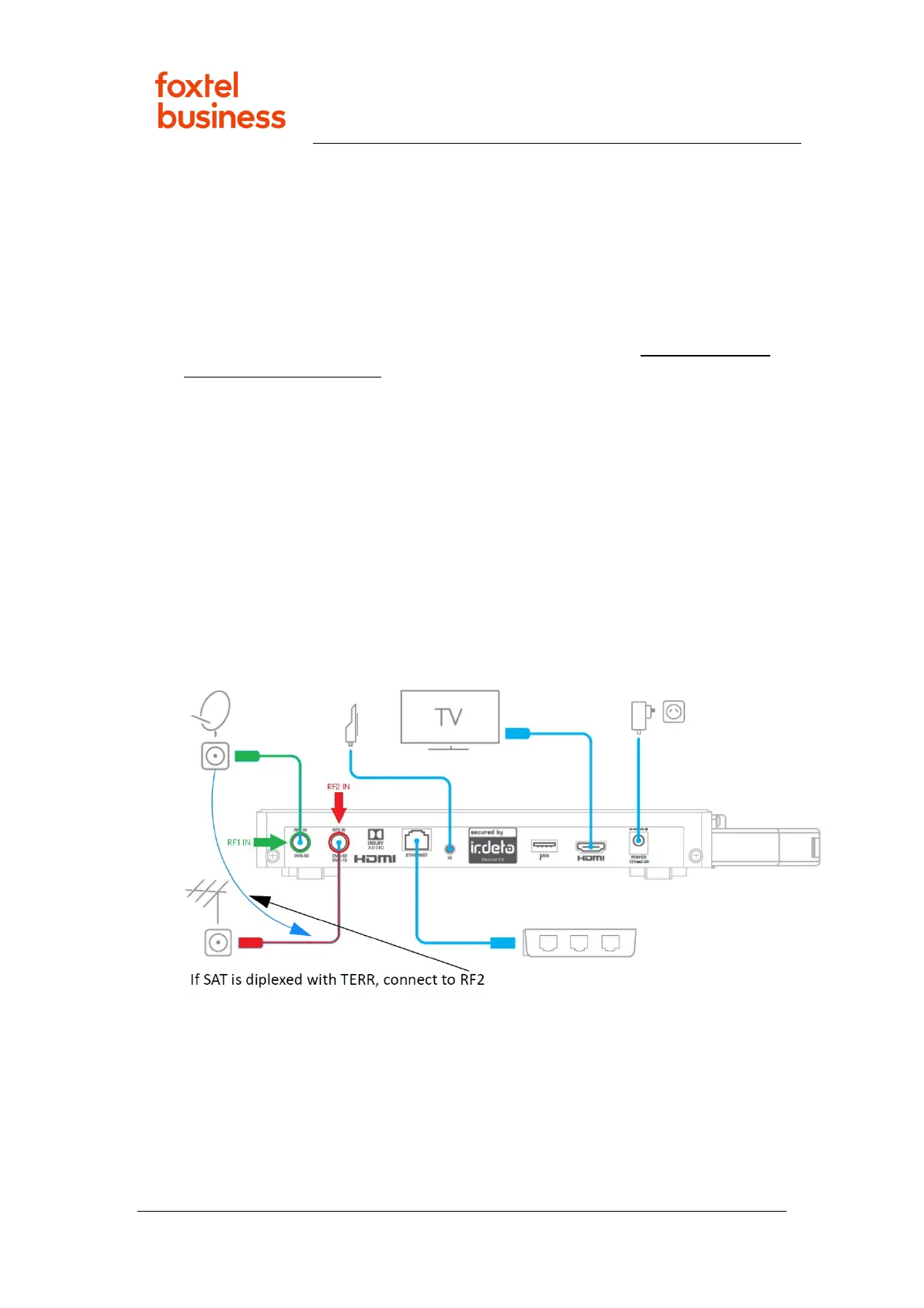
2. Check signal cable(s) are securely connected between wall socket and box
(see image below). If there is only one coaxial cable at the wall plate, it should
be connected to the RF2-IN of the box. If there are two coaxial cables at the
wall plate, the cable connected to the terrestrial FTA antenna should be
connected to RF2-IN and other cable (Foxtel satellite) to RF1-IN.
3. Change channels. Is a red No Signal message still displayed on all channels?
• Yes – Go to Re-Boot Box.
• No – All channels now have signal as expected. Issue resolved.
4. Loss of Channels – One IPTV (vuStreamer) Box
1. Press VOD/On Demand key on the remote-control and navigate through the
On Demand screens to play a title. Was it possible to play a Video On Demand
title?



 To Next Page