P a g e | 26 of 40
FREMCO A/S
ELLEHAMMERVEJ 14 | DK9900 FREDERIKSHAVN, DENMARK | VAT NO.: DK30815416
TELEPHONE +45 7230 1213 | SALES@FREMCO.DK | WWW.FREMCO.DK
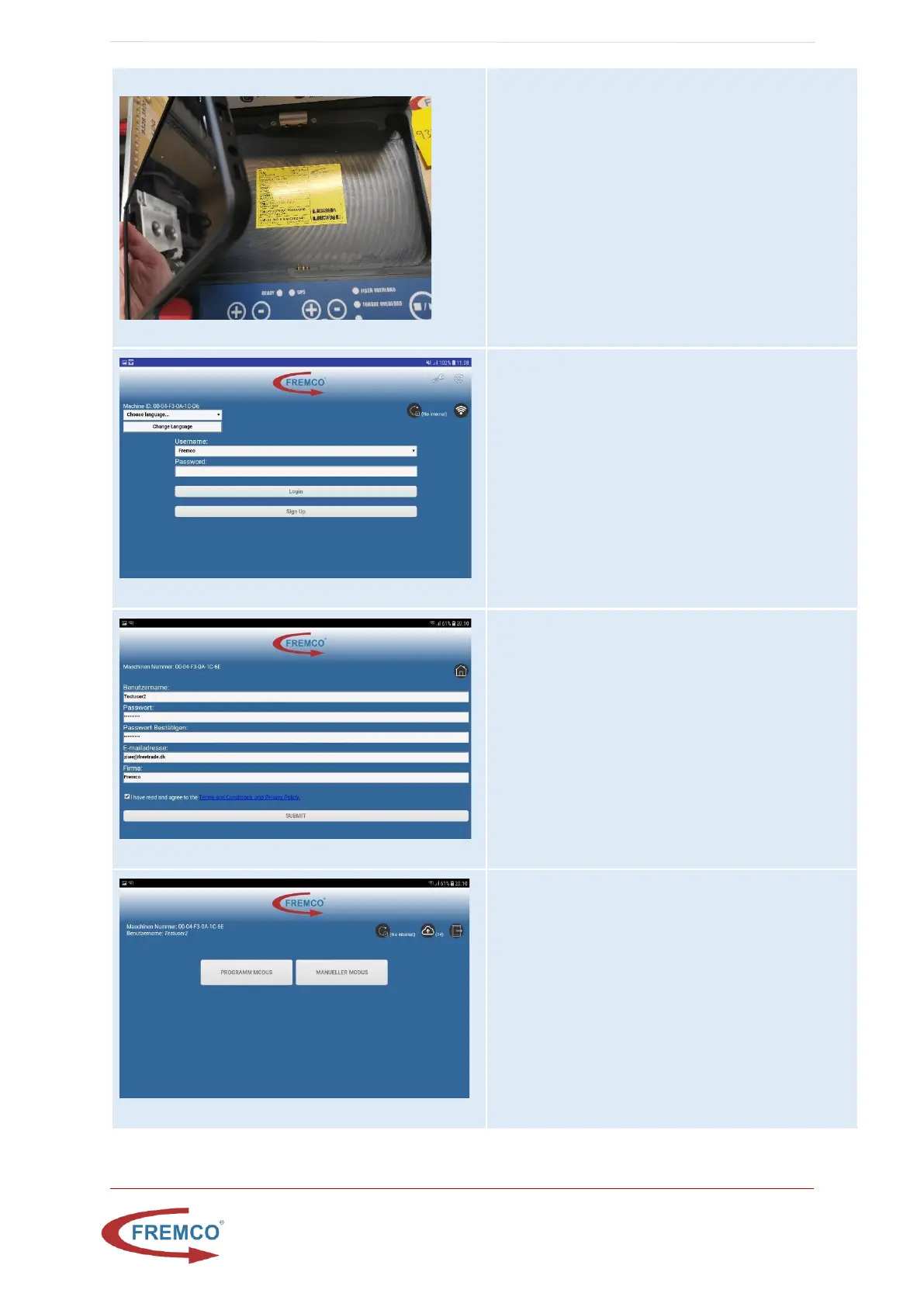
Verify the hotspot name
Take the tablet out of the controller, so you are able to
see the yellow label. Now verify the hotspot and
passwords are correct in the tablet by:
press home button -> swipe up -> press settings ->
connections -> mobile hotspot and tethering -> mobile
hotspot:
The Hotspot SSID are unique for every tablet, but can
be found in this format on the yellow label: hotspot-
xxxx
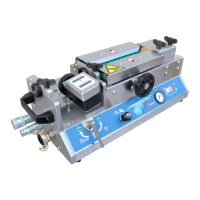
Login Screen
Either login with an existing user or create a new user.
Please note: If the page for some reason is not
displayed properly, it can be refreshed by pressing the
refresh button at top right on the display.
Create User
A new user can be created by filling out the new user
form and press submit, the user needs to agree to
Fremco GDPR statement.
Select Job Type Screen
To start a job without reporting, choose manual. To
start a report job, press program.


 To Next Page