P a g e | 27 of 40
FREMCO A/S
ELLEHAMMERVEJ 14 | DK9900 FREDERIKSHAVN, DENMARK | VAT NO.: DK30815416
TELEPHONE +45 7230 1213 | SALES@FREMCO.DK | WWW.FREMCO.DK
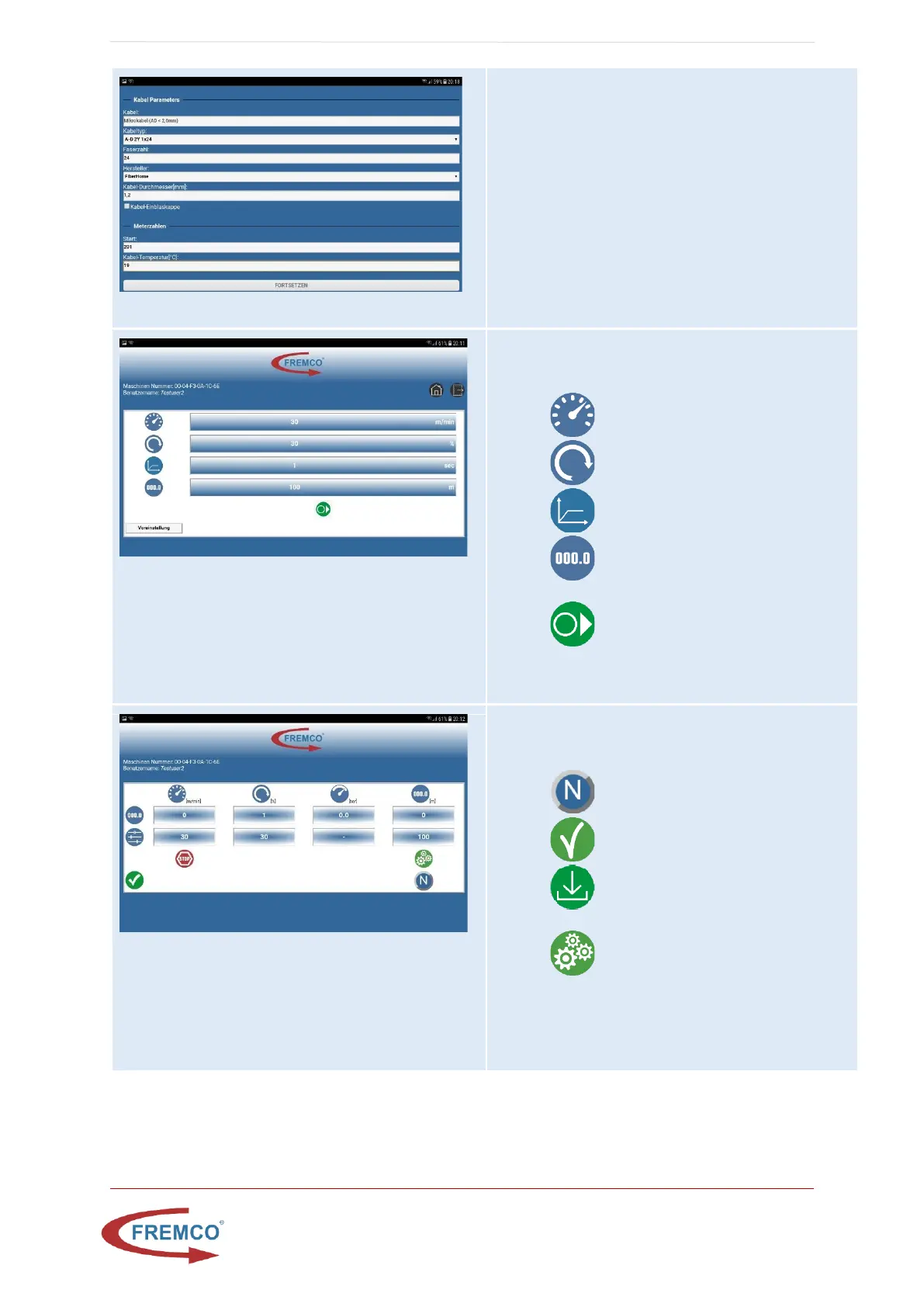
Job Report Form Screen
(Only in report/program mode)
Fill in job report and press submit, most parameters will
be auto filled from latest job.
Job Pre-set Screen
This window is shown prior to job execution. On this
screen it is possible to:
• Set start speed
• Set start torque
• Set start ramp time
• Set number of meter to run, 0 means
infinite
• When set press to get to job screen
Job Running Screen
From this screen it is possible to:
• Follow the job in real time
• Change direction
• End job (only manual mode)
• End job and download report (only
report mode)
• Change pre-set meters
• Please note: That the actual start,stop and
parameter changes are handled on the keypad
of the controller, not the tablet


 To Next Page