P a g e | 28 of 40
FREMCO A/S
ELLEHAMMERVEJ 14 | DK9900 FREDERIKSHAVN, DENMARK | VAT NO.: DK30815416
TELEPHONE +45 7230 1213 | SALES@FREMCO.DK | WWW.FREMCO.DK
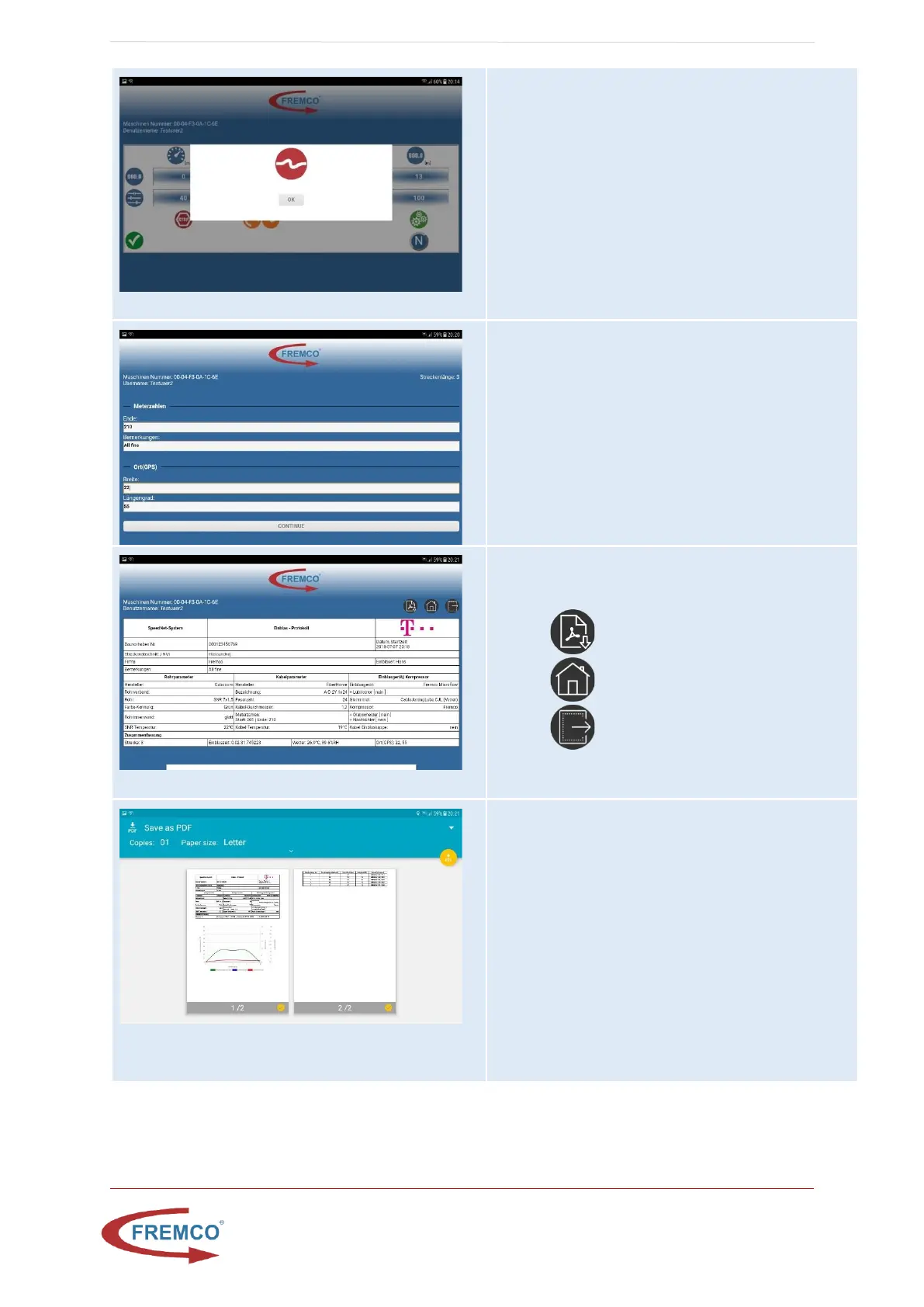
Machine Stopped due to Error
To restart press ok on the screen and start the job
again by pressing start at the keypad of the controller.
Job finished Form
In report/program mode the end meter indicator on
the fiber as well as a note related to how the job went
is put in by the user. If the controller or the tablet does
not have GPS signal these coordinates have to be put in
manually.
Show Report Screen
Here the report can be inspected before it can be
converted to pdf.
• Download report as pdf
• Go to select new job page
• Logout
Download PDF and Send PDF
The pdf can be downloaded to the tablet by pressing
the yellow button.
• Save it to internal storage -> Fremco folder
• Go to home screen by pressing the middle
black physical button on the tablet


 To Next Page