P a g e | 32 of 40
FREMCO A/S
ELLEHAMMERVEJ 14 | DK9900 FREDERIKSHAVN, DENMARK | VAT NO.: DK30815416
TELEPHONE +45 7230 1213 | SALES@FREMCO.DK | WWW.FREMCO.DK
Restore MicroFlow shortcut
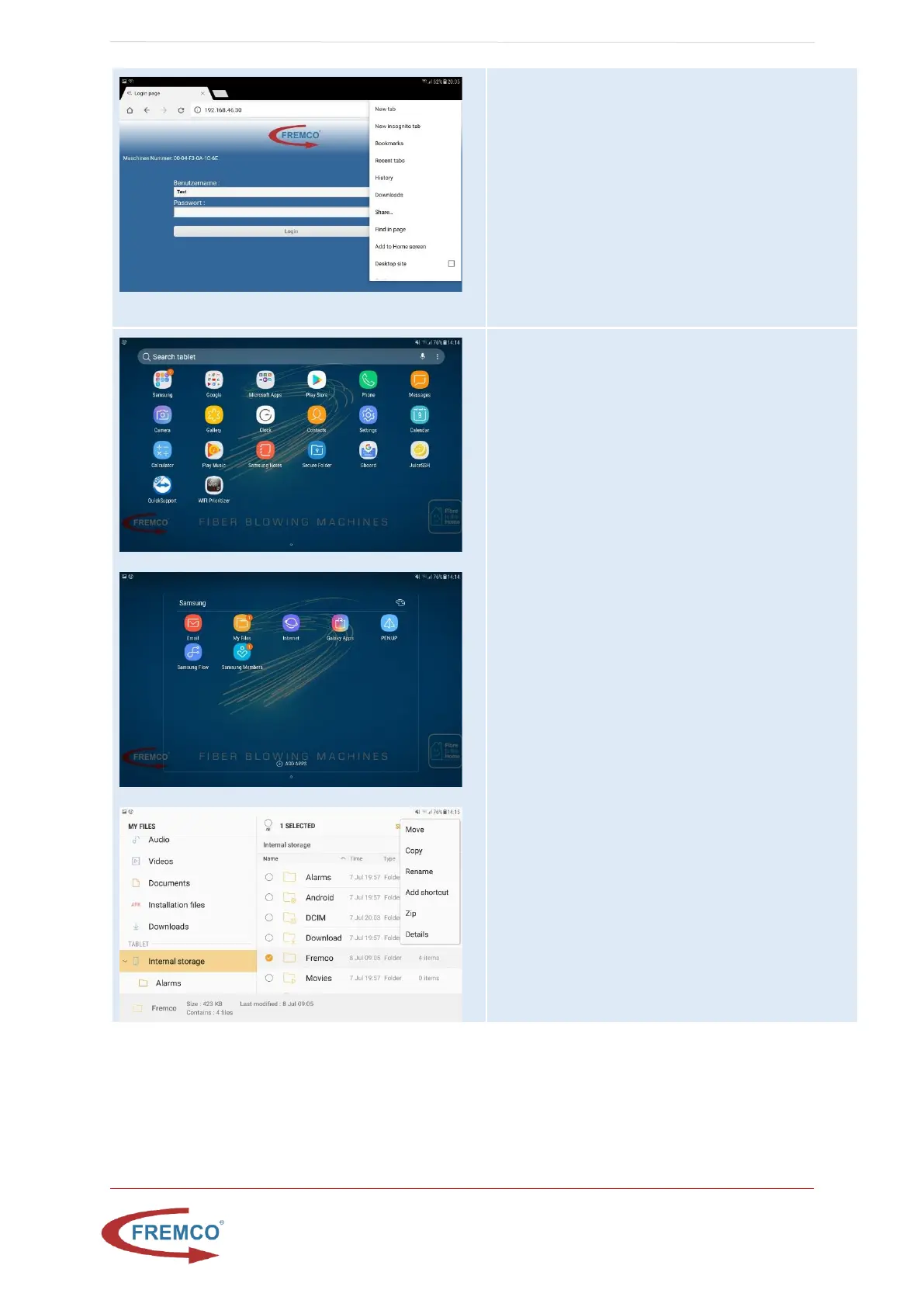
In normal mode, with controller on, Tablet connected
to the controller AP and Ready light on:
• Open Chrome browser and enter the ip-
address : http://192.168.46.30/
• When page has loaded click button on top
right site of browser and select add to home
screen
• Write name “Microflow”
A new shortcut is now available at the home screen
that can be used in normal mode
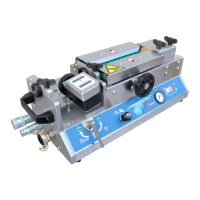
Restore MicroFlow Fremco folder Shortcut
• Go to home screen on tablet by pressing
middle physical button
• Swipe up to go to apps
• Select “Samsung” folder
• Select “My Files”
• Go to internal storage
• Press and hold Fremco folder
• Press icon with three dots in top right corner
of the tablet
• Choose “Add shortcut”
• Select “Home screen”
• Go to home screen on tablet by pressing
middle physical button


 To Next Page