25
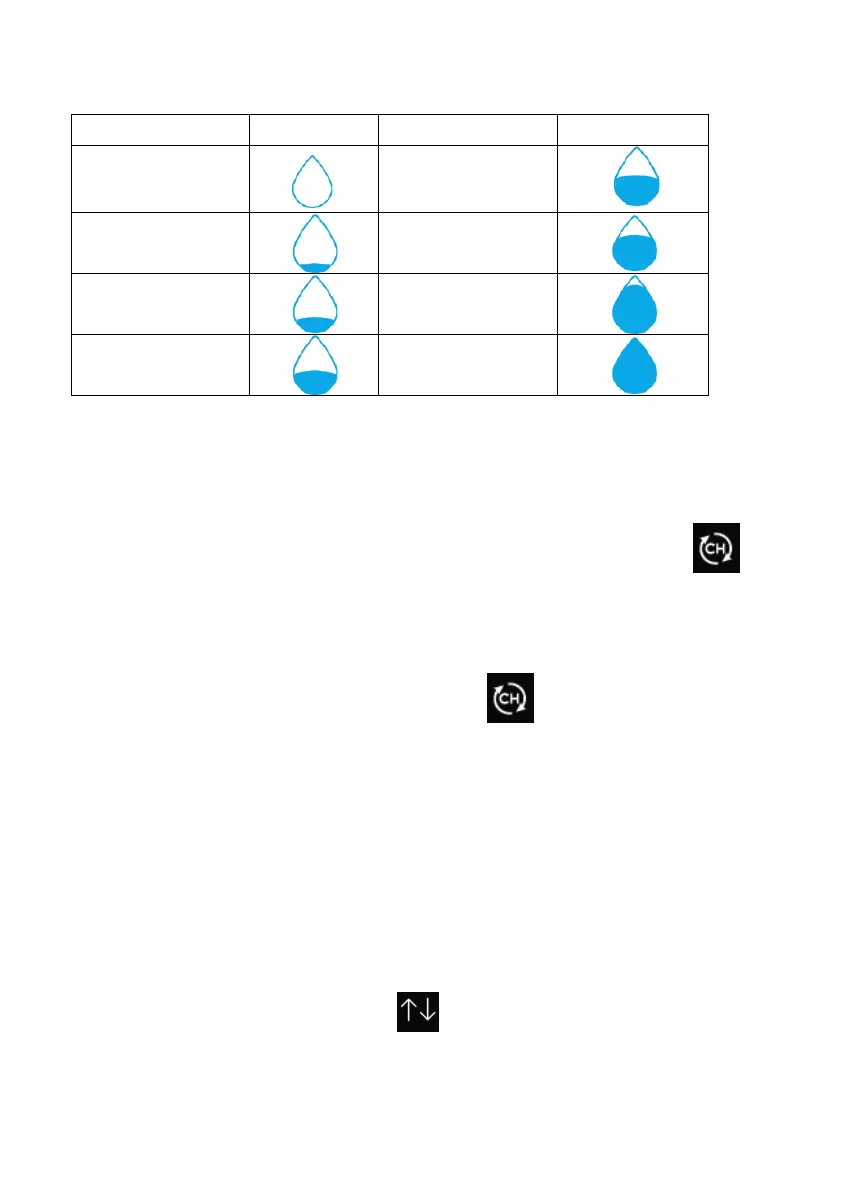
5.4.3.4 Hourly Rainfall Icon
Hourly Rain (in)
Icon Hourly Rain (in)
Icon
0.0
0.6 to 0.8
0 to 0.2
0.8 to 1
0.2 to 0.4
1 to 1.2
0.4 to 0.6
1.2 to 1.4
5.5 Multiple Channel Selection and Scroll Mode
Multi-channel sensors are optional sensors, not included in the package. If
you have multiple wireless sensors, while in normal mode, press the
key to toggle display in sequence of indoor, ch1, ch2….ch8, scroll display.
Please note if only CH2 is received, it will skip CH1, and toggle only between
indoor and already learned sensors.
While in Scroll display mode, the scroll icon will be displayed next to
the indoor humidity, and will scroll every 5 seconds.
Note: For multi channel sensors, only the current data of each sensor can be
viewed on the console, and no history data will be saved or uploaded to any
weather servers.
5.5 History Mode
5.5.1 View and Reset MAX/MIN
While in normal display, press the key once to view and reset
minimum and maximums.



 To Next Page