16
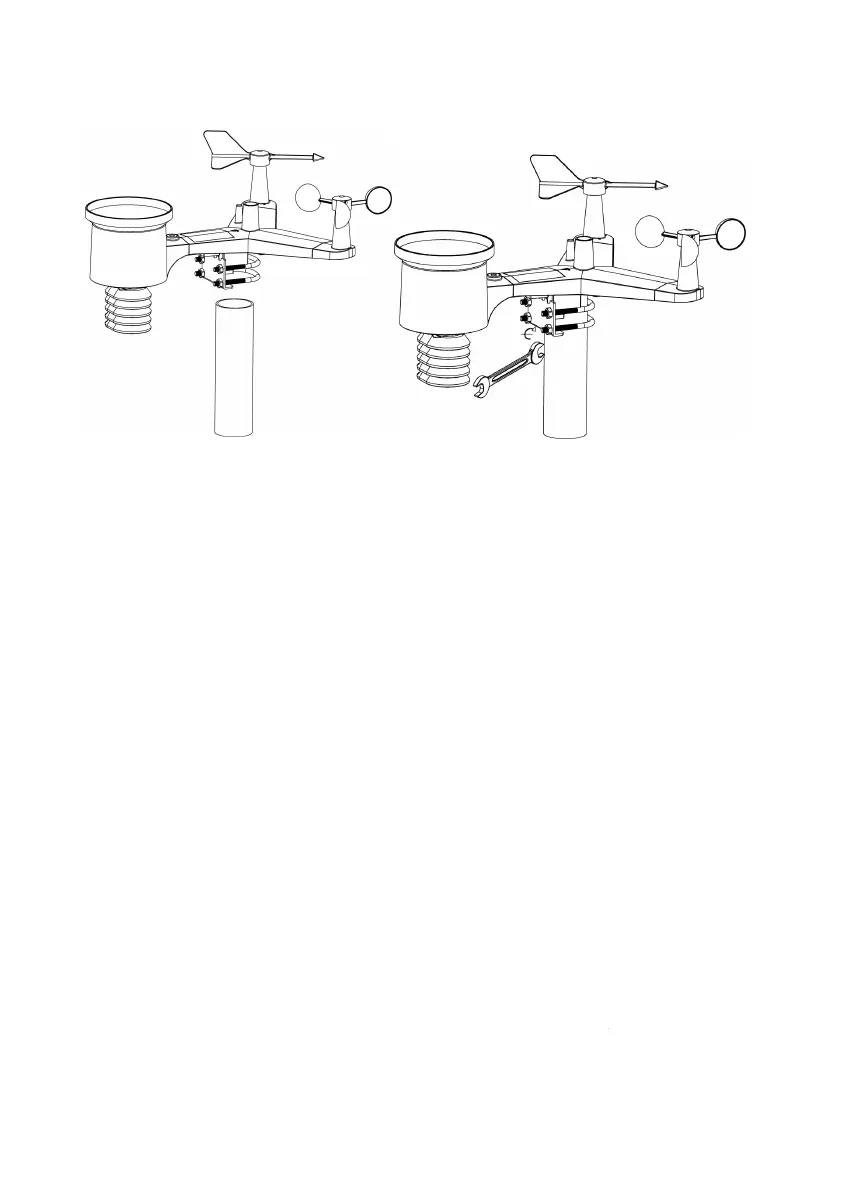
Finally, place the sensor package on top of the prepared mounting pipe.
The U-
Bolts should be loose enough to allow this but loosen the nuts as
necessary. Once placed, hand tightens all four nuts, taking care to do
so evenly.
Now you will need to align the
whole package in the proper direction by
rotating it on top of the mounting pipe as needed.
labeled “North
” that you will find on top of the sensor package right
next to the light sensor. You must rotate the whole sensor package
until this arrow points due north
. To achieve proper alignment, it is
helpful to use a compass (many cell phones have a compass
application). Once rotated in the correct orientation, lightly tighten the
bolts a little more (use a wrench) to prevent further rotation
Figure 10
Finally, place the sensor package on top of the prepared mounting pipe.
Bolts should be loose enough to allow this but loosen the nuts as
necessary. Once placed, hand tightens all four nuts, taking care to do
whole package in the proper direction by
” that you will find on top of the sensor package right
next to the light sensor. You must rotate the whole sensor package
. To achieve proper alignment, it is
helpful to use a compass (many cell phones have a compass
application). Once rotated in the correct orientation, lightly tighten the
bolts a little more (use a wrench) to prevent further rotation
.



 To Next Page