EasyManua.ls Logo

Froggit WH3000SE - Upload Data to Weather Services

Froggit WH3000SE
89 pages
Print Icon
To Next Page IconTo Next Page
To Previous Page IconTo Previous Page
Loading...
52
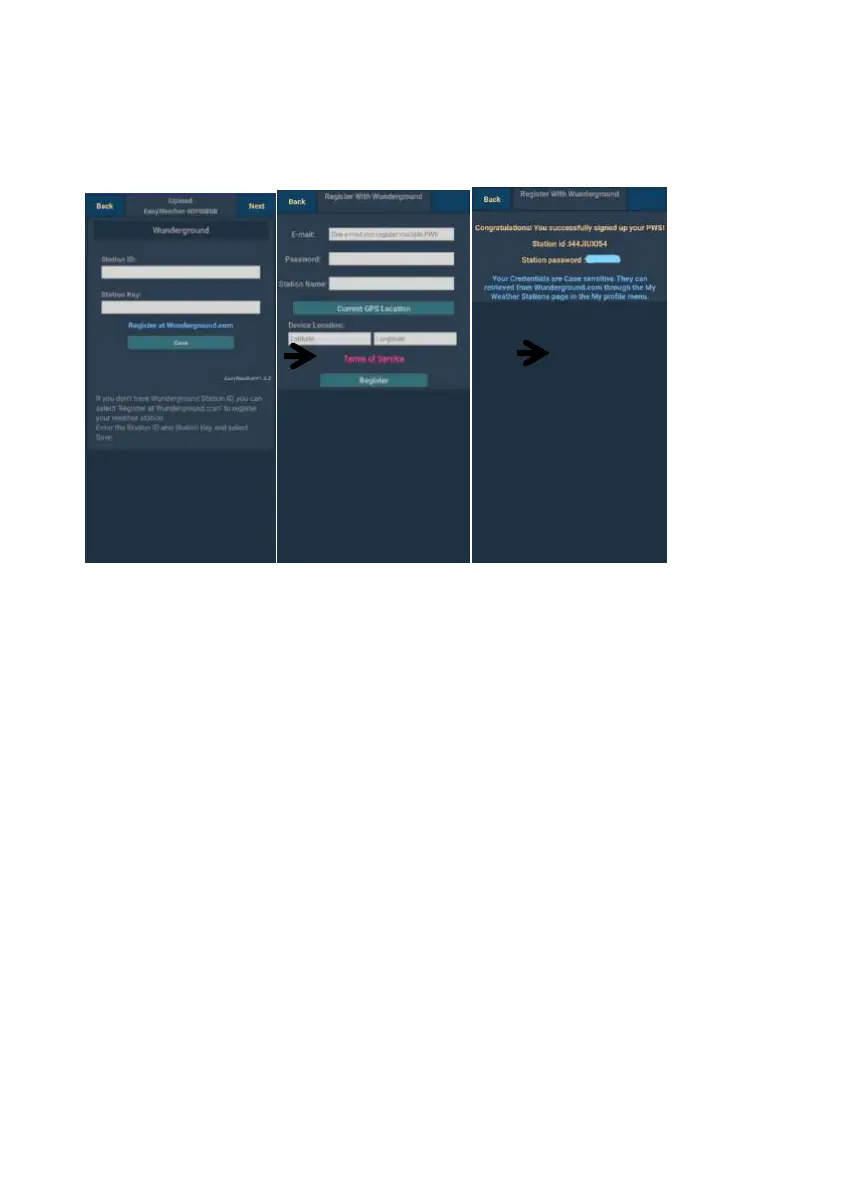
a. Upload your weather data to Wunderground.com
1)
Upload your weather data to
Wunderground.com
Input Station ID &Station
Key, pressSave. Your
station ID will be added on
the WU StationID.
then press Next. ump to
the screen about Upload
your weather data to
Weathercloud.net
If you don’t have
Wunderground Station ID
and Key,
press“
Register at
2)
Register at
Wunderground.com
Enter your valid e-mail
address and
password to obtain the
Station ID &Station Key
from
Wunderground.com.
Enter the Station
Name you want.
Press “Current GPS
Location” to get the
device current location
of Latitude and
Longitude.
Then press
Register
3)
If register successfully,
you’ll receive a Station
ID and Station
password / key.. You
will also receive an
e-mail about the
information of Station
ID and Station
password / key
Then press Back to
return back Upload
screen

Table of Contents

Other manuals for Froggit WH3000SE

Related product manuals