Original manual – Iss. 0.1 User manual – BM 3E Freezer 18/ 44
6.5 User preferences menu
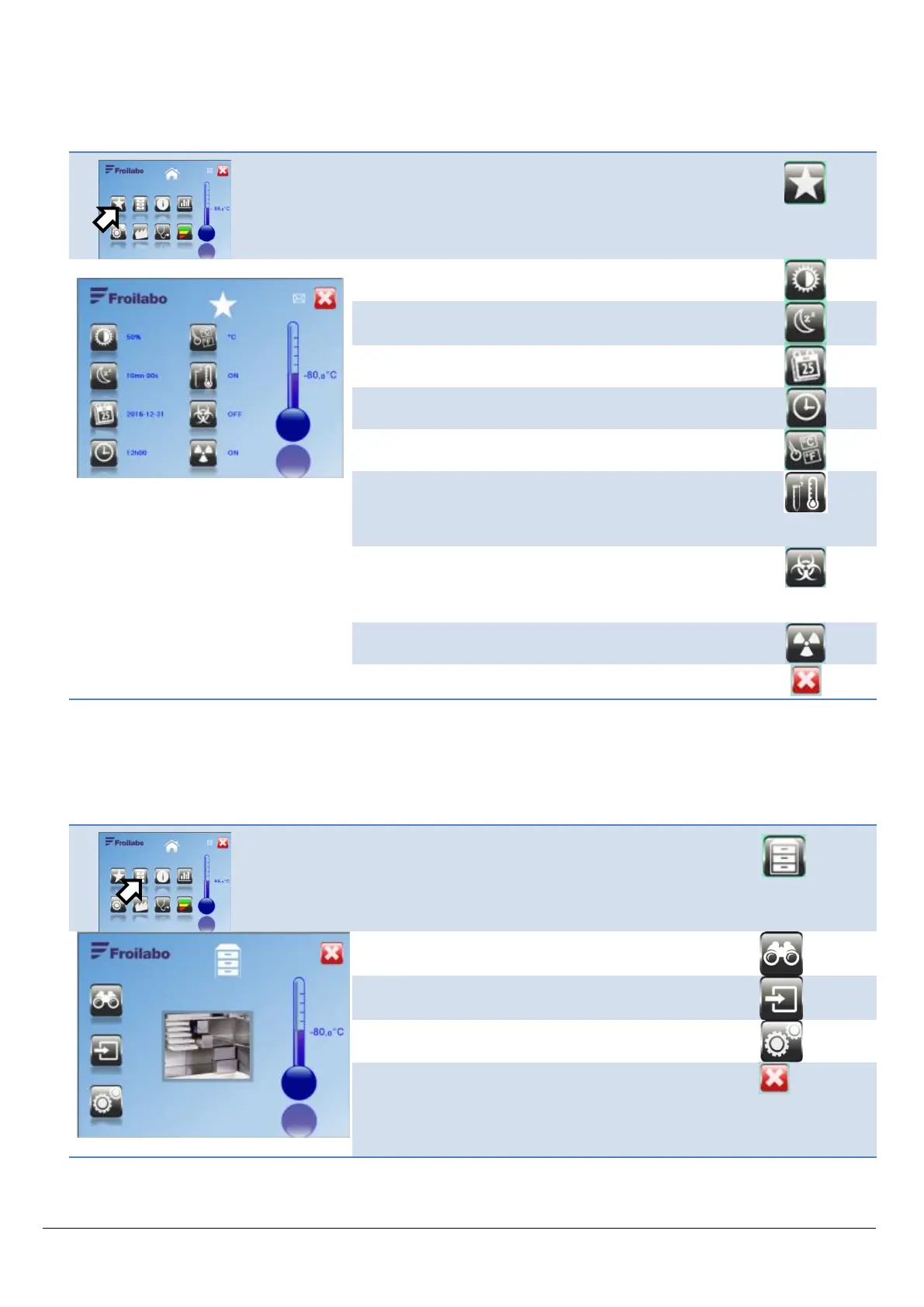
The user can configure certain settings to customise use of the freezer.
From the Home screen, access the user preferences.
Screen brightness setting
Choice of temperature unit: °C / °F
Default value: °C
Display of estimated sample temperature.
Default value: ON
When set to OFF, the chamber air temperature is
displayed.
Display of biological risk warning: ON/OFF. Default value:
OFF.
When set to ON, the logo is displayed at the top of the
screen.
Display of radiation risk warning: ON/OFF.
Default value: OFF.
6.6 Mapping menu
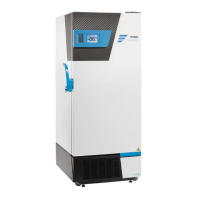
General menu giving access to the three mapping-related functions.
This menu is an option on Evolution models.
From the Home screen, access the mapping menu.
Configure the freezer storage space
Return to the previous menu without saving changes
Pressing one of these buttons brings up a username entry
screen.


 To Next Page