Original manual – Iss. 0.1 User manual – BM 3E Freezer 23/ 44
6.9 Statistics
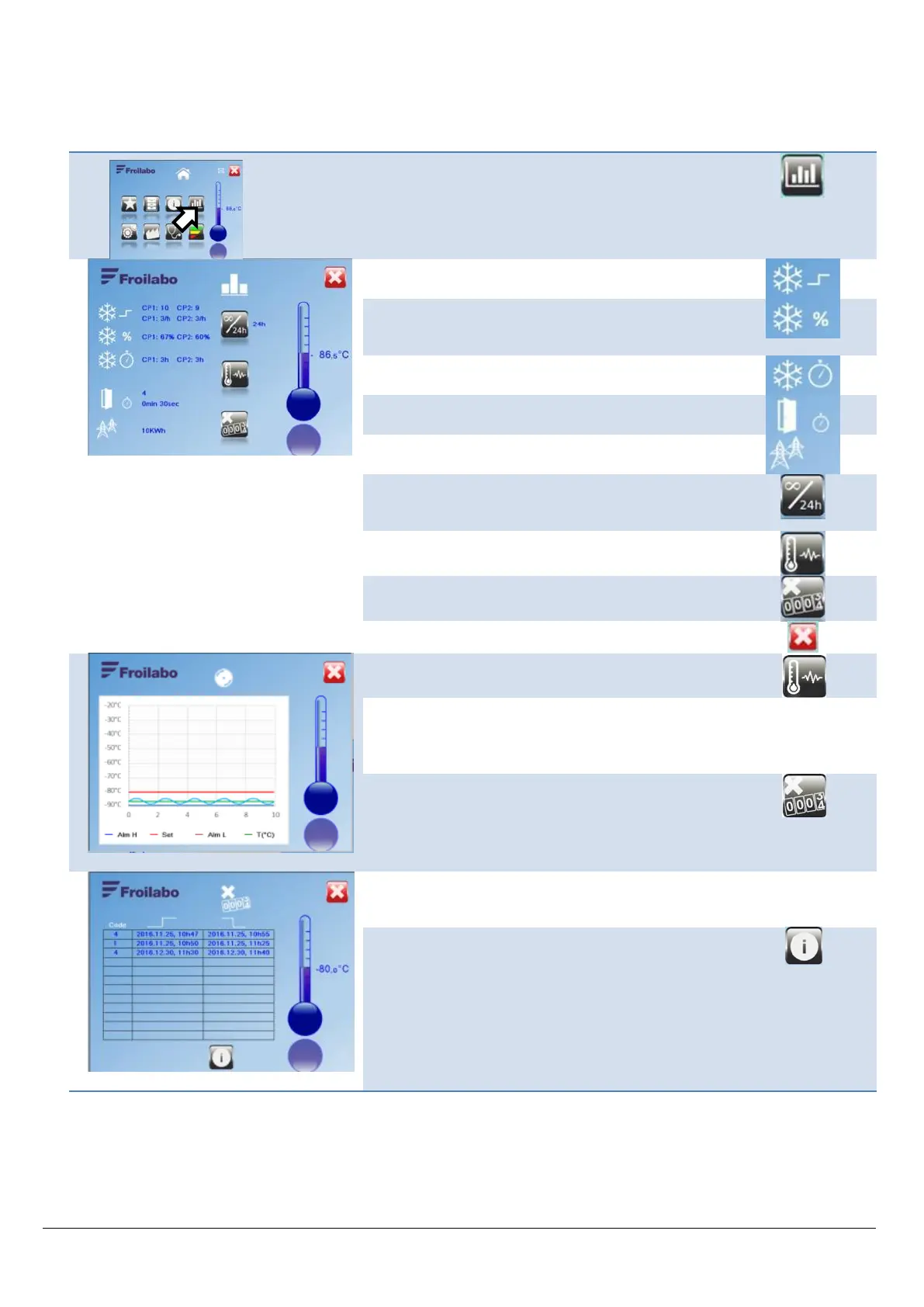
Data is stored in the unit. It can be displayed either for the last 24 hours or for the entire operating life of the freezer.
From the Home screen, access the Statistics menu.
(*)
CP1: Stage 1 (bottom) compressor
CP2: Stage 2 (top) compressor
Number of start-ups (e.g. 10) and number of start-ups
per hour (e.g. 3/h) for each compressor.(*)
Compressor usage rate.
This displays the compressor operating time relative to
the total operating time for the unit.
Compressor usage time, in hours.
Number of times the door has been opened, and
average door open time.
Electrical power consumption of the unit.
Selection of statistical data displayed:
“24H”: last 24 hours
"4EVER”: since the freezer was commissioned
Access to the temperature graph for the last 10 hours.
See below.
Access to the fault history.
From the Statistics menu, access the temperature
graph.
The graph shows the actual temperature, the high and
low alarm levels and the temperature setpoint. If
possible, link the axis limits to the temperature alarm
levels. Allow for return.
From the Statistics menu, access the fault history.
List of the last 10 errors, followed by the dates and
times when the fault occurred and ceased.


 To Next Page