Original manual – Iss. 0.1 User manual – BM 3E Freezer 19/ 44
6.6.1 Configuring the freezer
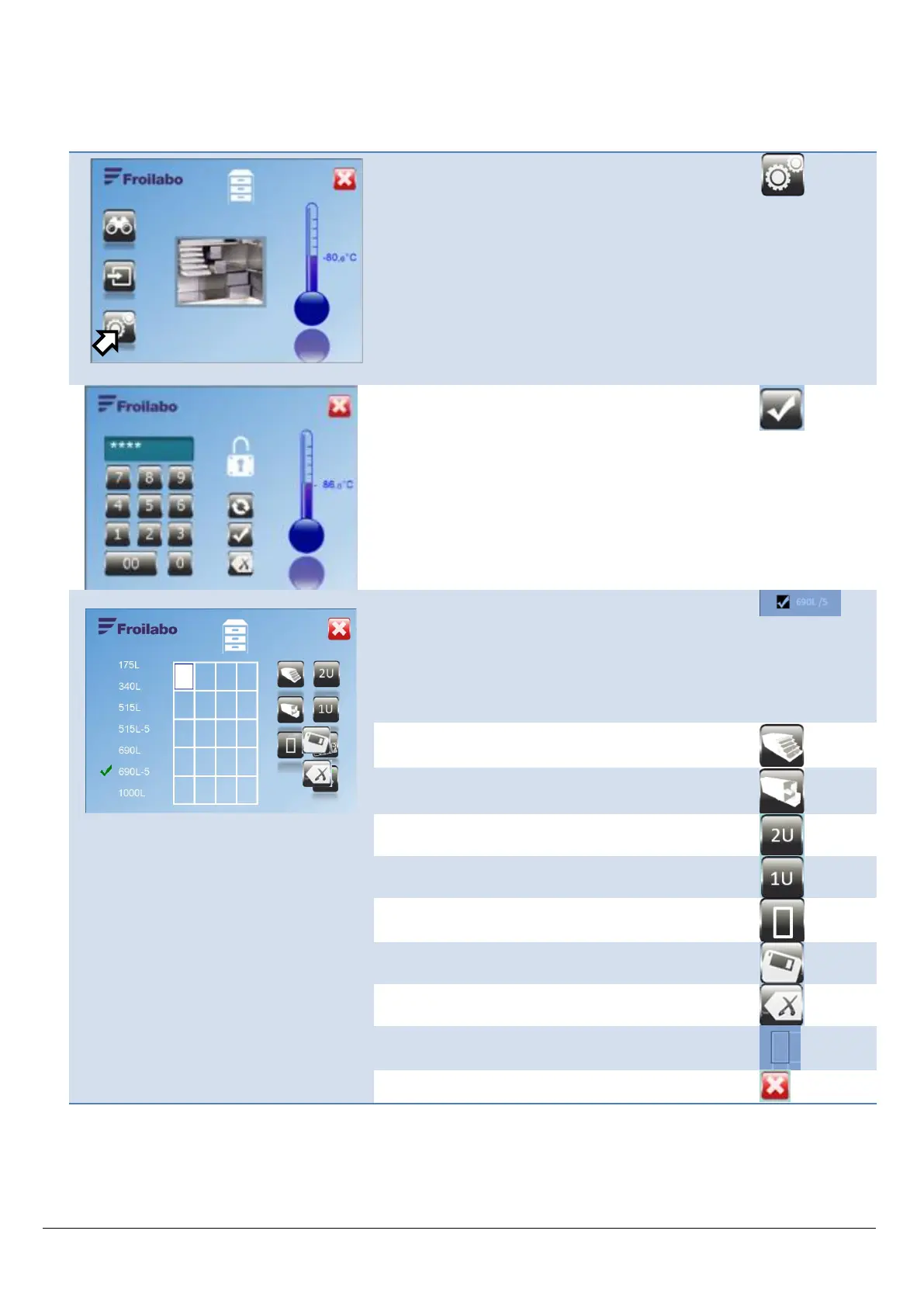
The freezer must be configured to specify the type of storage elements incorporated. Configuration thus entails
defining the types and locations of drawers and shelves.
From the Mapping screen, access the freezer
configuration menu.
Enter the access code (five digits).
Confirm.
Select the freezer capacity by pressing the
corresponding value. The elementary grid
corresponding to the capacity is displayed (factory-set
default value).
Note: Several sample numbers can be stored in the
same location.
Select a shelf two units wide.
Select a drawer one unit wide.
Select another accessory two units wide.
Select another accessory one unit wide.
Exit the menu, confirming the configuration.
Erase the last item entered.
The elementary location being configured is
highlighted.
Return to the previous menu without saving changes.


 To Next Page