19FR-54RTR User Manual
Section 3 - Conguration
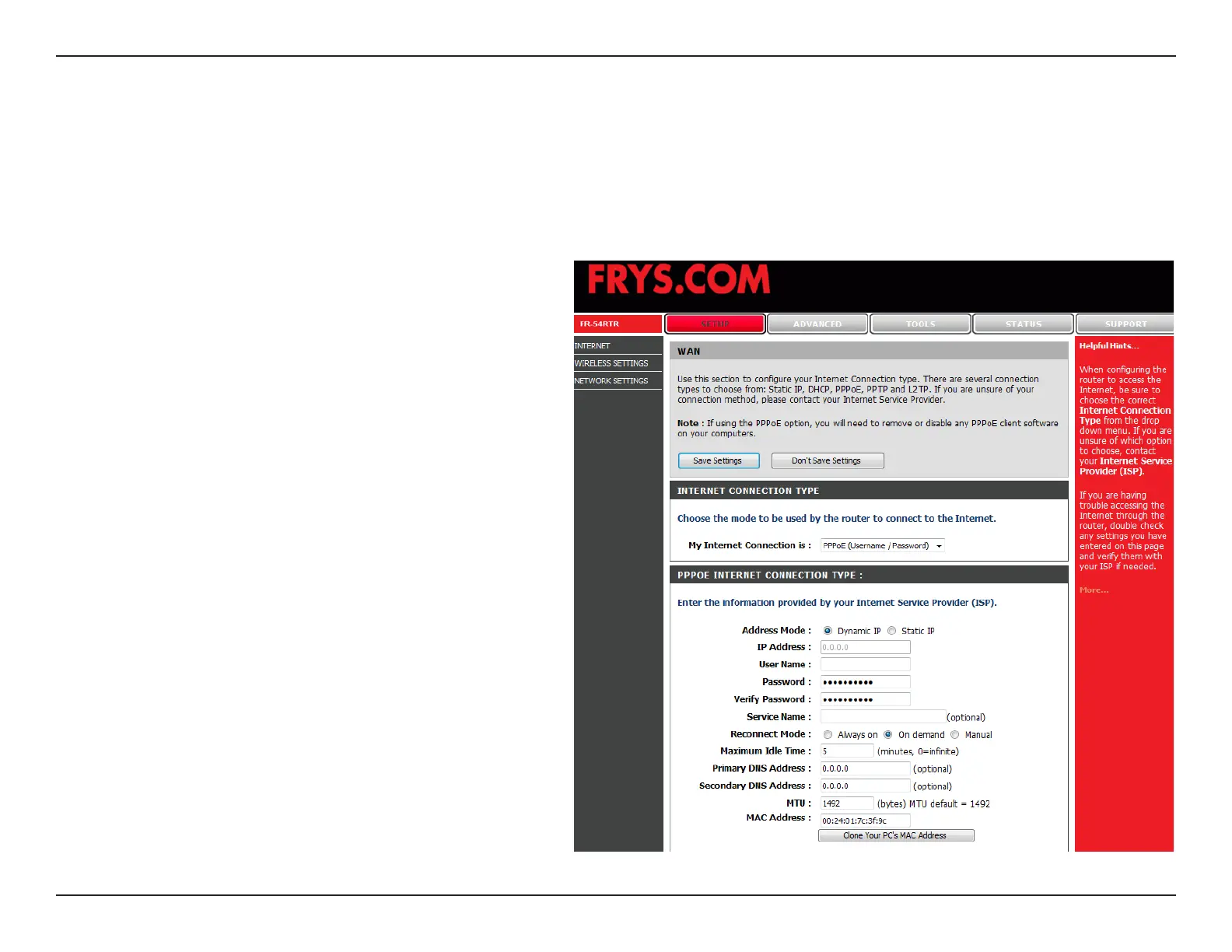
Select Dynamic (most common) or Static.
Select Static if your ISP assigned you the IP
address, subnet mask, gateway, and DNS server
addresses.
Enter your PPPoE user name.
Enter your PPPoE password and then retype the
password in the next box.
Enter the ISP Service Name (optional).
Select either Always-on, Manual, or Connect-on
demand.
Enter the IP address (Static PPPoE only).
Enter the Primary and Secondary DNS Server
Addresses (Static PPPoE only).
Enter a maximum idle time during which the
Internet connection is ma i n t a i n e d during
inactivity. To disable this feature, enable
Auto-reconnect.
PPPoE:
User Name:
Password:
Service Name:
Reconnect
Mode:
IP Address:
DNS
Addresses:
Maximum Idle
Time:
Internet Setup
Choose PPPoE (Point to Point Protocol over Ethernet) if your ISP uses a PPPoE connection. Your ISP will provide
you with a username and password. This option is typically used for DSL services. Make sure to remove your PPPoE
software from your computer. The software is no longer needed and will not work through a router.


 To Next Page