21FR-54RTR User Manual
Section 3 - Conguration
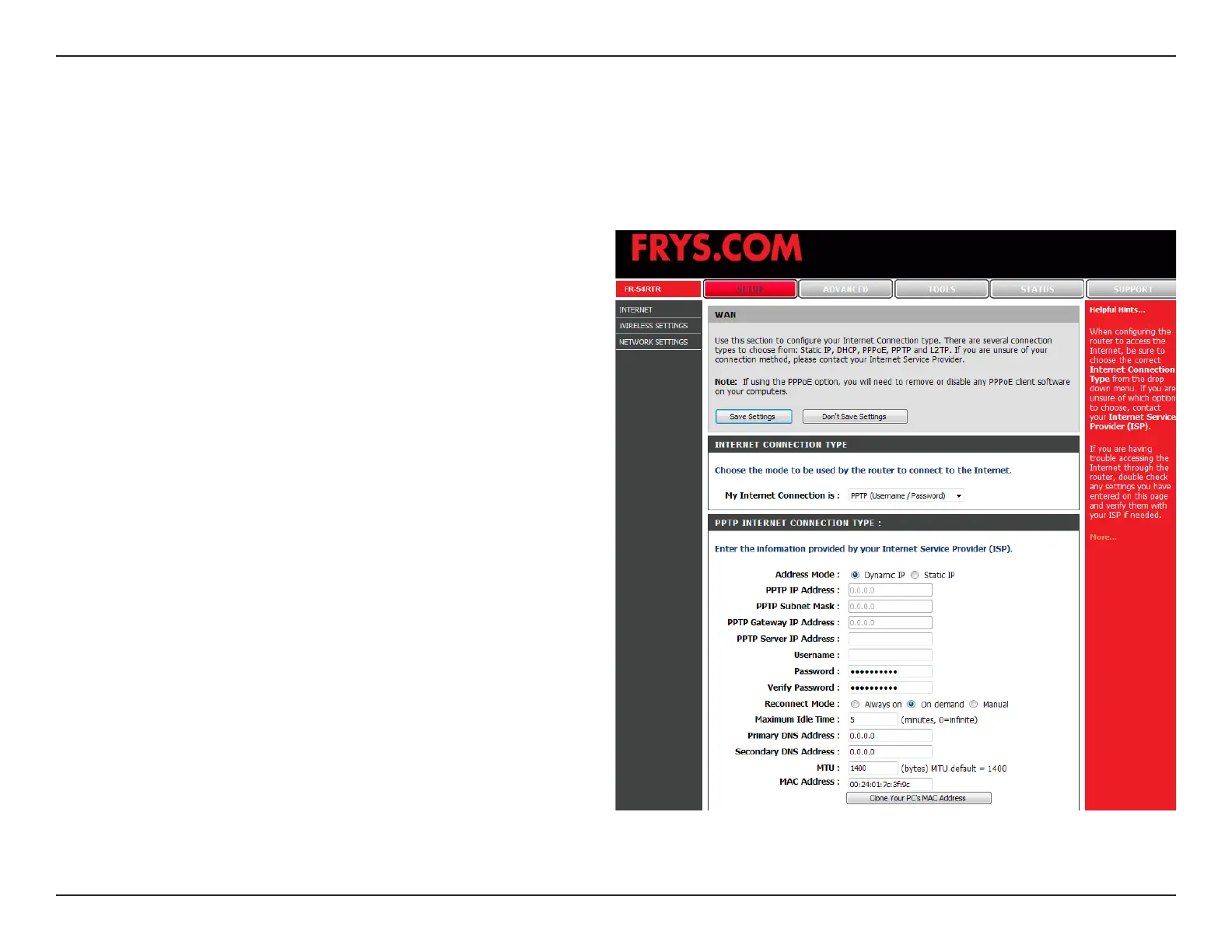
Select Dynamic (most common) or Static. Select Static
if your ISP assigned you the IP address, subnet mask,
gateway, and DNS server addresses.
Enter the IP address (Static PPTP only).
Enter the Primary and Secondary DNS Server
Addresses (Static PPTP only).
Enter the Gateway IP Address provided by your ISP
(Static PPTP only).
The DNS server information will be supplied by your
ISP (Static PPTP only).
Enter the Server IP provided by your ISP.
Enter your PPTP account name.
Enter your PPTP password and then retype the
password in the next box.
Enter a maximum idle time during which the Internet
connection is maintained during inactivity. To disable
this feature, enable Auto-reconnect.
PPTP:
IP Address:
Subnet Mask:
Gateway:
DNS:
Internet Setup
PPTP
Choose PPTP (Point-to-Point-Tunneling Protocol ) if your ISP uses a PPTP connection. Your ISP will provide you with
a username and password. This option is typically used for DSL services.
Server IP:
PPTP Account:
PPTP Password:
Maximum Idle
Time:


 To Next Page