47FR-54RTR User Manual
Section 3 - Conguration
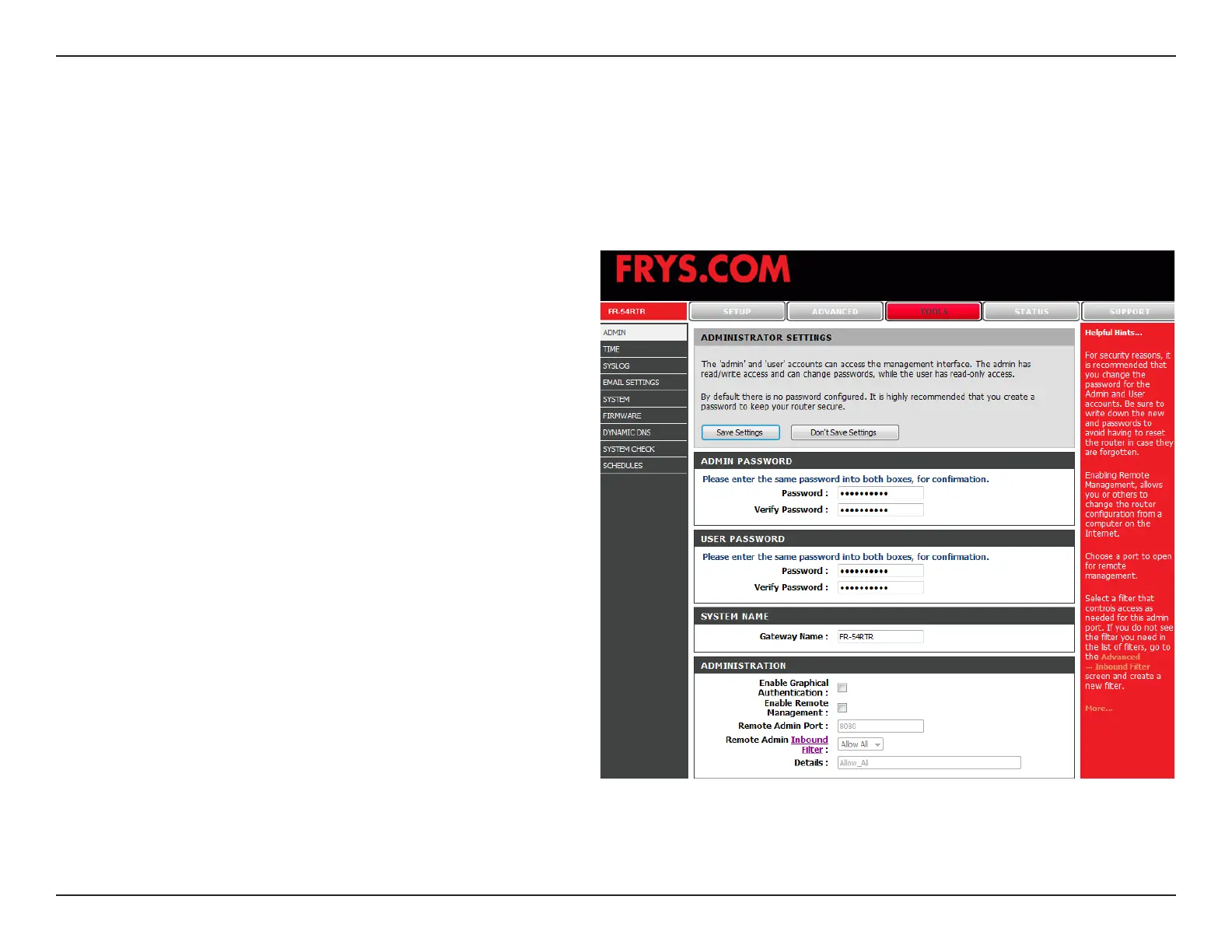
Enter a new Login Name for the Administrator
account.
Enter a new password for the Administrator Login
Name. The administrator can make changes to the
settings.
Enter a new Login Name for the user account.
Enter the new password for the User login. If you
login as the User, you can only see the settings, but
cannot change them.
Enter a name for FR-54RTR.
Enables a challenge-response test to require users
to type letters or numbers from a distorted image
displayed on the screen to prevent online hackers
and unauthorized users from gaining access to your
router’s network settings.
Remote management allows the FR-54RTR to be
congured from the Internet by a web browser. A
username and password is still required to access the Web-Management interface. In general, only a member of your network
can browse the built-in web pages to perform Administrator tasks. This feature enables you to perform Administrator tasks
from the remote (Internet) host.
Administrator
Login Name:
Administrator
Password:
User Login
Name:
User
Password:
Gateway
Name:
Enable
Graphical
Authentication:
Remote
Management:
Administrator Settings
This page will allow you to change the Administrator and User passwords. You can also enable Remote Management.
There are two accounts that can access the management interface through the web browser. The accounts are admin
and user. Admin has read/write access while user has read-only access. User can only view the settings but cannot
make any changes. Only the admin account has the ability to change both admin and user account passwords.


 To Next Page