69FR-54RTR User Manual
Section 4 - Security
Congure WPA/WPA2 (RADIUS)
It is recommended to enable encryption on your wireless router before
your wireless network adapters. Please establish wireless connectivity
before enabling encryption. Your wireless signal may degrade when
enabling encryption due to the added overhead.
1. Log into the web-based conguration by opening a web browser and
entering the IP address of the router (192.168.0.1). Click on Wireless
Settings on the left side.
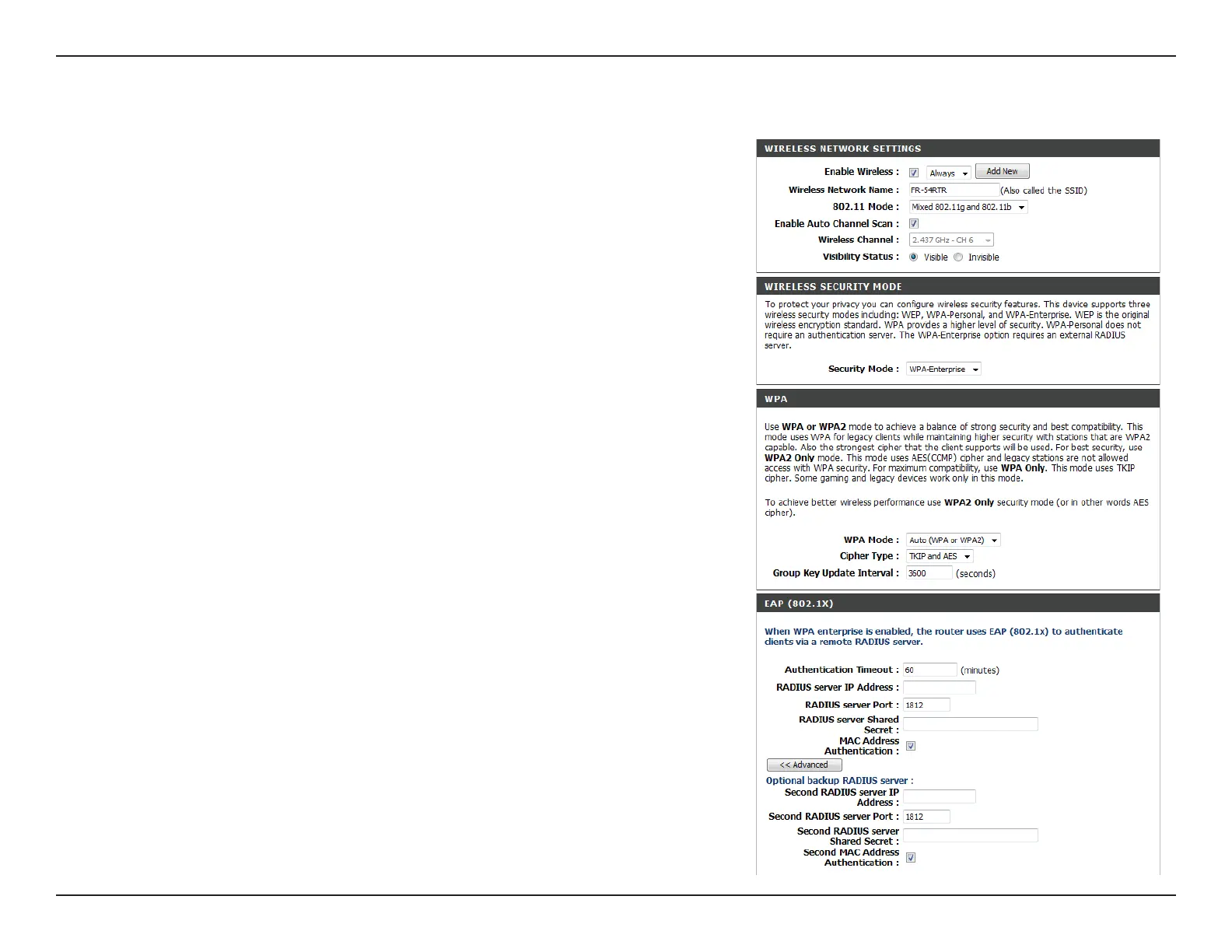
2. Next to Security Mode, select Enable WPA-Enterprise Security or
Enable WPA2-Enterprise Security.
3. Next to Cipher Mode, select TKIP, AES, or Auto.
4. Next to PSK/EAP, select EAP.
5. Next to RADIUS Server 1 enter the IP Address of your RADIUS
server.
6. Next to Port, enter the port you are using with your RADIUS server.
1812 is the default port.
7. Next to Shared Secret, enter the security key.
8. If you have a secondary RADIUS server, enter its IP address, port, and
secret key.
9. Click Apply Settings to save your settings.


 To Next Page