32FR-54RTR User Manual
Section 3 - Conguration
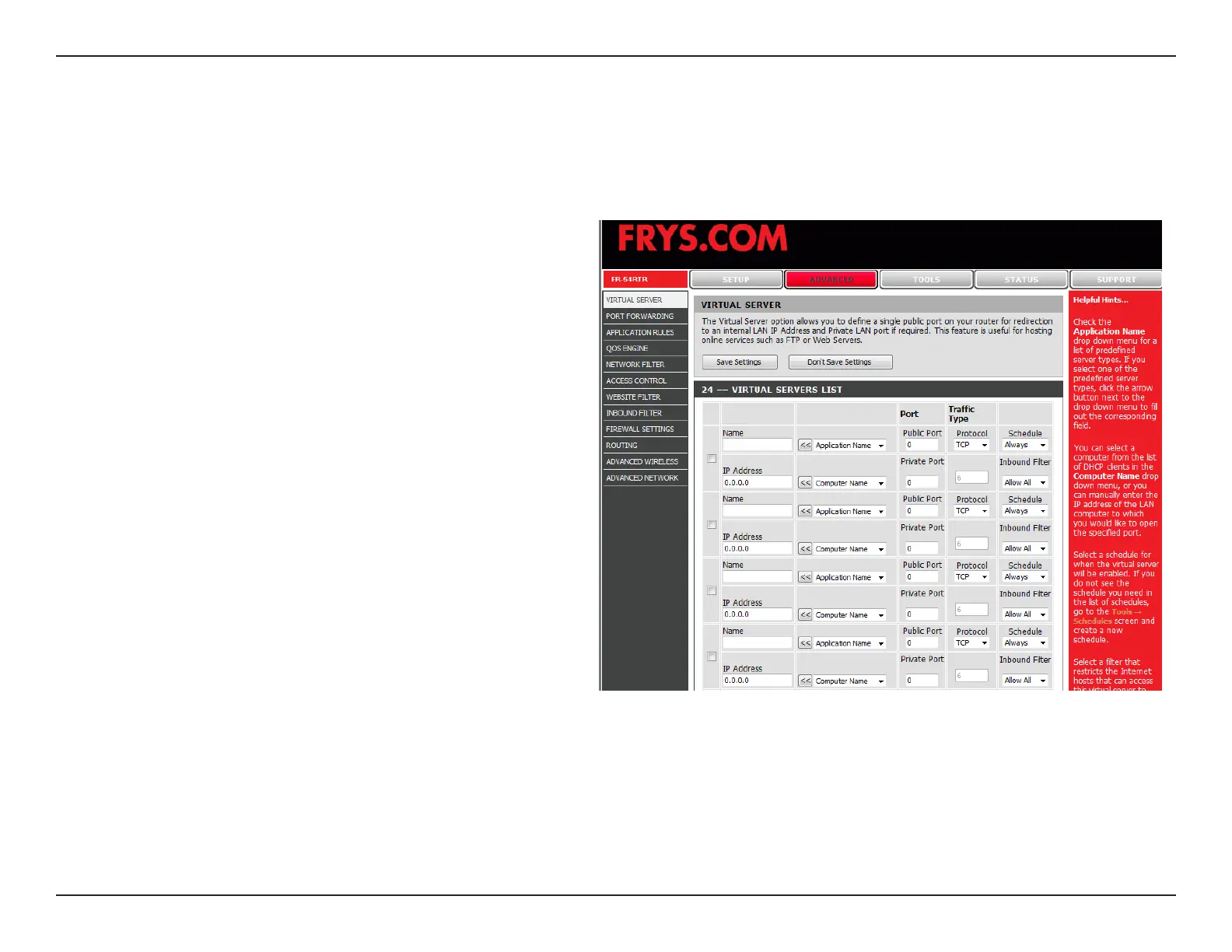
Virtual Server
Name:
Application
Name:
Public Port/
Public Port:
Protocol Type:
Inbound Filter:
Schedule:
This option allows you to dene a single public port on your router for redirection to an internal LAN IP Address and
Private LAN port if required. This is a useful feature for hosting online services such as FTP or Web Services.
Enter a name for the rule or select an application
from the drop-down menu. Select an application and
click << to populate the elds.
Use the drop down menu for a list of predened
server types.
Enter the port that you want to open next to Private
Port and Public Port. The private and public ports
are usually the same. The public port is the port seen
from the Internet side, and the private port is the port
being used by the application on the computer within
your local network.
Select TCP, UDP, or Both from the drop-down
menu.
Select Allow All (most common) or a created Inbound
lter. You may create your own inbound lters in the
Advanced > Inbound Filter page.
Select a schedule for when the virtual server will be
enabled.


 To Next Page