29FR-54RTR User Manual
Section 3 - Conguration
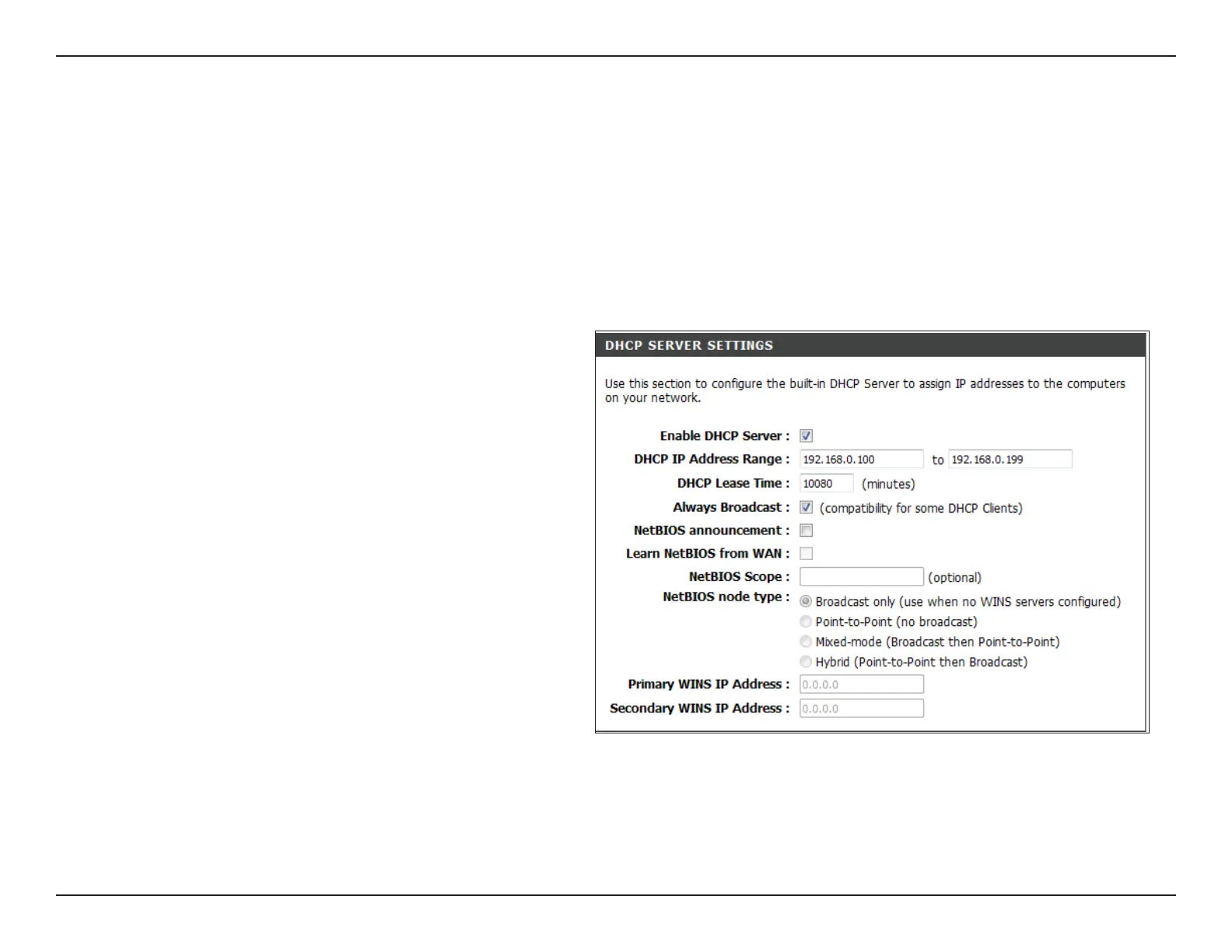
Check the box to enable the DHCP server on
your router. Uncheck to disable this function.
Enter the starting and ending IP addresses for
the DHCP server’s IP assignment.
The length of time for the IP address lease.
Enter the Lease time in minutes.
If NetBIOS advertisement is switched on,
switching this setting on causes WINS
information to be learned from the WAN side,
if available. Turn this setting off to congure
manually.
This is an advance setting and is normally left
blank. This allows the conguration of NetBIOS
domain name under which network hosts
operate. This setting has no effect if the “ Learn
NetBIOS information form WAN is activated.
Enable DHCP
Server:
DHCP IP
Address
Range:
Lease Time:
Learn NetBIOS
from WAN:
NetBIOS
Scope:
DHCP Server Settings
DHCP stands for Dynamic Host Control Protocol. The FR-54RTR has a built-in DHCP server. The DHCP Server will
automatically assign an IP address to the computers on the LAN/private network. Be sure to set your computers to be
DHCP clients by setting their TCP/IP settings to “Obtain an IP Address Automatically.” When you turn your computers on,
they will automatically load the proper TCP/IP settings provided by the FR-54RTR. The DHCP Server will automatically
allocate an unused IP address from the IP address pool to the requesting computer. You must specify the starting and
ending address of the IP address pool.


 To Next Page