67FR-54RTR User Manual
Section 4 - Security
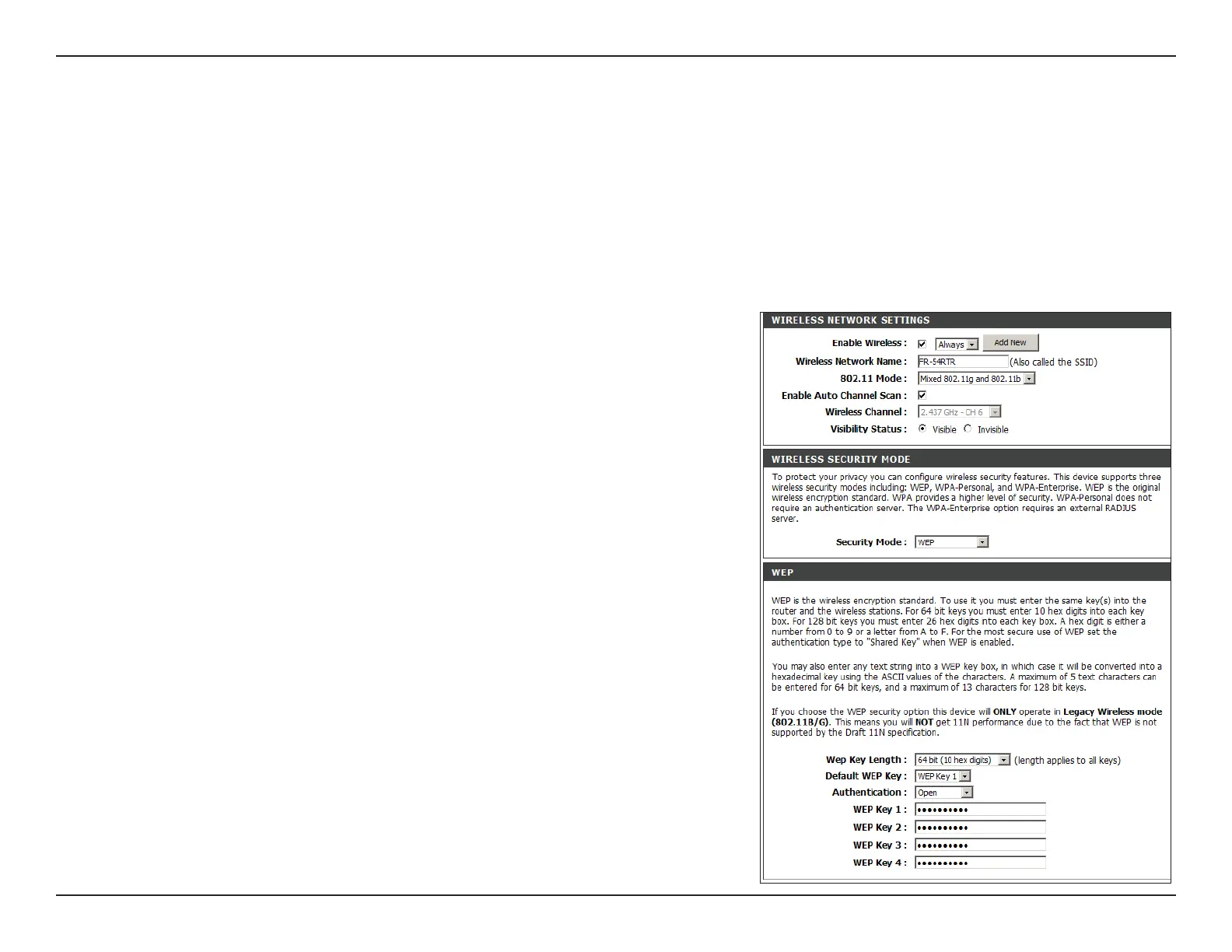
Congure WEP
It is recommended to enable encryption on your wireless router before your wireless network adapters. Please establish
wireless connectivity before enabling encryption. Your wireless signal may degrade when enabling encryption due to
the added overhead.
1. Log into the web-based conguration by opening a web browser and entering the IP address of the router (192.168.0.1).
Click on Wireless Settings on the left side.
2. Next to Security Mode, select Enable WEP Security.
3. Next to Authentication, select Shared Key.
4. Select either 64-bit or 128-bit encryption from the drop-down menu
next to WEP Encryption.
5. Next to Key Type, select either Hex or ASCII.
Hex (recommended) - Letters A-F and numbers 0-9 are valid.
ASCII - All numbers and letters are valid.
6. Next to Key 1, enter a WEP key that you create. Make sure you enter
this key exactly on all your wireless devices. You may enter up to 4
different keys.
7. Click Save Settings to save your settings. If you are conguring the
router with a wireless adapter, you will lose connectivity until you enable
WEP on your adapter and enter the same WEP key as you did on the
router.


 To Next Page