27FR-54RTR User Manual
Section 3 - Conguration
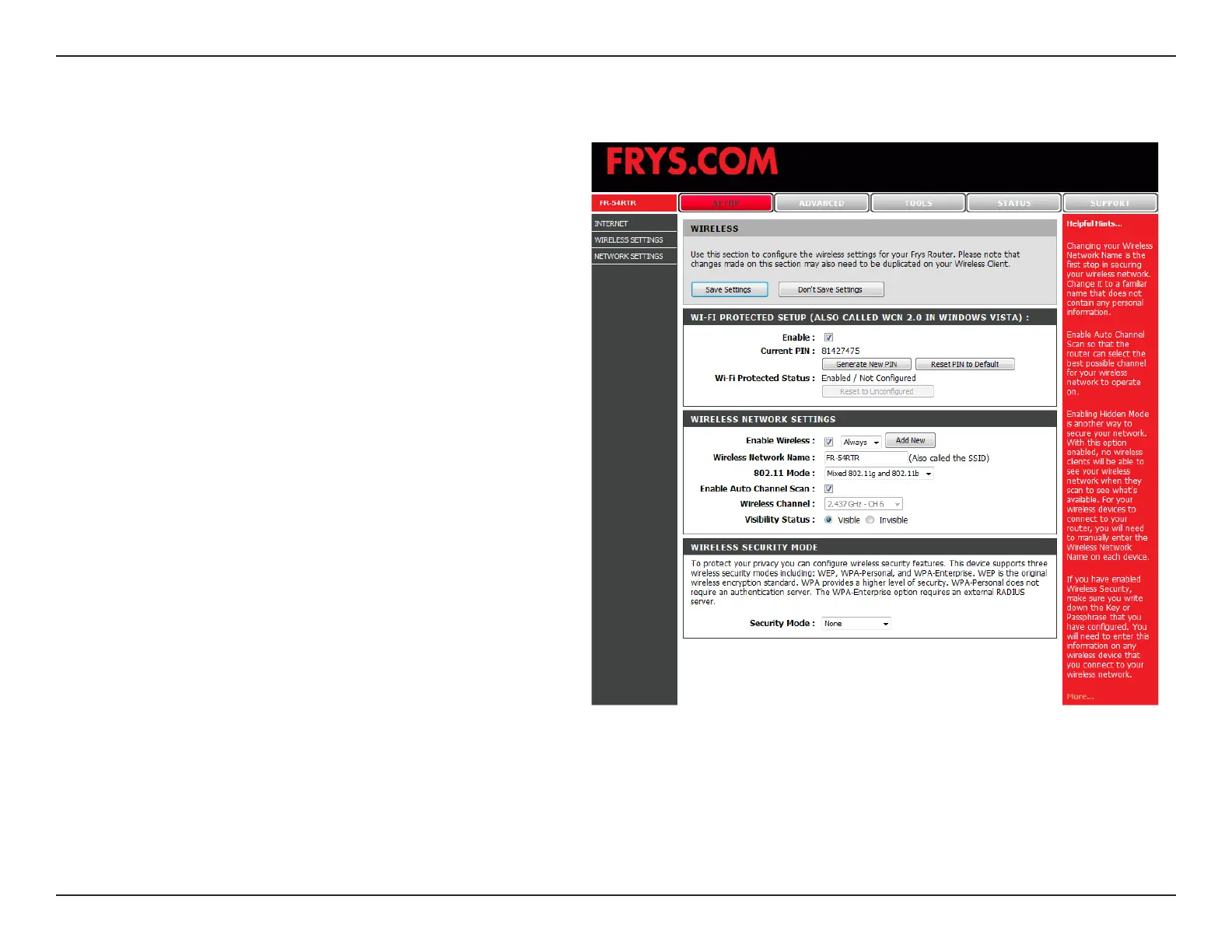
Check the box to enable the wireless function.
If you do not want to use wireless, uncheck the
box to disable all the wireless functions.
Service Set Identier (SSID) is the name of your
wireless network. Create a name using up to 32
characters. The SSID is case-sensitive.
Indicate s the channel setting for the
FR-54RTR. By default the channel is set to
Auto. The Channel can be changed to t the
channel setting for an existing wireless network
or to customize the wireless network. The Auto
Channel Scan setting can be selected to allow
the FR-54RTR to choose the channel with the
least amount of interference.
Select one of the following:
802.11g if all your wireless clients are only
802.11g. 802.11b if all your wireless clients are
only 802.11b. Mixed 802.11g and 802.11b select
if you are using a mix of 802.11g and 802.11b
wireless clients.
Check this option if you would not like the SSID
of your wireless network to be broadcasted by
the FR-54RTR. If this option is checked, the
SSID of the FR-54RTR will not be seen by Site
Survey utilities so your wireless clients will have
to know the SSID of your FR-54RTR in order
to connect to it.
Enable
Wireless:
Wireless
Channel:
Wireless
Network Name:
802.11 Mode:
Visibility
status:
Manual Wireless Settings


 To Next Page