42FR-54RTR User Manual
Section 3 - Conguration
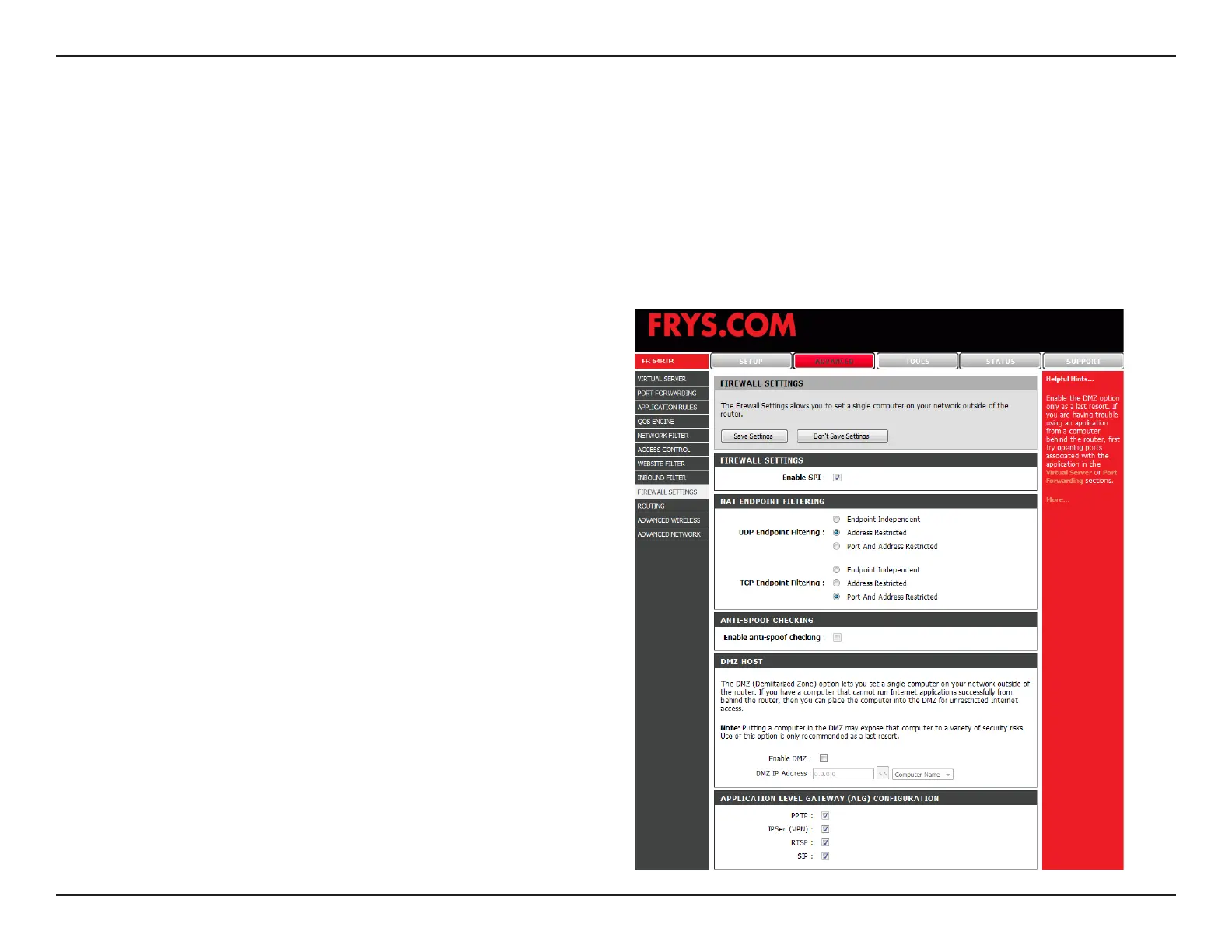
Check this box to enable SPI.
Select one of the following for TCP and UDP ports:
Endpoint Independent - Any incoming trafc sent
to an open port will be forwarded to the application
that opened the port. The port will close if idle for 5
minutes.
Address Restricted - Incoming trafc must match
the IP address of the outgoing connection.
Address + Port Restriction - Incoming traffic
must match the IP address and port of the outgoing
connection.
Enable this option to provide protection from certain
kinds of “spoong” attacks.
Check this box to enable DMZ.
Enter the IP address of the computer you would like
to open all ports to.
Enable SPI:
NAT Endpoint
Filtering:
Enable
anti-spoof
checking:
Enable DMZ
Host:
DMZ IP
Address:
Firewall Settings
This section will allow you to setup a DMZ host and to enable VPN passthrough.
If you have a client PC that cannot run Internet applications properly from behind the FR-54RTR, then you can set
the client up for unrestricted Internet access. It allows a computer to be exposed to the Internet. This feature is useful
for gaming purposes. Enter the IP address of the internal computer that will be the DMZ host. Adding a client to the
DMZ (Demilitarized Zone) may expose your local network to a variety of security risks, so only use this option as a
last resort.


 To Next Page