5-3
DISPLAY ACTION
INSERT PAN
4. Push the filter pan fully into place. Displayed if the filter pan is
not fully engaged.
DRAINING IN PROGRESS 5. No action required.
WASHING IN PROGRESS 6. No action required.
FILLING IN PROGRESS 7. No action required.
PREHEAT 8. No action required. Displayed until the fryer reaches setpoint.
START 9. Fryer is ready for use. Displayed once fryer reaches setpoint.
The complete filtering process takes roughly four minutes.
If during filtration the oil isn’t completely returned the system will proceed to an incomplete filtration function.
See section 7.3.1.
NOTE: If during filtration the filter pan is removed, the filtration process stops and resumes once pan is reseated
into place.
DANGER
Keep all items out of drains. Closing actuators may cause damage or injury.
5.3.2 Auto Demand Filtration
Auto demand filtration is used to manually start an auto filtration. Note: Simultaneous filtering of multiple vats does
not occur.
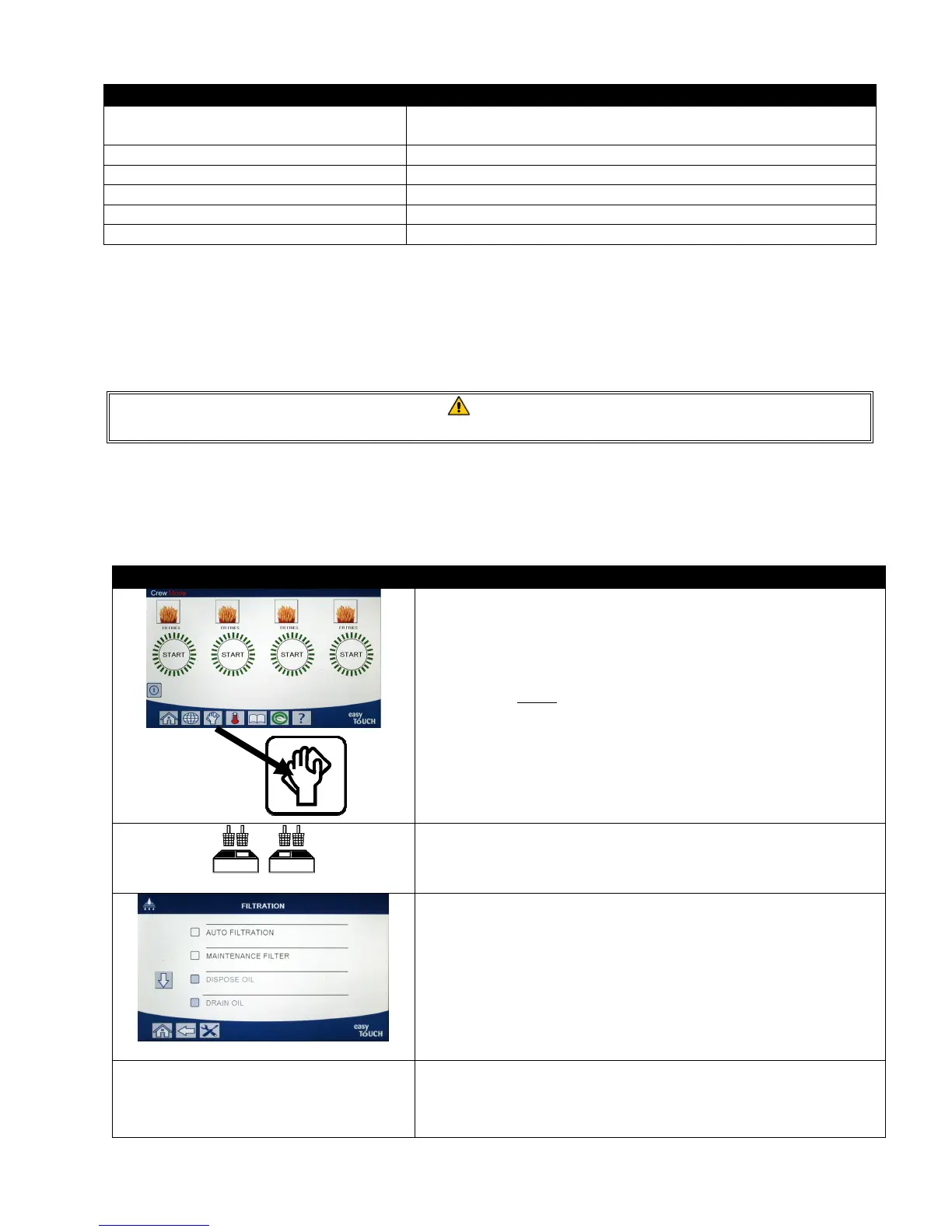
DISPLAY ACTION
1. The fryer MUST be at setpoint temperature. Press the filtration
menu button.
2. Select LEFT VAT or RIGHT VAT for split vats.
3. Select AUTO FILTRATION.
AUTO FILTRATION?
4. Press the √ (check) button to start filtration. If the X button is
selected, filtering is cancelled and the fryer resumes normal
operation.













 To Next Page