208
The Setup Menus
8
PLAYBACK
Option
Description
E
EYE SENSOR
Putting your eye to the viewfi nder turns the viewfi nder
on and the LCD monitor off ; taking your eye away turns
the viewfi nder off and LCD monitor on.
q
VIEWFINDER ONLY
Viewfi nder on, LCD monitor off .
r
LCD ONLY
LCD monitor on, viewfi nder off .
EVF BRIGHTNESS
Adjust the brightness of the display in the electronic view nder.
Option
Description
AUTO Automatic brightness adjustment.
MANUAL
Adjust brightness manually; choose from options be-
tween −7 and +5.
EVF COLOR
Adjust the hue of the display in the electronic view nder.
Options
−5 −4 −3 −2 −1 0 +1 +2 +3 +4 +5
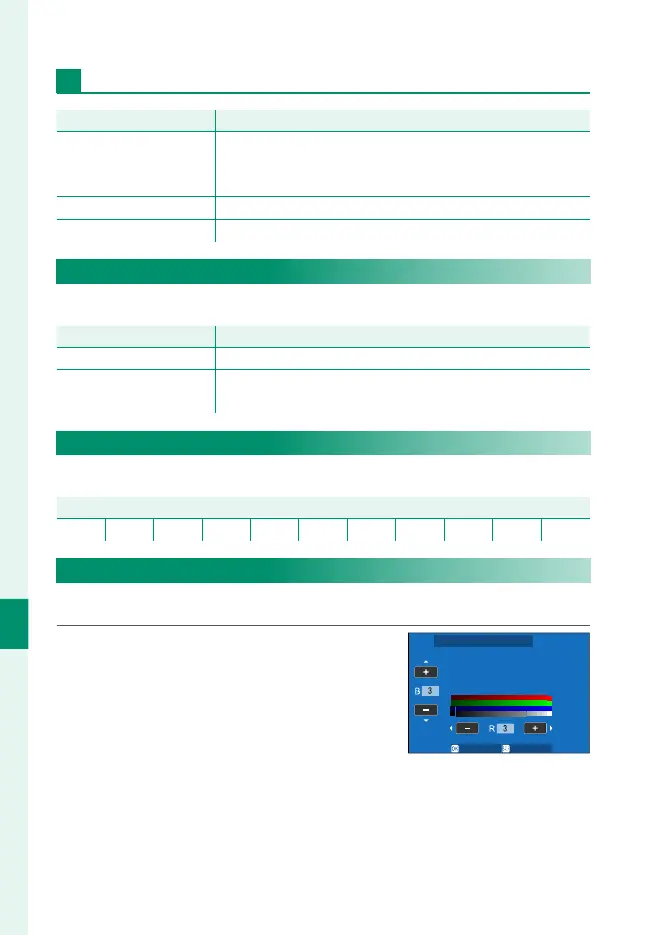
EVF COLOR ADJUSTMENT
Adjust the color of the display in the electronic view nder.
1
Adjust colors using the focus stick
(focus lever).
SET CANCEL
EVF COLOR ADJUSTMENT
2
Press MENU/OK.




 To Next Page