24
1
Before You Begin
Touch Screen Mode
The LCD monitor also functions as a touch screen.
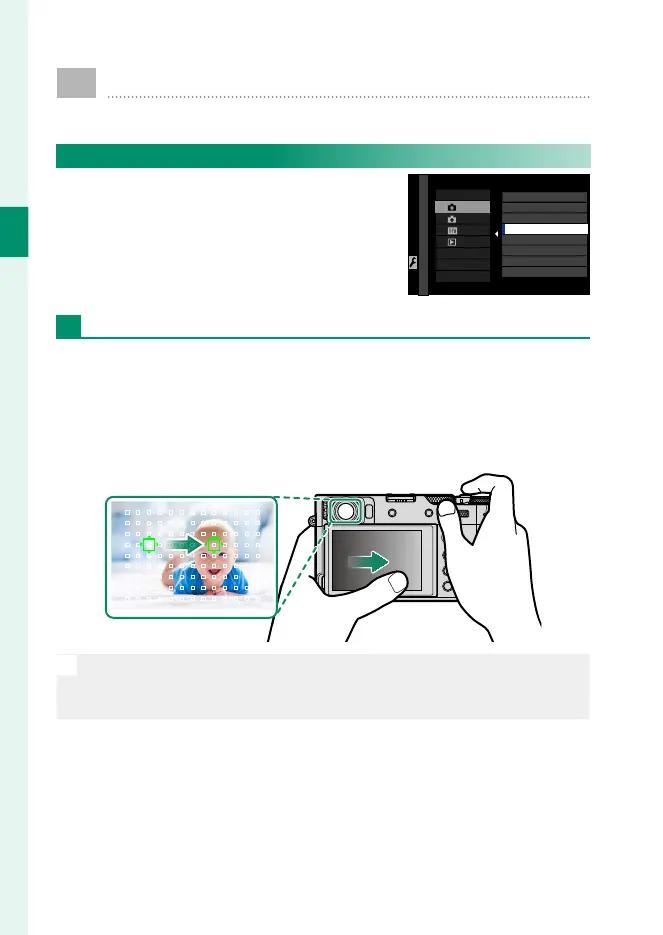
Shooting Touch Controls
To enable touch controls, select ON for
D BUTTON/DIAL SETTING> TOUCH
SCREEN SETTING> x TOUCH SCREEN
SETTING.
TOUCH SCREEN SETTING
EVF/OVF TOUCH SCREEN AREA SETTINGS
TOUCH FUNCTION
DOUBLE TAP SETTING
TOUCH SCREEN SETTING
TOUCH SCREEN SETTINGS
ON
OFF
EVF
The LCD monitor can be used to select the focus area while pic-
tures are being framed in the electronic view nder (EVF). Use
D BUTTON/DIAL SETTING> TOUCH SCREEN SETTING> EVF/
OVF TOUCH SCREEN AREA SETTINGS to choose the area of the
monitor employed for touch controls.
N
If n FACE SELECT op is enabled when FACE DETECTION ON is
selected for G AF/MF SETTING> FACE/EYE DETECTION SETTING,
the face used for focus can be chosen via touch controls.



 To Next Page