33
2
First Steps
Inserting the Battery and a Memory Card
3
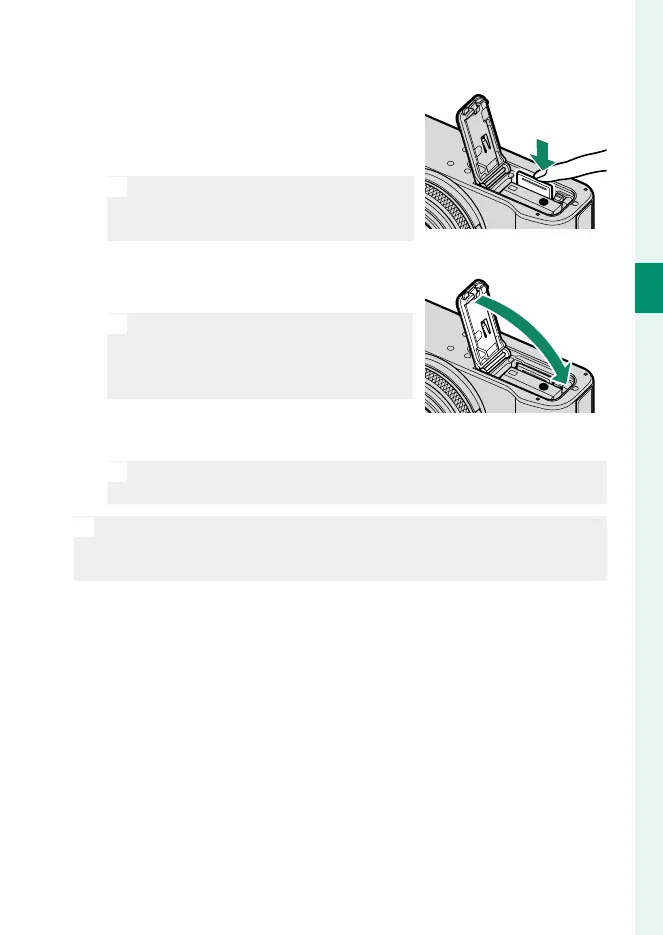
Insert the memory card.
Holding the card in the orientation
shown, slide it in until it clicks into
place at the back of the slot.
O
Be sure card is in the correct orienta-
tion; do not insert at an angle or use
force.
4
Close the battery-chamber cover.
Close and latch the cover.
O
If the cover does not close, check that
the battery is in the correct orienta-
tion. Do not attempt to force the cov-
er shut.
5
Format the memory card (P 200).
O
Format memory cards before rst use, and be sure to reformat all
memory cards after using them in a computer or other device.
O
Do not open the battery-chamber cover when the camera is on. Fail-
ure to observe this precaution could damage image les or memory
cards.



 To Next Page