6
3
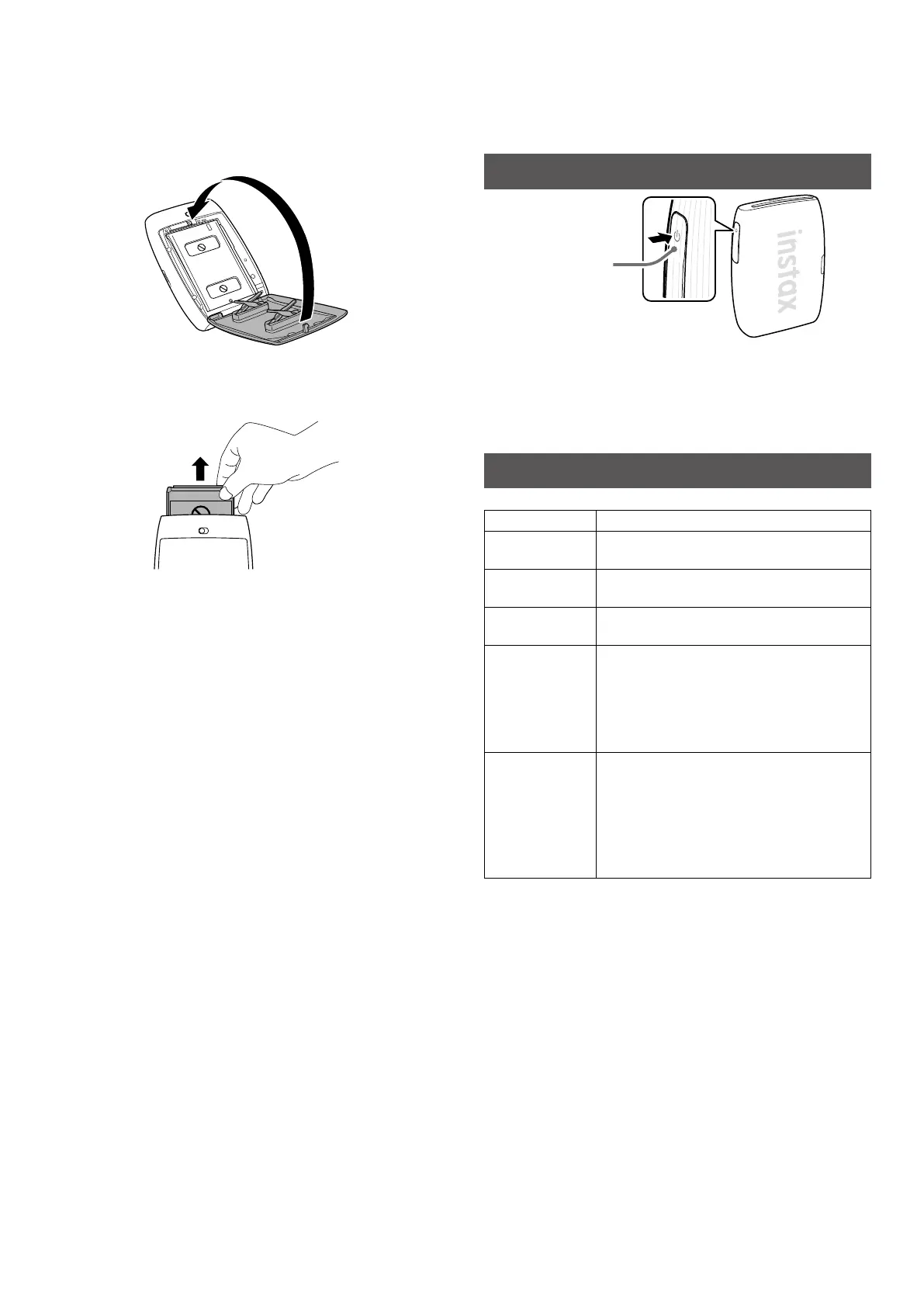
Close the Film door�
4
Remove the black film cover that is automatically
ejected from the printer�
The INSTAX MINI LINK 3 Smartphone Printer is designed for use
with INSTAX MINI Instant Film (sold separately) only.
Turning the Printer on/off
Power button
Press and hold the Power button for approximately 1 second to
turn the printer on or off.
The LEDs light up when the printer is turned on.
The printer turns off automatically when not in use for a certain
period of time (Auto turn-off function can be adjusted in the App).
Checking the Printer Status with the LED
The LED lights indicate the printer status.
Indication Status
Blue LED
(flashing)
Firmware is being updated
Magenta LED
(pulsing)
Reprinting
Cyan LED
(flashing)
The data transfers to the printer
Yellow LED (static
- the printer will
turn off in
3-seconds)
Cannot be charged
Low battery
* If this continues even after charging, there
may be a malfunction. In such cases, contact
the applicable Fujifilm Customer Service/
Repair Center.
Yellow LED
(flashing)
Film ejection error occurred
Please check to make sure the film ejection
slot is not jammed and the Film door is
securely closed.
* If this continues to occur, please contact the
applicable Fujifilm Customer Service/Repair
Center.




 To Next Page