8
8
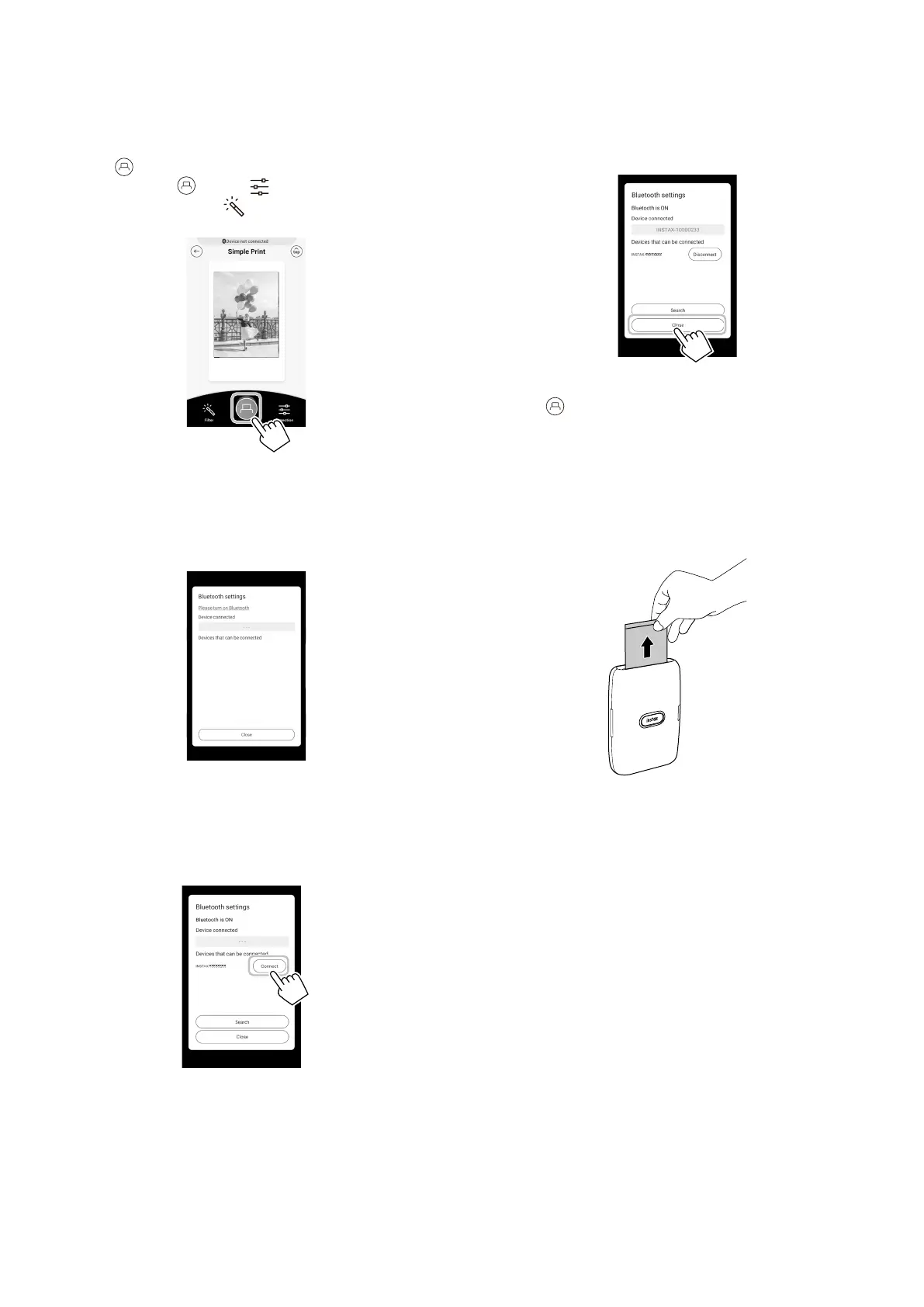
When a printer is connected, tap [Close]�
9
Tap again�
The printer starts printing.
10
When the film has been ejected (the printer stops
making a sound), hold the edge of the film, then
take it out�
You can confirm the number of films remaining on the
screen of the smartphone.
6
Tap or swipe the image up on the screen�
Before tapping , tapping on the lower right adjusts
the image and tapping on the lower left applies a filter
to the image.
Note
If your Bluetooth settings are switched off, the following
screen appears.
Tapping [Please turn on Bluetooth] opens the Bluetooth
settings screen. Put the Bluetooth settings on.
7
When a printer is detected, tap [Connect]�
If multiple printers are detected, select the printer you
would like to connect to from the list.
Locate the printer’s identifier (device name) on the bottom
of the printer.













 To Next Page