5
Loading/Unloading the INSTAX SQUARE®
Instant Film Pack
CAUTION
Do not open the film door until you have used all of the
exposures on your INSTAX instant film pack; otherwise, the
remainder of the film will become exposed and turn white�
Exposed instant film cannot be used to print INSTAX images�
• When you load the film pack, never press the two rectangular
holes on the back of the film pack.
• Never use a film pack beyond its shelf life; otherwise, it may
damage the printer.
Use FUJIFILM INSTAX SQUARE Instant Print Film only. The
INSTAX MINI™ or INSTAX WIDE™ Instant Film Packs cannot be
used in the INSTAX SQUARE LINK printer.
Notes on the film pack
• Each FUJIFILM INSTAX SQUARE Instant Film Pack contains one
black film protective cover and 10 film sheets.
• Do not remove the film pack from its inner bag until you are
ready to load the film pack into the printer.
• The film cover is ejected automatically when the film door is
closed.
For details, refer to the instructions and warnings on the
package of FUJIFILM INSTAX SQUARE Instant Print Film.
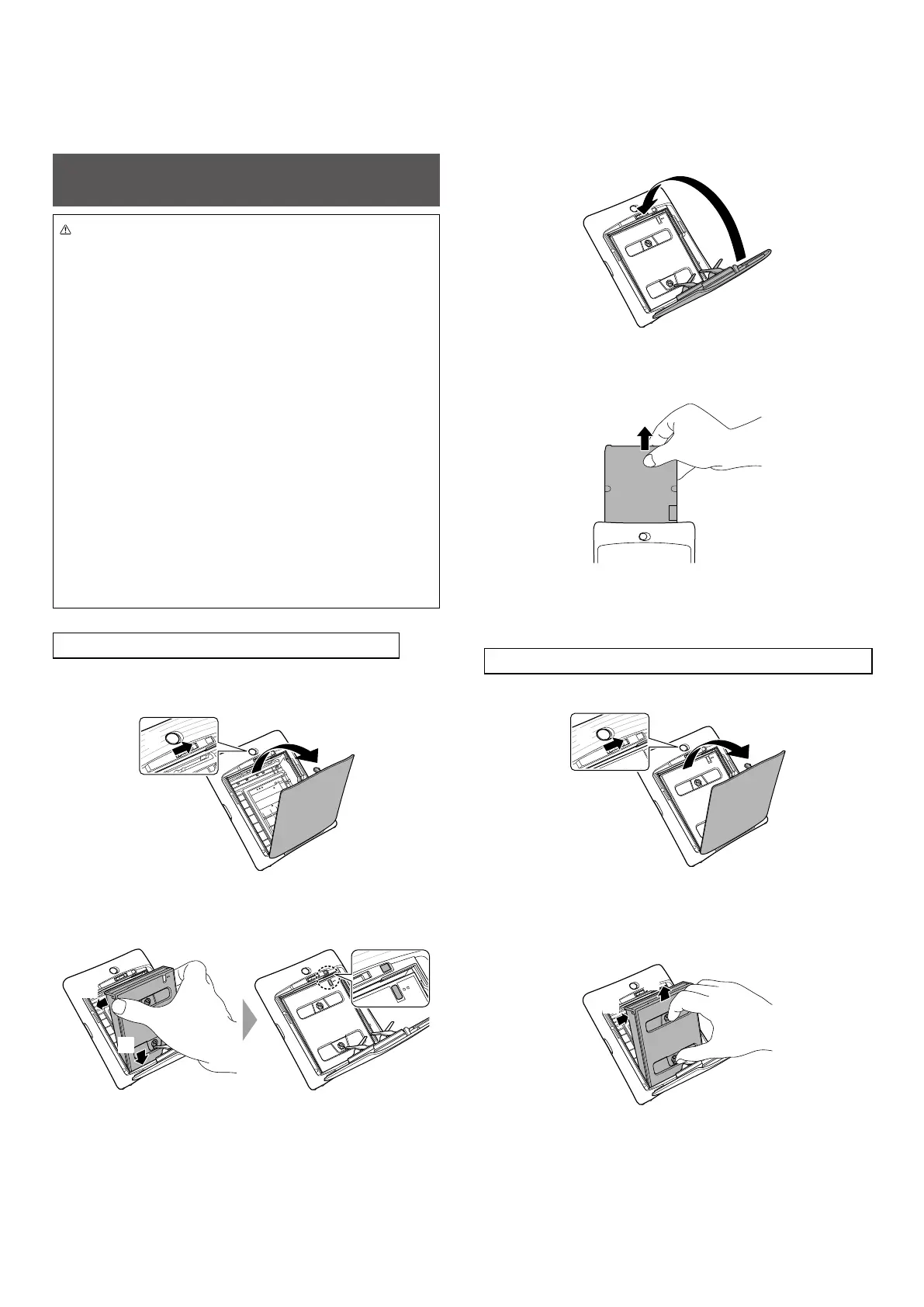
Loading the INSTAX SQUARE Instant Film Pack
1
Slide and hold the film door lock and open the film
door�
2
1
2
Insert an INSTAX SQUARE instant film pack by
aligning the yellow marks�
2
1
3
Close the film door�
4
Remove the black film cover that is ejected from the
printer�
The INSTAX SQUARE LINK Smartphone Printer is designed for use
with INSTAX SQUARE instant print film only.
Unloading a Used INSTAX SQUARE Instant Film Pack
1
Slide the film door lock to open the film door�
2
1
2
Grasp the rectangular holes on the film pack, then
pull film pack out from the printer� Properly dispose
of used film pack�
2
1














 To Next Page